
When multiple URLs show the same content, search engines can get confused about which one to prioritize. This can hurt your search rankings, dilute link equity, and waste crawl budget. Canonical URLs solve this by signaling the preferred version of a page. Here's what you need to know:
- Canonical Tags: Use
rel="canonical"to guide search engines to the main URL. For example, URLs likehttps://example.com/product?ref=emailshould point tohttps://example.com/product. - Why It Matters: Canonicalization reduces duplicate content, improves crawl efficiency, and consolidates ranking signals.
- Common Issues: Problems like canonical chains, loops, or misconfigured tags can cause indexing errors, keyword cannibalization, and split backlinks.
- Fixes: Audit tags for errors, ensure they point to valid pages, and align all signals (internal links, sitemaps, etc.) to the canonical URL.
- Tools: Use Google Search Console and crawling tools like Screaming Frog to diagnose and fix issues. Automation tools can simplify large-scale management.
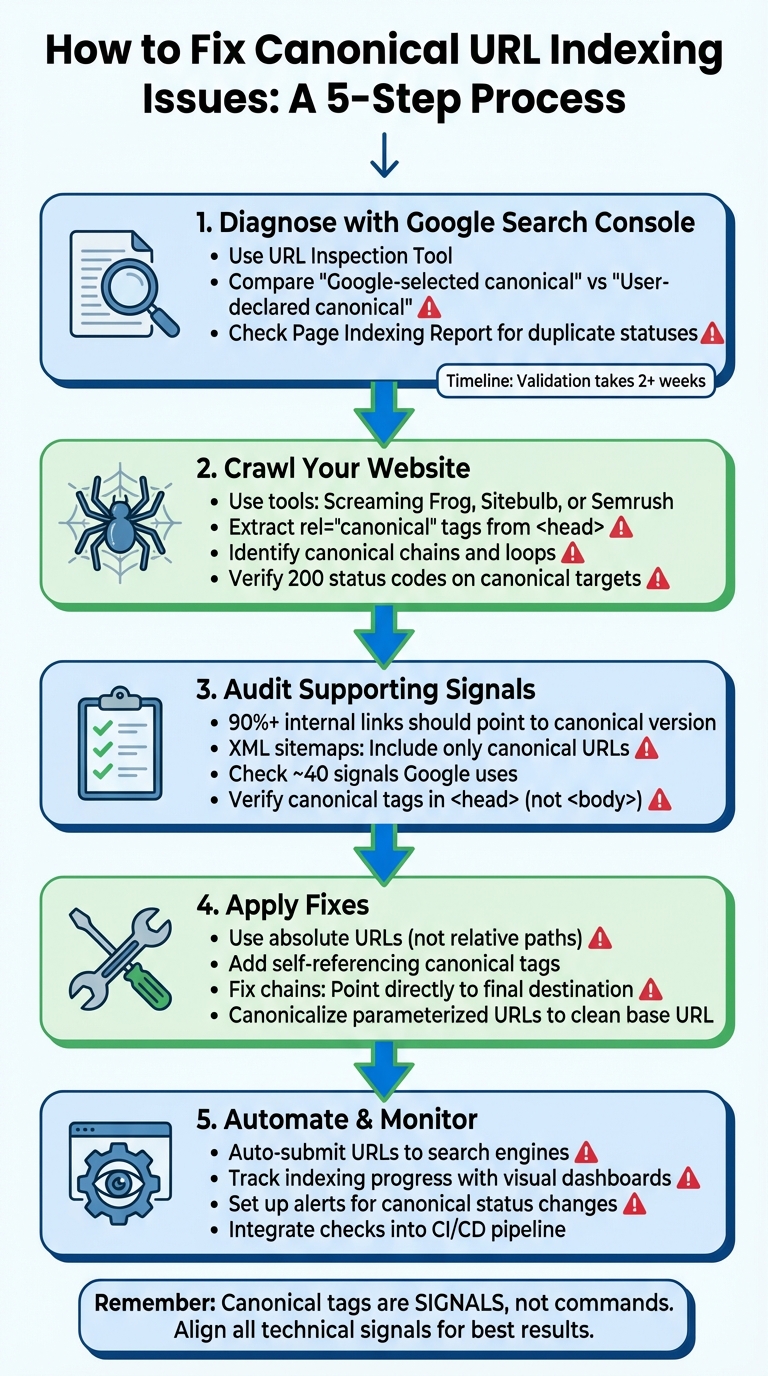
How to fix all canonical tag issues flagged in Google Search Console?
How to Identify Canonical-Related Indexing Problems
Canonicalization plays a key role in SEO, but it can sometimes go awry. Spotting and fixing these issues requires a mix of tools and a thorough review of your site. The goal is to ensure that what you intend as canonical matches what Google recognizes, with all relevant signals working in harmony.
Using Google Search Console for Diagnostics
Google Search Console is your go-to tool for pinpointing canonicalization issues. Start with the URL Inspection Tool. Enter a URL, expand the "Page indexing" section, and compare the "Google-selected canonical" URL to the "User-declared canonical" URL. If they don't match, Google has chosen a different canonical version.
For a broader view, check the Page Indexing Report. Look for statuses like "Duplicate, Google chose different canonical than user" or "Duplicate without user-selected canonical". Export this data into a spreadsheet to identify patterns. URLs with "?" often indicate parameter-related duplication. Keep in mind, validating fixes can take up to two weeks or more.
"By definition, URLs are case sensitive, and also things like slashes at the end do matter. So, technically, yes - these things matter. They make URLs different."
- John Mueller, Search Relations Team Lead, Google
Additionally, check for duplicate indexing of URLs with variations, such as uppercase vs. lowercase or with and without trailing slashes. These inconsistencies can lead to unnecessary duplication.
To dive deeper, use crawling tools to map canonical tags across your site.
Crawling Your Website to Map Canonical Tags
Tools like Screaming Frog, Sitebulb, or Semrush Site Audit allow you to analyze canonical tags at scale. Configure the crawler to extract the <link rel="canonical"> tag from each page's <head> section. Ensure these tags use absolute URLs (e.g., https://example.com/page) rather than relative ones.
Be on the lookout for canonical chains or loops, where pages point to each other instead of a single canonical URL. These setups not only waste crawl budget but also dilute ranking signals. Additionally, verify that canonical target URLs return a 200 status code and aren't blocked by robots.txt or marked with "noindex". If a page contains multiple canonical tags, search engines may disregard all of them.
Checking Supporting Signals for Canonicalization
After crawling your site, ensure all supporting signals align with your canonical preferences. Google considers around 40 signals to determine a page's canonical version. Start by auditing your internal links - over 90% should direct to the canonical version rather than parameterized variations. Also, your XML sitemaps should only include canonical URLs.
Canonical tags must be placed correctly within the <head> section. Tags misplaced in the <body> due to unclosed tags or injected scripts can be ignored by Google. For HTTPS consistency, avoid listing HTTP URLs in sitemaps or hreflang annotations, and ensure your SSL certificate is valid. Lastly, avoid blocking non-canonical URLs in robots.txt - Google needs to crawl these pages to see the canonical tag and consolidate link equity.
How to Fix Canonical URL Misconfigurations
Now that you've identified canonical issues, it's time to apply targeted fixes to get everything back on track. The key? Align all signals - canonical tags, internal links, and XML sitemaps - to one preferred URL. Keep in mind that Google treats canonical tags as signals, not commands. Consistency across these signals helps prevent the indexing errors discussed earlier.
Correcting Incorrect Canonical Tags
Start by auditing your canonical tags for common mistakes. Always use absolute URLs (e.g., https://example.com/page/) instead of relative paths like /page/. Relative URLs can confuse search engines, especially on sites with complex directory structures.
Next, ensure every canonical tag points to a URL that returns a 200 OK status. Canonical tags leading to 404 errors or server issues will disrupt indexing. Also, avoid duplicate canonical tags on the same page. For example, if a tag appears in both the HTML head and the HTTP header, Google may ignore both - this often happens when multiple SEO plugins are active on platforms like WordPress.
Each primary page should include a self-referencing canonical tag. As John Mueller from Google explains:
"I recommend [using a] self-referential canonical because it really makes it clear to us which page you want to have indexed".
Finally, make sure your internal links and XML sitemap reference only the canonical URLs. This avoids sending mixed signals to search engines and helps consolidate ranking power.
Fixing Canonical Chains and Loops
Canonical chains occur when one page points to another, which then points to yet another page - creating a messy relay that wastes crawl budget. Canonical loops, where two pages point to each other, are equally problematic and could hurt your rankings.
To address these, use tools like Screaming Frog or Sitebulb to map out the issues. Identify the one authoritative URL that should represent the content, and update all intermediate pages to point directly to that final destination. For large-scale fixes, work backward through the chain to prevent temporary loops. Once changes are made, verify them in Google Search Console.
Also, ensure canonical tags don't point to URLs that redirect. Either remove the redirect or update the canonical tag to the final destination URL.
Managing URL Parameters and Filters
URL parameters - like tracking codes (?utm_source=email), sorting options (?sort=price), or filters (?color=red) - can create duplicate content and dilute ranking signals. To fix this, canonicalize parameterized URLs back to a clean, master version.
For example, add a rel="canonical" tag in the <head> of parameterized pages that points to the base URL without parameters. A URL like /products/shoes/?color=red&sort=price should canonicalize to /products/shoes/. This consolidates ranking signals across all variations.
Tracking identifiers (e.g., gclid or utm_source) should also point back to the clean URL. For pages with pagination, avoid canonicalizing all pages in a series to the first page. Instead, use self-referencing canonical tags on each paginated page to ensure all unique content gets indexed.
For faceted navigation, where multiple filter combinations exist, canonicalize to the base category URL - unless a specific filter combination deserves its own indexable page. Additionally, update internal links to point directly to canonical URLs rather than parameterized versions. Avoid blocking parameterized URLs in robots.txt, as this prevents search engines from seeing your canonical tags. These steps help consolidate ranking signals and improve overall site indexation.
| Method | Best Use Case | Strength of Signal |
|---|---|---|
| 301 Redirect | When a page is permanently moved or retired | Strongest (Directive) |
| rel="canonical" Tag | When multiple URLs must remain accessible to users | Strong (Signal) |
| Sitemap Inclusion | To suggest preferred URLs for large-scale websites | Weak (Signal) |
| HTTP Header | For non-HTML files such as PDFs or Word docs | Strong (Signal) |
Using Automation for Canonical and Indexing Management
Managing canonicals manually becomes impractical when dealing with hundreds or thousands of pages. Automation tools step in to handle the heavy lifting, scanning thousands of URLs at once to identify issues like problematic canonical chains or loops. They also compare the canonicals you've set with those Google selects, flagging any mismatches instantly. This automation builds on earlier diagnostic steps, ensuring your canonical setup stays accurate over time.
Automating URL Submissions to Search Engines
Once you've fixed canonical errors, the next step is to re-submit URLs for crawling. Tools like IndexMachine simplify this by automatically submitting URLs directly to Google Search Console and Bing Webmaster Tools. This prompts search engines to prioritize crawling your updated canonical targets. With the ability to manage up to 20 Google and 200 Bing URL submissions daily under API limits, this is especially helpful after bulk fixes. Instead of manually verifying each page, automation ensures faster and more efficient re-evaluation.
Tracking Indexing Progress with Visual Data
IndexMachine provides a clear visual representation of your indexing progress, showing which canonical URLs are indexed and which are excluded. It offers detailed insights, such as the coverage state and the last crawl date for each page, helping you identify any delays in discovery. You can also track when Google last visited specific pages, making it easier to spot patterns in crawl behavior. Daily reports highlight newly indexed pages and flag 404 errors, which could mean your canonical tags are pointing to deleted URLs. By consolidating data from Google and Bing, the platform gives you a complete picture of how search engines interpret your canonical preferences, reinforcing the fixes you've made.
Preventing Future Canonical Errors at Scale
Ongoing monitoring is key to avoiding the reappearance of canonical issues. IndexMachine keeps an eye on high-priority pages and notifies you of changes in their canonical status - potentially catching problems like trailing slash inconsistencies or conflicts between WWW and non-WWW versions early. Automated alerts prevent these issues from impacting your rankings. For larger teams, integrating canonical checks into CI/CD pipelines can catch misconfigurations before they go live. Regular audits also help uncover orphan pages that lack internal links. By maintaining clean canonical signals across your site, you make better use of your crawl budget and ensure search engines focus on your most important content. These efforts not only protect your SEO performance but also simplify long-term site management.
Conclusion
Why Proper Canonicalization Matters for SEO
Canonical tags play a crucial role in technical SEO. They help consolidate ranking signals from duplicate or similar URLs into one authoritative version, ensuring link equity isn't spread thin across multiple pages. However, it's important to remember that Google treats canonical tags as suggestions rather than commands. To make your preferred URL stand out as the authoritative one, all technical signals - like internal links, XML sitemaps, and redirects - must align. As Martin Splitt, Google Developer Advocate, puts it:
"Canonical tags operate as signals not commands... the algorithm might override your choice based on other factors like internal linking patterns".
This alignment ensures Google understands and respects your preference for the canonical URL.
Benefits of Automation for Indexing Management
Manually managing canonical tags is manageable for small sites but becomes overwhelming as the number of pages grows. Automation tools can simplify this process by quickly handling thousands of URLs, identifying issues like canonical chains or loops that could otherwise take weeks to resolve. Tools like IndexMachine not only correct these errors but also submit the updated URLs directly to Google and Bing. They provide visual tracking of which canonical URLs are indexed and send daily reports to flag newly indexed pages or detect 404 errors caused by canonicals pointing to deleted pages. This kind of automation reduces the workload while ensuring accuracy and efficiency across your site.
Next Steps for SEO Professionals
To build on these strategies, SEO professionals can take a few actionable steps. Start by auditing your canonical tags using Google Search Console's URL Inspection tool to compare the user-declared and Google-selected canonicals. Add self-referencing canonical tags to every page to reinforce their authority. For websites with a large number of page variations, consider incorporating canonical checks into your CI/CD pipeline to catch errors before they go live. Automation isn't just a solution for fixing current problems - it's a proactive approach to monitoring and preventing future issues through consistent oversight and alerts.
FAQs
How do I properly set up canonical tags to avoid indexing issues?
To get your canonical tags set up the right way, stick to these essential steps:
- Use one absolute
rel="canonical"tag per page. Place it in the<head>section and ensure it points to the exact URL you want indexed. This should include the full protocol (likehttps://) and your preference forwwwor non-wwwversions. If the page is its own canonical version, the tag should reference the page itself. - Avoid sending mixed signals. Make sure your canonical tag, redirects, and sitemap all align with the same preferred URL. Conflicting information can confuse search engines and hurt your indexing efforts.
- Keep an eye on things regularly. Tools like Google Search Console are great for checking if search engines are recognizing your canonical URLs as intended. You can also use platforms like IndexMachine to audit your site and catch any issues with your tags.
By staying consistent and checking in often, you'll make it easier for search engines to know which pages to highlight in search results.
How can I identify and fix issues with canonical URLs?
Detecting and fixing issues with canonical URLs is essential for keeping your site properly indexed and maintaining strong search rankings. Tools like Screaming Frog SEO Spider and Google Search Console are invaluable for identifying and addressing these problems.
Screaming Frog generates detailed reports that flag missing, self-referencing, or conflicting canonical tags on your site. This makes it simple to pinpoint problematic URLs. Meanwhile, Google Search Console's URL Inspection tool shows how Google interprets a page's canonical tag and notifies you if the tag you've declared doesn't match the one Google has indexed.
By using these tools together, you can streamline the process. Start by running a site-wide crawl with Screaming Frog to identify anomalies. Then, use the URL Inspection tool in Google Search Console to confirm Google's understanding of your canonical tags. Once you've made the necessary corrections, request a re-indexing to ensure your updates are applied quickly.
Why does Google sometimes ignore the canonical URL I set?
Google might select a different canonical URL than the one you specify if its algorithms believe another page better serves users or aligns more effectively with its indexing criteria. Things like redirects, internal linking structure, duplicate or closely related content, URL parameters, sitemap accuracy, and overall relevance can all play a role in this decision.
To increase the chances that Google honors your chosen canonical URL, focus on reinforcing it with strong signals across your site. Keep directives consistent, use internal links that point to the canonical page, and ensure that the page delivers unique, high-quality content that meets users' needs and expectations.