
Googlebot is the tool Google uses to find, analyze, and organize website content for its search engine. If Googlebot doesn't crawl and index your site, your pages won't show up in search results. Here's a quick breakdown of how it works:
- Crawling: Googlebot discovers web pages using sitemaps, links, and manual submissions through Google Search Console.
- Indexing: It processes content, evaluates quality, and determines which pages to store in Google's database.
- Serving Results: Indexed pages compete to appear in search results based on relevance and quality.
Key Takeaways:
- Submit XML sitemaps and use internal/external links to help Googlebot find your pages.
- Optimize your site's structure and focus on high-quality, mobile-friendly content.
- Monitor crawl stats, fix errors, and manage your crawl budget to ensure Googlebot prioritizes the right pages.
Efficient crawling and indexing are essential for SEO success. Tools like Google Search Console and automated platforms can help streamline the process.
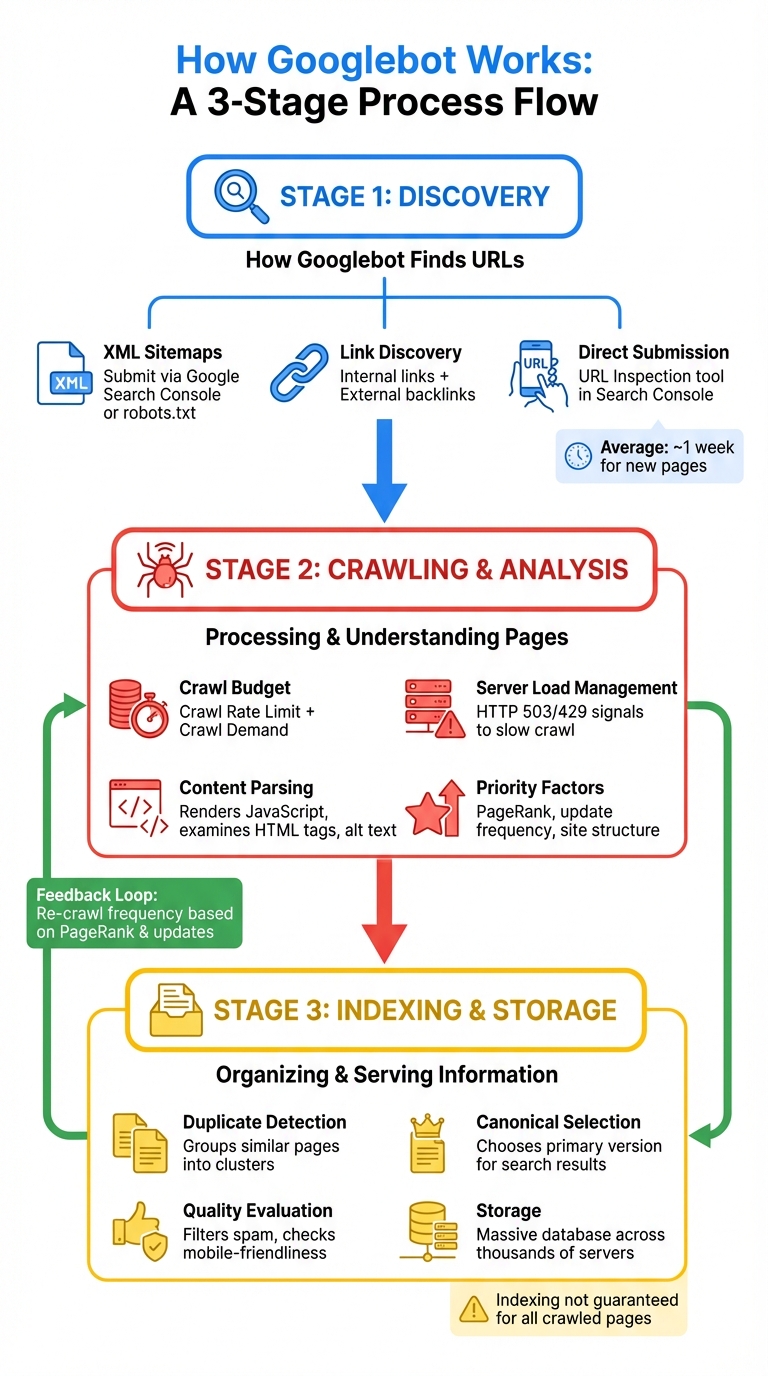
How Google Search crawls pages
How Googlebot Finds URLs
Before Googlebot can crawl your site, it first needs to find your URLs. It does this through three main methods: XML sitemaps, link discovery, and direct submissions via Google Search Console. Each method helps Googlebot piece together your site's structure and identify pages to crawl.
XML Sitemaps
An XML sitemap acts as a roadmap for Googlebot, listing all the pages you want it to index. This method is especially helpful for newer websites without many external links or for larger sites with sections that may not be well-linked internally. When you include a URL in your sitemap and submit it through Google Search Console or reference it in your robots.txt file, Googlebot recognizes it as submitted.
"Google needs a way to find a page in order to crawl it. This means that it must be linked from a known page, or from a sitemap." - Google Search Console Help
To ensure Googlebot discovers your pages, submit your sitemap via the Sitemaps report in Google Search Console. Also, include a directive in your robots.txt file pointing to your sitemap URL. Focus on listing only the canonical versions of your key pages - avoid duplicates, alternate versions, or any URLs blocked by robots.txt. For brand-new websites, kickstart the process by requesting indexing of your homepage using the URL Inspection tool. This often prompts Googlebot to begin crawling other pages on your site. On average, it takes about a week for Google to start crawling and indexing a newly discovered page or site.
Link Discovery
Googlebot's primary way of finding new content is by following links. It crawls both internal links within your site and external links from other websites. Once Googlebot lands on a known page, it scans for links to uncover additional pages. For instance, a category page might lead it to a newly published blog post.
"Starting from your homepage, Google should be able to index all the other pages on your site, if your site has comprehensive and properly implemented site navigation for visitors." - Google Search Console Help
To help Googlebot efficiently navigate your site, use a hub-and-spoke navigation structure. In this setup, category pages act as hubs that directly link to new or related content. Regularly check for and fix broken links, as they can waste your site's crawl budget - the number of pages Googlebot is willing to crawl within a certain timeframe. External links from other websites also play a vital role, especially for new sites that Googlebot hasn't encountered yet. These links can act as entry points, boosting the chances of discovery.
Google Search Console Submissions
In addition to sitemaps and links, you can directly submit URLs to Google Search Console to ensure they're crawled quickly. The URL Inspection tool allows you to manually request crawls for specific URLs, which is particularly useful for time-sensitive updates or after fixing critical errors. To use this tool, you need to be the property owner or have "full user" permissions in Search Console.
"Crawling can take anywhere from a few days to a few weeks. Be patient and monitor progress using either the Index Status report or the URL Inspection tool." - Google Search Central
Keep in mind that there's a daily quota for URL submissions. Before submitting, check if a page is already indexed by using the site:URL search operator. Submitting the same URL multiple times won't speed up the process and only wastes your quota. If you've fixed several pages at once, consider creating a temporary sitemap with just the affected URLs. You can then filter the Page Indexing report by this sitemap and request validation for the changes.
How Googlebot Crawls and Analyzes Pages
After Googlebot finds your URLs, it begins the crawling and analysis phase. This step determines which pages are crawled, how often Googlebot visits them, and how deeply they are analyzed. By understanding how this process works, you can make adjustments to improve crawl efficiency and speed up indexing. The goal is to ensure that every page is properly assessed before it gets indexed.
Crawl Budget and Frequency
Googlebot doesn't treat all pages on your site equally. It uses a crawl budget, which combines two factors: how much your server can handle (Crawl Rate Limit) and how interested Google is in your content (Crawl Demand) based on your site's popularity and updates.
"Crawl Budget = Crawl Rate Limit + Crawl Demand" - Gary Illyes, Search Advocate, Google
Pages are prioritized using factors like PageRank, the frequency of content updates, and how often they've been crawled before. These priorities are organized into layers, with high-priority pages getting more attention.
"The best way to think about it is that the number of pages that we crawl is roughly proportional to your PageRank." - Matt Cutts, Former Head of Webspam, Google
Your site's structure also plays a big role in crawl frequency. Pages that are closer to your homepage - requiring fewer clicks - are visited more often. A flatter site structure ensures even less prominent pages get regular attention. On the other hand, pages buried too deep in the hierarchy may be ignored for long stretches.
To get the most out of your crawl budget, remove low-value URLs like "add to cart" links, duplicate parameter-based pages, or infinite calendar pages. Use the robots.txt file to block these URLs so Googlebot focuses on content that matters. You can also improve crawl efficiency by replacing traditional pagination with "load more" buttons or infinite scroll, which keeps more links easily accessible on the first page.
Server Load Management
Googlebot is designed to avoid overwhelming your server while crawling. The Crawl Rate Limit adjusts automatically based on your server's performance and response times. Faster, more stable servers allow for higher crawl limits, while slower servers or frequent errors cause Googlebot to slow down.
"Our goal is to crawl as many pages from your site as we can on each visit without overwhelming your server." - Google Developers
If your server is under stress, you can use HTTP 503 or 429 responses to signal Googlebot to slow its crawl. This helps maintain your site's responsiveness while still allowing Googlebot to do its job. However, repeated 500-level errors can lead to a significant slowdown in crawling, so monitoring server health is crucial.
To improve your Crawl Rate Limit, invest in high-quality hosting, enable server-side caching, and use a Content Delivery Network (CDN) to reduce load times. Implementing HTTP/2 can also make data transfers more efficient. Regularly check the Crawl Stats report in Google Search Console to monitor response times and identify any problem areas.
Content Parsing
Once Googlebot downloads your pages, it renders them - including executing JavaScript - to fully understand the content.
"Rendering is important because websites often rely on JavaScript to bring content to the page, and without rendering Google might not see that content." - Google Search Central
During parsing, Googlebot examines your text, key HTML tags like <title> elements, and attributes such as alt text for images. It also collects signals like the page's language, its relevance to specific countries, and overall usability to decide how the page should rank in search results. Parsing even includes spotting duplicate content.
To ensure Googlebot can access your critical content, avoid hiding it behind complex JavaScript that might not execute properly. Use descriptive alt attributes for all images, as these help Google understand visual content. If you want to block specific pages from appearing in search results, use meta robots tags like noindex. Keep in mind that while robots.txt can block crawling, it doesn't always prevent indexing.
The Indexing Process
After Googlebot finishes crawling your site, the next step is indexing. This is where Google organizes and stores your pages in its massive database, deciding which ones will appear in search results and how they'll be displayed. Understanding this process is key to ensuring your most important pages are indexed properly.
"Indexing isn't guaranteed; not every page that Google processes will be indexed." - Google Search Central
Google's index is enormous. Your pages are essentially competing for space in this vast library, and Google uses specific criteria to decide what gets stored and how it's categorized.
Duplicate Content and Canonical URLs
Using the data collected during crawling, Google identifies similar pages and groups them into clusters. When duplicate or closely related content is detected, Google selects one page from the cluster to serve as the canonical version, which is the main page shown in search results. Alternate versions may still appear in certain contexts.
"The canonical is the page that may be shown in search results. To select the canonical, we first group together (also known as clustering) the pages that we found on the internet that have similar content, and then we select the one that's most representative of the group." - Google Search Central
Google evaluates various signals like language, location, and usability to decide which page becomes the canonical version. If you don't explicitly specify your preferred version, Google will choose for you - and its choice might not align with your intent.
To avoid this, use canonical tags in your HTML to indicate the primary version of a page. This not only reduces confusion but also ensures that the preferred page accumulates all the ranking signals. Strengthen this by using internal links to point to the canonical page, further reinforcing its importance. Regularly check Google Search Console to verify that the correct pages are being marked as canonical and that no key pages are mistakenly categorized as duplicates.
Content Quality Evaluation
Google's indexing system also considers the quality of your content. Factors like keyword relevance, freshness, link frequency, and user experience all play a role. Automated filters are designed to exclude spam, phishing attempts, and thin content, ensuring that low-quality pages don't dominate search results. Pages that violate Google Search Essentials (previously Webmaster Guidelines) can even be excluded entirely. Additionally, Google prioritizes the mobile version of your site for indexing and ranking, so your content must be mobile-friendly.
To improve your chances of being indexed, focus on creating detailed, high-value content that meets user needs. Consolidate thin or low-performing pages into comprehensive guides to boost their authority. Implement structured data (Schema markup) to help Google understand your content's purpose and context. Keep your site updated with fresh information, signaling to Google that your content remains relevant and encouraging more frequent crawls.
Storage in Google's Index
Once a page is selected for indexing, Google stores it in a massive database spread across thousands of servers, optimized for quick retrieval.
"Our Search index is like a library, except it contains more information than all the world's libraries put together." - Google Search Overview
However, some pages blocked by robots.txt may still appear in search results, though only with limited content. To ensure your pages are fully indexed, avoid blocking them with robots.txt and ensure critical content isn't hidden behind JavaScript that might not render properly.
Use the Coverage report in Google Search Console to monitor which pages are indexed and identify any issues that might prevent indexing, such as "noindex" tags or quality concerns. This proactive approach helps you address problems early and ensures your most important content is properly stored in Google's index.
Next, we'll dive into common indexing challenges and how to resolve them.
Common Indexing Problems and Solutions
Even well-maintained websites can encounter hurdles with indexing. Identifying and resolving these issues is critical to ensure Googlebot efficiently crawls your most important pages.
Blocked Pages
One of the most common indexing issues occurs when Googlebot can't access your pages. This often results from restrictions in the robots.txt file, which tells Googlebot which parts of your site to avoid. While it's useful for keeping admin areas or test pages private, accidentally blocking key sections can hurt your visibility. Regular audits of your robots.txt file can help prevent such mishaps.
The noindex directive is another potential issue. Pages tagged with <meta name="robots" content="noindex" /> can be crawled but won't appear in search results. While this is helpful for pages like thank-you pages or internal searches, it becomes a problem if mistakenly applied to pages you want indexed. Use the Page Indexing report in Google Search Console to spot and fix any unintended noindex tags.
Password-protected pages are also hidden from Googlebot. If your content requires a login, it won't be indexed. Similarly, server errors - like 5xx status codes - can cause Googlebot to abandon its crawl attempts altogether. Tools like the Test Live URL feature in Google Search Console can help you identify and resolve these issues. Additionally, the Crawl Stats report can reveal spikes in 5xx errors or increased download times, which often indicate server bottlenecks.
"You are what Googlebot eats. Your rankings and search visibility are directly related to not only what Google crawls on your site, but frequently, how often they crawl it." - Cyrus Shepard, SEO Expert
Another hidden issue is crawl budget waste. Long redirect chains, infinite URL parameters from filters, and slow-loading pages can consume your crawl budget before Googlebot reaches your key content. For example, Google typically follows no more than five redirects in a single crawl attempt. One case study showed that doubling a website's load speed increased the number of URLs crawled daily from 150,000 to 600,000. To optimize, aim for page load times under two seconds - ideally under one second.
| Status Code/Issue | Impact on Crawling | Recommended Solution |
|---|---|---|
| 404 / 410 | Ends the crawl; wastes budget if linked. | Remove internal links or use 301 redirects if relevant. |
| 5xx Errors | Stops crawling; may reduce crawl rate. | Check server capacity, hosting setup, and database load. |
| 301 / 302 | Redirects to a new destination. | Avoid chains longer than five; link directly to the final URL. |
| Robots.txt Disallow | Blocks Googlebot from accessing the URL. | Remove the directive if the page needs indexing. |
| Noindex Tag | Crawled but not indexed. | Remove the tag if the page should appear in search results. |
Duplicate Content Issues
Duplicate content across URLs weakens page authority. Common culprits include URL parameters for sorting or filtering, domain inconsistencies (like HTTP vs. HTTPS or www vs. non-www), and content scraped by other sites.
"Duplicate content is when identical or highly similar content appears at more than one URL on the internet, affecting the rankings of one or more of the pages." - Tushar Pol, SEO Expert, Semrush
To address this, 301 redirects are effective for consolidating duplicate pages or resolving domain inconsistencies, as they permanently guide both users and Googlebot to the preferred URL. For cases where multiple URLs must remain live - like product pages with various filter options - canonical tags (<link rel="canonical" href="URL" />) signal Googlebot which version to prioritize while keeping all URLs accessible.
For content that should remain visible to users but not appear in search results - such as syndicated content or admin pages - apply noindex directives. In Google Search Console, configuring URL parameter handling can prevent Googlebot from treating sorting or filtering parameters as unique pages. If external sites scrape your content, you can file a DMCA takedown request through Google's legal troubleshooter.
Site audit tools can flag duplicate pages if they are at least 85% identical, helping you determine when action is necessary. Google Search Console can also show which version of a page Google considers canonical.
Server Errors and Broken Links
Server errors and broken links can further disrupt crawling. A server error means Googlebot couldn't access a page due to timeouts, high traffic, or server downtime. Use the Crawl Stats report in Google Search Console to identify recurring availability issues, and simplify URL parameter lists to reduce server strain.
Implementing HTTP caching with ETag and Last-Modified headers can help Googlebot detect content changes, reducing unnecessary recrawls.
"When a website links to its internal URLs with tracking parameters, Google sees those internal links as canonicalisation signals and may choose to index the URL with the tracking parameter." - Barry Adams, Founder, Polemic Digital
Avoid using tracking parameters on internal links, as they can create crawl inefficiencies by prompting Googlebot to crawl multiple versions of the same content. For 404 errors, it's acceptable for removed pages with no replacement to return a 404 status. However, if a replacement exists, use a 301 redirect to guide Googlebot to the new URL.
Audit your sitemaps for redirects using the Page with redirect report in Google Search Console, and update any URLs to point directly to the final destination. Once issues are resolved, use the Validate Fix option in Google Search Console to prompt Google to recheck the affected pages. This process can take up to two weeks, sometimes longer.
Efficient crawl management is essential for maintaining strong indexing performance. If your server faces consistent overload, Google Search Console allows you to temporarily reduce the crawl rate until capacity improves. Finally, verify that legitimate Googlebot IPs aren't being mistakenly blocked by performing reverse DNS lookups.
Using IndexMachine to Improve Googlebot Indexing
IndexMachine takes the hassle out of managing Googlebot's crawl and indexing activities, especially for large websites where manual oversight through Google Search Console can be overwhelming. By automating key tasks, IndexMachine ensures your content gets discovered and indexed much faster.
Automated Sitemap Submissions
One of IndexMachine's standout features is its ability to automatically submit updated XML sitemaps to Google Search Console. This speeds up URL discovery significantly, which is especially helpful during major changes like a site migration or the launch of a new website. Instead of waiting weeks for Google to catch up, IndexMachine can cut that timeline down to just a few days.
"A sitemap is an important way for Google to discover URLs on your site. It can be very helpful if you just launched your site or recently performed a site move." - Google Search Central
The tool not only keeps your sitemaps up to date but also handles bulk submissions with all the necessary metadata. This includes details like alternate language versions and media-specific information for videos and images, eliminating the need for manual entries. On top of that, it actively monitors crawl activity to identify inefficiencies that could slow down indexing.
Crawl Progress Monitoring
IndexMachine offers detailed insights into crawl activity by tracking metrics like total crawl requests, average server response times, and download sizes. It can differentiate between discovery crawls - when Googlebot is finding new URLs - and other types of crawls, helping you identify and address bottlenecks efficiently.
The tool uses visual charts to categorize pages as indexed, pending, or excluded, giving you a clear picture of your indexing status. You can even track coverage states and see the last crawl dates for individual pages, allowing you to fine-tune your crawl budget. With real-time tracking, you'll always be aware of any new issues that might arise.
Indexing Issue Alerts
Another useful feature of IndexMachine is its real-time alert system, which flags problems like 404 errors and server issues. This allows you to fix these problems quickly - whether through 301 redirects or repairing broken links - preventing Googlebot from wasting crawl budget on inaccessible pages.
Daily reports summarize newly indexed pages and highlight any urgent issues that need your attention. The system also monitors server response times, ensuring that crawl rates remain optimal and indexing performance stays on track.
Conclusion
To achieve SEO success, it's crucial to understand how Googlebot handles discovery, crawling, and indexing. Without indexing, your content won't appear in search results. These three stages - discovery, analysis, and storage - are what ultimately determine if your pages gain visibility. This makes regular site maintenance and optimization essential.
Keeping your site visible means staying on top of technical management. Regularly check crawl stats, address server errors quickly, and ensure your site is optimized for mobile users. For larger websites, managing your crawl budget becomes even more important. You'll need to direct Googlebot to your most valuable pages while restricting access to less important areas to avoid wasting crawl resources.
"If your pages aren't indexed, they can't be ranked and shown in search engine results pages (SERPs). And no rankings means no organic (unpaid) search traffic." - Hava Salsi, Semrush
Although tools like Search Console provide valuable direct control, automation can fill in the gaps, especially for large websites. Platforms like IndexMachine simplify the process by automating sitemap submissions, tracking crawl progress in real time, and flagging issues like 404 errors or server problems before they hurt your rankings. For larger sites, this kind of automation can be a game-changer.
FAQs
How can I make sure Googlebot indexes my most important pages?
To make sure Googlebot indexes your important pages, begin by creating and submitting a sitemap that lists all your key URLs. Ensure these pages are easily accessible through clear internal links and double-check that they aren't blocked by your robots.txt file or tagged with noindex. For specific pages, you can use the URL Inspection tool in Google Search Console to request crawling and indexing. Focus on pages with unique, high-quality content to boost your site's visibility in search results.
What are the best ways to optimize my site's crawl budget?
To ensure Google focuses on the pages that matter most on your site, it's essential to manage your crawl budget effectively. Here are a few ways to do just that:
- Cut out unnecessary pages: Block thin, outdated, or duplicate content using tools like
robots.txtornoindextags. This prevents Google from wasting resources on irrelevant pages. - Highlight your key pages: Include your important pages in an updated XML sitemap, link them prominently in your site's main navigation or footer, and create clear internal links to guide Google to them.
- Boost your site speed: A faster website allows Google to crawl more pages. Optimize images, enable compression, and make sure your server is dependable to improve loading times.
Keep an eye on your crawl stats in Google Search Console regularly to spot areas that need attention. These steps can help Google focus on your priority content, improving your site's visibility in search results.
How can I fix indexing issues like duplicate content or server errors?
When managing duplicate content, it's important to guide Google toward the right version of your page. Use a rel=canonical tag on duplicate pages to signal the preferred URL, or merge duplicates by setting up a 301 redirect. For purposeful duplicates, such as printer-friendly pages, apply a noindex meta tag to prevent them from being indexed. Make it a habit to review Search Console for duplicate URL warnings and address them quickly to make the most of your crawl budget.
Server errors (5xx responses) can stop Googlebot from accessing your site, which hurts your visibility. To tackle this, use the Crawl Stats report in Search Console to identify the problematic URLs. Then, dig into your hosting logs to pinpoint the issue - whether it's server overload, misconfiguration, or downtime - and fix it. After resolving the problem, request a recrawl in Search Console to ensure those pages get properly indexed. A fast, reliable server is essential for maintaining your site's visibility and optimizing your crawl budget.