

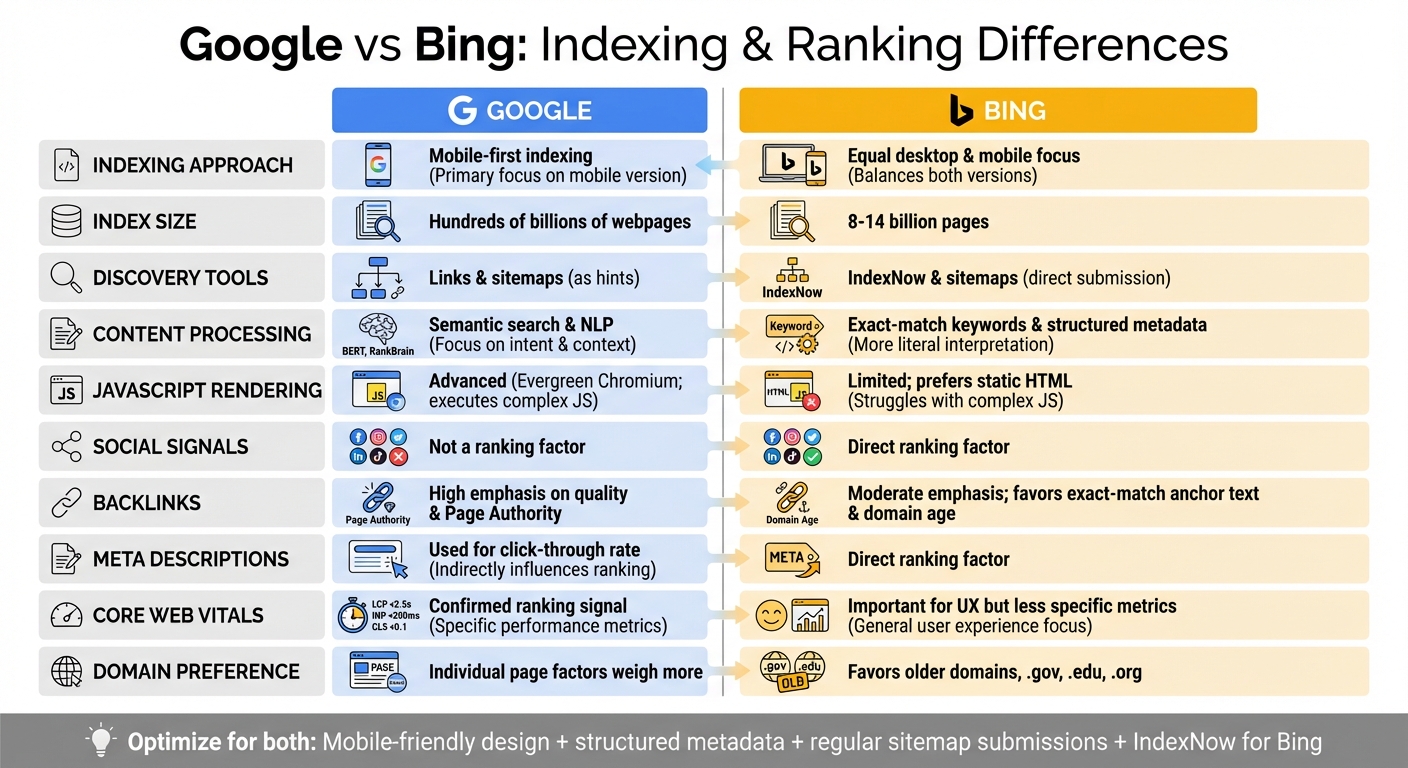
Google and Bing index websites differently, and understanding these differences can help you optimize for both. Here's what you need to know:
- Google focuses on mobile-first indexing, using your site's mobile version for ranking and indexing. It prioritizes quality over quantity, indexing fewer pages but with stricter standards.
- Bing treats desktop and mobile content equally and uses tools like IndexNow to speed up content discovery. It tends to index more pages, especially from established domains.
- Google relies heavily on semantic search and user intent, while Bing emphasizes exact-match keywords and structured metadata.
- Sitemaps are used differently: Google uses them as a "hint", while Bing uses them more directly for discovery and prioritization.
- Bing integrates social signals (likes, shares) into rankings, while Google does not.
Quick Comparison
| Feature | Bing | |
|---|---|---|
| Indexing Approach | Mobile-first | Equal desktop & mobile focus |
| Discovery Tools | Links & sitemaps (as hints) | IndexNow & sitemaps (direct) |
| Ranking Focus | Semantic search (NLP) | Exact-match keywords |
| Social Signals | Not a ranking factor | Direct ranking factor |
| JavaScript | Advanced rendering (Chromium) | Limited, prefers static HTML |
To succeed on both platforms, optimize for mobile (Google), use structured metadata (Bing), and submit sitemaps regularly. For Bing, leverage IndexNow for faster updates and consider social media engagement to boost visibility.
Bing Webmaster Tools: STOP Waiting for Google to Index You
How Google and Bing Crawl Websites
To ensure your website gets properly indexed, it's crucial to understand how Googlebot and Bingbot operate and what makes their crawling methods unique.
How Googlebot Works
Googlebot primarily discovers new URLs by following links from pages it has already crawled. This means your internal linking structure plays a huge role in how effectively Google can find and index your content. Handling billions of pages every day, Googlebot operates at an incredible scale with immense computing resources.
One standout feature of Googlebot is its ability to adjust its crawl rate. If it detects server issues, like HTTP 500 errors, it slows down to avoid putting extra strain on your site. It can process up to 2MB of uncompressed HTML or CSS files and up to 64MB for PDFs. For JavaScript-heavy pages, Googlebot uses a recent version of Chrome to render the content brought in by scripts. As stated by Google Search Central:
Googlebot uses an algorithmic process to determine which sites to crawl, how often, and how many pages to fetch from each site.
Since Google has shifted to mobile-first indexing, most crawl requests now come from the Googlebot Smartphone crawler. This makes mobile optimization a non-negotiable part of your website strategy.
How Bingbot Works
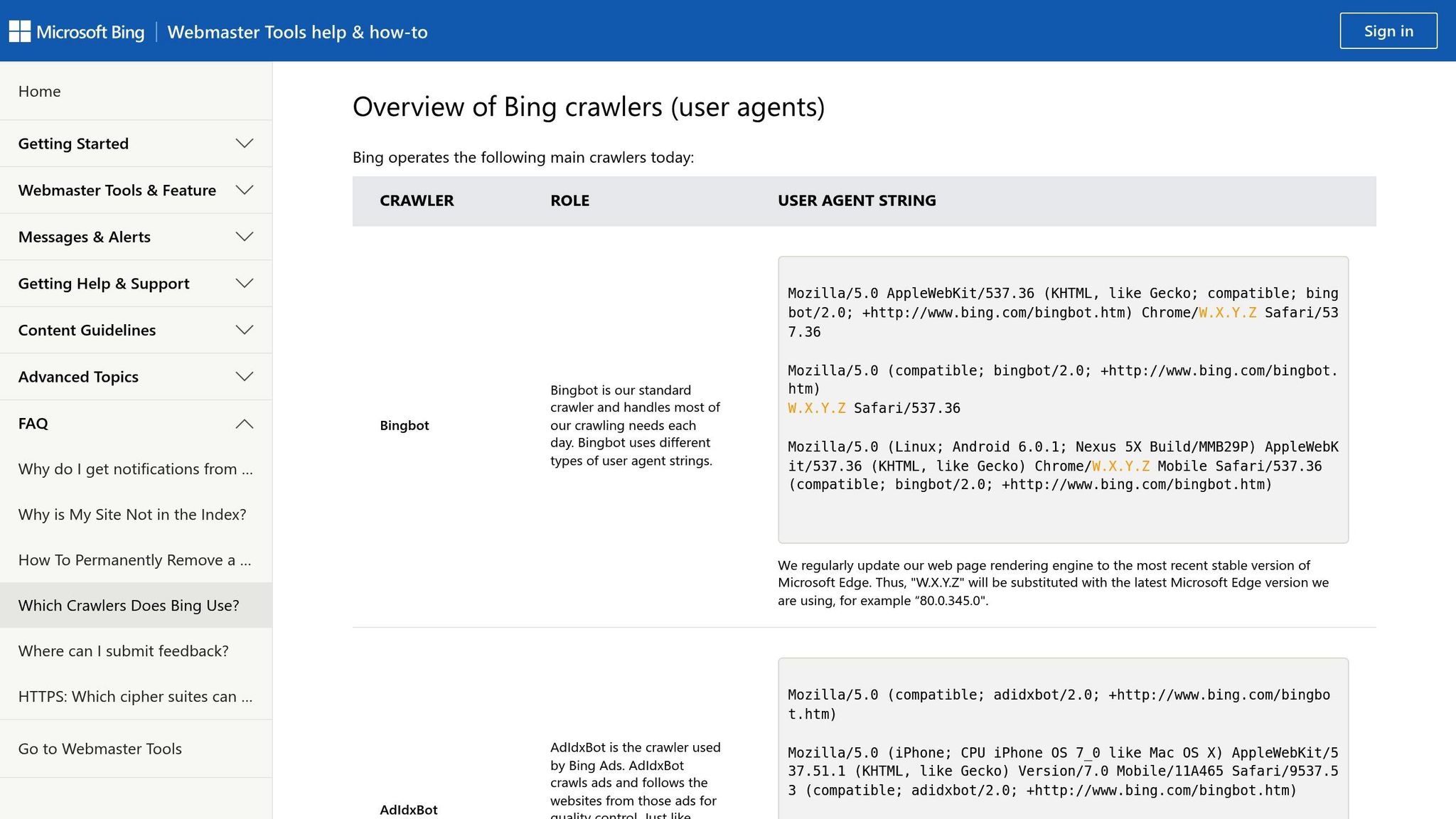
Bingbot takes a different approach, focusing on unindexed or recently updated pages. It heavily relies on structured sitemaps and the IndexNow API for discovering content, rather than primarily using link-following like Googlebot.
A unique feature of Bingbot is the "Crawl Control" option in Bing Webmaster Tools. This allows you to manually manage when and how quickly Bingbot crawls your site, helping you reduce server strain during high-traffic periods. Despite crawling billions of URLs daily, Bingbot is designed to minimize its impact on site performance. Fabrice Canel, Principal Product Manager at Microsoft Bing, highlights the benefits of IndexNow:
IndexNow is helping shift the power of the web back into the hands of content creators, providing webmasters with a direct line for their content into search engines.
While Bingbot can process JavaScript, it recommends dynamic rendering for larger sites. This involves serving pre-rendered content directly to Bingbot, which reduces HTTP requests and speeds up indexing.
Sitemap Submission Tools
Both Google and Bing use sitemaps to guide their crawlers, but they treat these files differently. Sitemaps can include up to 50,000 URLs with a maximum file size of 50MB when uncompressed.
- Google treats sitemaps as a "hint" to inform its crawling, but it doesn't guarantee indexing.
- Bing, on the other hand, uses sitemaps more directly, treating them as both a discovery tool and a way to prioritize content, often leading to faster visibility for new pages.
| Feature | Google Search Console | Bing Webmaster Tools |
|---|---|---|
| Sitemap Role | Hint for crawl optimization | Discovery tool and priority indicator |
| Supported Formats | XML, RSS, Atom 1.0, Text | XML, RSS, MRSS, Atom 1.0, Text |
| Unique Features | Rendered page view | IndexNow for instant notification; Site Explorer |
| Error Reporting | Detailed parsing and fetch errors | SEO error reports based on best practices |
Google Search Console offers detailed reporting on discovered URLs, indexing status, and issues like unreachable pages or incorrect formats. Meanwhile, Bing Webmaster Tools provides bulk URL submission and integrates with IndexNow, allowing you to notify Bing immediately when you publish or update content. To maximize visibility, submit sitemaps at your site root and reference them in your robots.txt file.
Indexing Speed and Policies
Search engines don't just differ in how they crawl your site - they also have distinct policies for how quickly and thoroughly they index your content. Knowing how each platform handles indexing can make a big difference in your site's visibility.
Google's Mobile-First Indexing
Google uses the mobile version of your website as the primary source for indexing and ranking. If your mobile site lacks critical elements like content, structured data, or metadata present on your desktop version, your search rankings could take a hit. Most crawl requests are handled by the Smartphone Googlebot, and mobile-friendly sites tend to transition to this indexing method faster.
Importantly, mobile-first indexing doesn't mean Google has a separate index for mobile content. Instead, it's a shift in how content is added to their unified index. To avoid delays or ranking issues, make sure your high-value content, structured data, and metadata are consistent across both mobile and desktop versions.
Bing's Equal Device Treatment
Bing takes a different approach by treating desktop and mobile versions equally. It encourages using the same URLs for both, so you won't face penalties for having only a desktop site. However, optimizing for mobile still improves user experience, which can impact engagement metrics.
One standout feature is Bing's IndexNow protocol, which notifies the search engine immediately when content is updated. This can trigger crawling in as little as 5 seconds to 5 minutes. Additionally, refreshing your XML sitemaps daily can speed up URL discovery and help clean up dead links.
Index Size Comparison
The size of an index can influence how much content is discoverable. Google's index includes hundreds of billions of webpages, while Bing's is smaller, estimated at 8 to 14 billion pages. This reflects Google's selective approach - it discovers more URLs but focuses on indexing high-quality, relevant content.
Bing, on the other hand, is more inclusive, often indexing a greater amount of content it discovers, especially from popular websites with high user engagement. For example, Bing has been noted to index more content in specific categories like blog posts, product pages, and images. Its efficiency lies in revisiting URLs only when updates are detected, making it particularly effective for sites that are regularly maintained.
Does Bing index faster than Google?
Bing can start crawling new or updated pages faster than Google, mainly because of IndexNow. When you ping IndexNow, Bing can begin crawling in as little as 5 seconds to 5 minutes, while Google leans on scheduled crawls and keeps its Indexing API limited to job postings and livestream videos. Faster crawling is not the same as guaranteed indexing, though. Both engines still decide what to keep based on content quality, so instant submission speeds up discovery, not the ranking decision itself. Here is how the two engines compare on the core indexing mechanics:
| Indexing mechanic | Bing | |
|---|---|---|
| Crawl scheduling | Algorithmic, adjusts to server health | Crawl Control settings; revisits URLs mainly when content changes |
| Instant submission API | Indexing API limited to job postings and livestreams | IndexNow, open to all content types |
| Mobile-first indexing | Yes, indexes the mobile version | No, single unified index for desktop and mobile |
| Index size | Hundreds of billions of pages | Roughly 8 to 14 billion pages |
Is Bing mobile-first like Google?
No, Bing does not use mobile-first indexing the way Google does. Bing keeps a single unified index for desktop and mobile instead of crawling and ranking primarily from the mobile version, and it recommends the same URLs and responsive design for both. Mobile friendliness is still a ranking signal on Bing, so a fast, usable mobile page helps. The practical difference is that Bing will not drop desktop-only content the way a thin mobile version can hurt you under Google's mobile-first indexing.
Up next, we'll explore how these indexing policies influence ranking factors differently across platforms.
How Algorithms Process Content
Search engines evaluate and rank content using their unique algorithms. Once indexing is complete, these algorithms assess the quality and relevance of your content. Knowing how different platforms approach this process is key to shaping an effective optimization strategy.
Google's Semantic Search
Google's algorithm leans heavily on natural language processing (NLP) models like BERT and RankBrain. These tools help Google grasp the intent and context behind search queries. By analyzing synonyms, variations, and context, Google aims to match results with what users truly want to find.
"Google understands synonyms, variations, and natural language better than Bing." - Marilyn Wilkinson, Semrush
Google's focus on intent extends to its evaluation criteria, particularly E-E-A-T: Experience, Expertise, Authoritativeness, and Trustworthiness. This approach goes beyond basic keyword signals, prioritizing content that genuinely satisfies user needs. On the other hand, Bing takes a more traditional route, as described below.
Bing's Keyword Matching
Bing's algorithm places greater emphasis on exact-match keywords, especially in on-page elements like titles, headings, and meta descriptions. While Bing has incorporated machine learning and GPT-4 to better interpret synonyms and semantic equivalents, it still relies on classic SEO practices. Notably, Bing treats meta descriptions as a direct ranking factor, unlike Google, which uses them mainly to boost click-through rates.
Additionally, Bing gives preference to domains with exact keyword matches and official extensions like .gov and .edu.
"Bing's inferior ability to understand text-based content leaves it relying more heavily on the basic SEO practices of including keywords in the metadata." - Ewan Gill, SEO, Semetrical
JavaScript Rendering
How search engines handle JavaScript can significantly impact content processing. Google uses an evergreen version of Chromium, enabling it to render JavaScript and view content as users do. It crawls HTML first and renders JavaScript afterward, which might introduce slight delays.
Bing, while capable of processing JavaScript, prioritizes static HTML content and multimedia elements like images and videos. For sites that rely heavily on JavaScript, employing server-side rendering or pre-rendering ensures compatibility with Bing's preferences.
Here's a quick comparison of how Google and Bing process content signals:
| Feature | Bing | |
|---|---|---|
| Primary Interpretation | Semantic search and user intent (NLP) | Keyword matching and on-page signals |
| Meta Descriptions | Used for click-through rate optimization | Direct ranking factor for content understanding |
| JavaScript Rendering | Advanced (Evergreen Chromium) | Limited; prefers static HTML |
| Social Signals | Not a ranking factor | Considered a ranking factor |
| Exact Match Domains | Less influential than in the past | Favors domains that match keywords exactly |
Ranking Factors After Indexing
Once a page is indexed, search engines evaluate it using specific ranking criteria. Backlinks play a key role for both Google and Bing, but their approaches differ. Google views backlinks as a signal of trust, prioritizing quality and Page Authority from reliable sources. Bing, while still valuing backlinks, places less overall emphasis on them. Instead, it favors exact-match anchor text and links from older domains, particularly those with .gov, .edu, or .org extensions.
Social media engagement also shows a noticeable difference in how it's treated. Bing integrates social signals - such as likes, shares, and comments - into its ranking algorithm. As Ewan Gill from Semetrical explains:
Bing has been very open about the important role that social signals play as a ranking factor in their algorithm.
On the other hand, Google maintains that social signals do not directly impact its rankings.
Core Web Vitals are another area where Google stands out. It uses specific performance benchmarks, including a Largest Contentful Paint under 2.5 seconds, an Interaction to Next Paint under 200 milliseconds, and a Cumulative Layout Shift below 0.1. Pages that meet these targets are rewarded. Bing, while recognizing the importance of page speed for user experience, does not emphasize these exact metrics to the same extent.
Here's a side-by-side comparison of key ranking factors for clarity:
Side-by-Side Ranking Factor Comparison
| Ranking Factor | Bing | |
|---|---|---|
| Backlinks | High emphasis on quality and Page Authority | Moderate emphasis; prioritizes anchor text and domain age |
| Social Signals | Not a ranking factor | Direct ranking factor (likes, shares, engagement) |
| Core Web Vitals | Confirmed ranking signal with specific targets | Important for UX but less focused on specific metrics |
| Domain Authority | Individual page factors weigh more | Heavily favors older, trusted domains |
| Multimedia Content | Prioritizes high-quality text | Excels at ranking images, videos, and audio |
| E-E-A-T | Essential for YMYL topics and content quality | Less emphasized; relies on traditional SEO signals |
| Mobile Optimization | Mobile-first indexing (prioritizes mobile version) | Unified index for both desktop and mobile |
These distinctions highlight how optimization strategies should be tailored depending on the search engine, setting the stage for the next section's discussion.
Tools for Managing Indexing
Google and Bing have different approaches to indexing, but both offer free tools to help website owners manage how their pages are discovered and indexed. Google Search Console and Bing Webmaster Tools share core functionalities like sitemap submission, URL inspection, and crawl monitoring. However, each platform also includes unique features tailored to its search engine. These tools simplify the indexing process, making it easier for website owners to ensure their content is effectively communicated to search engines.
Google Search Console Features
Google Search Console provides a range of tools to oversee website indexing. The Page Indexing report highlights which URLs are indexed and explains why some may not be, such as issues with robots.txt files or duplicate content. The URL Inspection tool is particularly useful for understanding how Googlebot processes JavaScript on your pages. If you fix an indexing issue, the Validate Fix feature allows you to track Google's progress as it reviews the changes, a process that can take up to two weeks.
Google's indexing system is primarily reactive. You submit your sitemap and wait for scheduled crawls. While Google does offer an Indexing API, its use is restricted to specific content types like job postings and livestream videos.
Bing Webmaster Tools Features
Bing Webmaster Tools takes a more proactive approach with features like IndexNow, an open-source protocol that lets you notify search engines immediately when you add, update, or delete content. Fabrice Canel, Principal Product Manager at Microsoft, explains:
"By allowing webmasters to proactively notify search engines of their content as soon as they upload it, IndexNow is helping shift the power of the web back into the hands of content creators, providing webmasters with a direct line for their content into search engines."
Other features include Crawl Control, which lets you manage how quickly Bingbot accesses your server to avoid overloading it during busy times. The Site Explorer tool organizes your site's structure in a folder-like view, making it easier to spot issues like crawl errors or redirects. Additionally, new users can import verified sites directly from Google Search Console, skipping manual verification. Bing also offers a backlinks tool, providing insights into link profiles for any site - not just your own. These features give you more control and visibility over your site's performance.
Bing Webmaster Tools vs Google Search Console: which to use?
Use both, because they cover different gaps rather than replacing each other. Google Search Console is the only place to see how Googlebot renders your pages, the Page Indexing report, and Core Web Vitals, so it is essential for the larger search engine. Bing Webmaster Tools adds what Search Console does not: IndexNow for instant submission, Crawl Control to throttle Bingbot, Site Explorer for a folder-level view, and a backlinks tool that works for any domain, not just your own. If you only have time for one, start with Google Search Console for reach, then add Bing Webmaster Tools to claim faster Bing indexing through IndexNow. Better still, connect both APIs once and let a tool submit for you.
Using IndexMachine for Both Search Engines

Managing two separate platforms can be a hassle, but IndexMachine simplifies the process by automating submissions to both Google and Bing. It connects to Google Search Console and Bing Webmaster Tools via their APIs, removing the need for manual URL submissions.
IndexMachine automatically monitors your sitemap and pushes new or updated URLs to both search engines as soon as changes are detected. You can enable or disable indexing for specific domains, offering precise control. The platform also tracks your indexing progress with visual charts that display each page's coverage status and last crawl date. Alerts notify you of issues like 404 errors that could hurt your indexing performance. By automating these tasks, IndexMachine saves hours of manual work while ensuring your content reaches users on both Google and Bing without unnecessary delays.
Strategies for Optimizing Both Search Engines
You don't need entirely different strategies to rank well on Google and Bing. Instead, focus on shared priorities while addressing their unique preferences. Building on effective index management, here's how to fine-tune your content for both platforms.
Combining Keyword and Semantic Approaches
Google emphasizes semantic depth, while Bing leans toward structured keyword signals. Google's algorithms, like RankBrain and BERT, analyze context, user intent, and how concepts interconnect. On the other hand, Bing still rewards exact-match keywords, especially in places like title tags, H1 headers, and meta descriptions. As the SearchSEO Editorial Team notes:
Google rewards depth and relevance, Bing rewards structure and accuracy.
To cater to both, combine these approaches. Use precise keyword phrases for Bing in title tags and headers, and diversify with natural language variations for Google. For instance, if your target keyword is "small business accounting software", include that exact phrase in your H1 for Bing while also covering related topics like financial management tools or expense tracking solutions for startups to satisfy Google's semantic focus.
Schema markup benefits both engines but for slightly different reasons. Bing depends on schema to grasp content context, while Google uses it to enhance rich search results. By adding structured data for articles, products, or local businesses, you improve how both search engines interpret your content.
Social media signals also play a bigger role for Bing. Unlike Google, which treats social engagement as an indirect factor, Bing uses interactions on platforms like LinkedIn and X (formerly Twitter) as direct ranking signals. Therefore, promoting content on social platforms can help boost your Bing rankings while also increasing brand visibility on Google. Keep in mind that Bing's audience tends to be older and more engaged.
Using Sitemaps and APIs Effectively
Efficient content retrieval hinges on proper sitemap and API usage. Both search engines need to be notified when you publish or update content, though their preferences differ. XML sitemaps are essential - they help search engines understand your site's structure and ensure comprehensive coverage. Submit your sitemap to both Google Search Console and Bing Webmaster Tools, and include a reference to it in your robots.txt file for automatic discovery.
One often-overlooked detail is the <lastmod> tag in your sitemap. This tag should reflect the actual date and time you updated the page (in full ISO 8601 format), not when the sitemap was generated. Bing uses this timestamp to prioritize fresh content. As Fabrice Canel and Krishna Madhavan from Microsoft AI explain:
The lastmod field in your sitemap remains a key signal, helping Bing prioritize URLs for recrawling and reindexing, or skip them entirely if the content hasn't changed.
For real-time updates, the two engines take different approaches. Google's Indexing API is limited to specific content types like job postings, leaving most sites reliant on scheduled crawls. Bing, however, offers IndexNow - a protocol that allows you to instantly notify the search engine when you add, update, or delete content. Implementing IndexNow can greatly speed up how quickly Bing indexes your changes.
To keep your content fresh and discoverable, combine sitemaps for full site coverage with IndexNow for immediate updates. For large sites with over 50,000 URLs, use a sitemap index file to manage multiple child sitemaps. Bing supports index files referencing up to 2.5 billion URLs, ensuring even massive sites remain well-organized.
Index on Google and Bing without doing it twice
IndexMachine submits your pages to both Google and Bing from one dashboard and watches the status on each, so you are not logging into two consoles. Want to see if a specific URL is already indexed? The free index checker gives you the answer.
Conclusion
Google and Bing take different paths when it comes to indexing and ranking content. Google leans on AI-powered semantic analysis and prioritizes mobile-first indexing, while Bing focuses on technical precision, favoring exact-match keywords and structured metadata.
As the SearchSEO Editorial Team explains:
"Google rewards depth and relevance, Bing rewards structure and accuracy."
You don't have to choose between the two - it's possible to optimize for both. Core SEO practices like fast-loading pages, high-quality backlinks, clean sitemaps, and schema markup are beneficial across both platforms. To fine-tune your strategy, cater to their specific needs: prioritize precise keywords in titles and headers for Bing, while creating context-rich content for Google. Additionally, maintaining active social media profiles can boost Bing's ranking signals. By addressing these preferences, your SEO efforts can work effectively on both search engines.
For faster indexing on Bing, consider using the IndexNow API.
Combining tools like Google Search Console and Bing Webmaster Tools can give you a well-rounded understanding of your site's performance. For example, Bing's Site Explorer offers insights into competitor backlink profiles, complementing Google's Core Web Vitals and rich result reports.
As Aleh Barysevich, Founder and CMO of Link-Assistant.Com, puts it:
"If you've already invested in Google SEO, then you're only a small adjustment away from seeing tangible results on other search engines... because Bing and Google share many of the same ranking signals."
With Bing and Yahoo holding 9.97% of the U.S. desktop search market share, optimizing for both platforms makes sense. It broadens your reach without requiring a significant overhaul of your SEO strategy. Stick to the fundamentals, adapt to each platform's strengths, and use tools like IndexMachine to simplify the indexing process. Many indexers only cover Google, so if you are evaluating an IndexMeNow alternative or switching from INDEXED.pro, check whether they submit to Bing as well, not just Google.
FAQs
What is mobile-first indexing, and how does it impact my website's ranking?
Mobile-first indexing means Google now prioritizes the mobile version of your website when crawling, indexing, and ranking pages. This shift mirrors how more and more people are browsing the internet on their smartphones.
To keep your rankings intact - or even improve them - your mobile site needs to be in great shape. This means it should load quickly, have a responsive design, and include the same content as your desktop site. If your mobile site is missing important content, takes too long to load, or offers a clunky user experience, your rankings could take a hit.
Although Google still looks at your desktop site, the mobile version now carries the most weight in ranking decisions. To stay competitive, make sure both your mobile and desktop sites deliver a smooth, consistent experience.
What is Bing's IndexNow protocol, and how can it help improve my website's visibility?
Bing's IndexNow protocol is a handy tool for website owners to directly inform search engines about content changes - whether it's adding new pages, updating existing ones, or removing outdated content. Instead of waiting around for search engines to crawl your site at their own pace, this protocol lets you take charge by pushing updates instantly.
The benefits? Your latest content shows up in search results faster, which can boost your visibility and overall search performance. Plus, it simplifies the indexing process by cutting down on the need for traditional crawling, saving time and resources while giving you more control over how your updates are reflected online.
Why does Bing focus more on social signals than Google?
Bing leans heavily on social signals, viewing user engagement as a major indicator of content's relevance and trustworthiness. Metrics like likes, shares, and comments give Bing insight into how well a piece of content connects with its audience.
This strategy ties into Bing's overall goal of offering search results that highlight relevance, quality, and credibility. By incorporating social activity, Bing ensures its rankings mirror the preferences and interactions of actual users.