
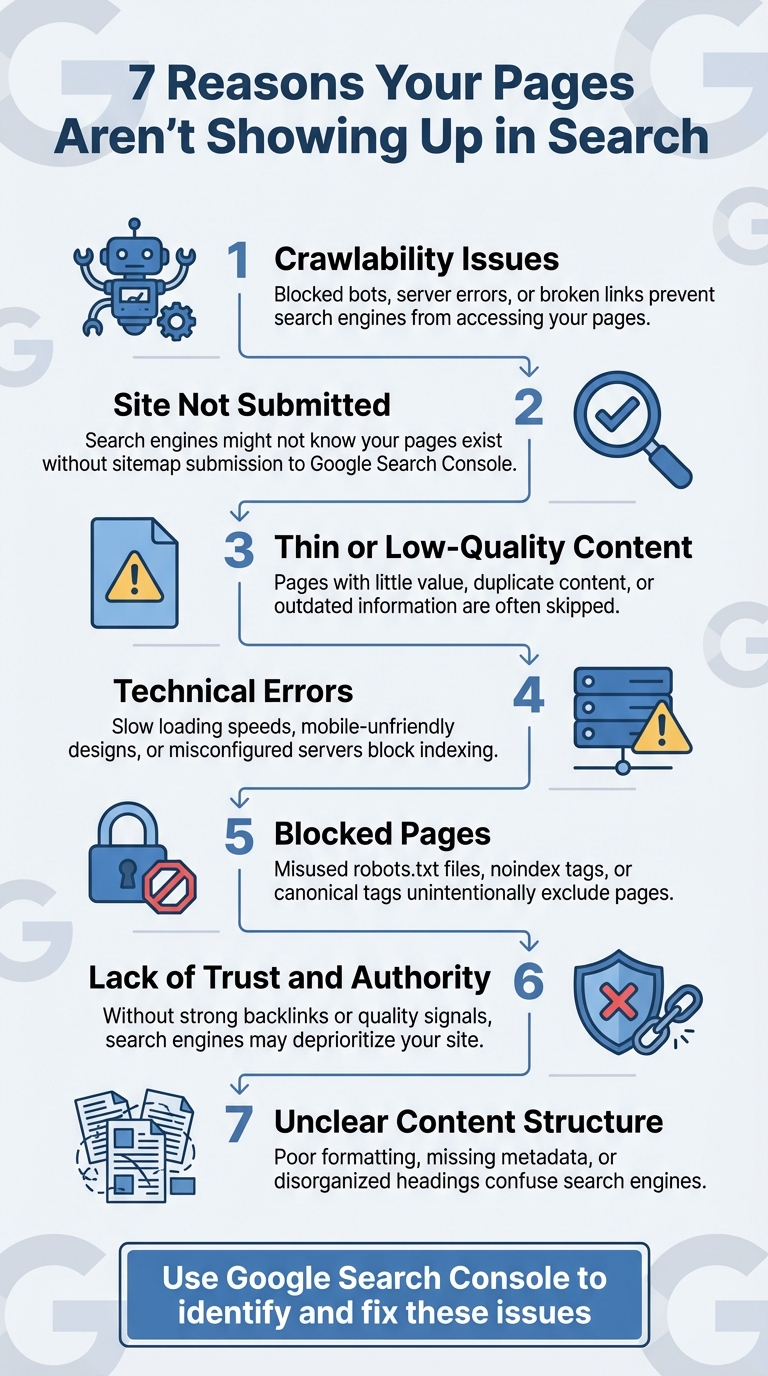
Your pages not appearing in search results can be frustrating - and costly. If search engines can't find or index your content, you're missing out on traffic, leads, and revenue. Here are the 7 most common reasons why this happens, along with actionable fixes:
- Crawlability Issues: Problems like blocked bots, server errors, or broken links can prevent search engines from accessing your pages.
- Site Not Submitted: If you haven't submitted your site or sitemap to tools like Google Search Console, search engines might not know your pages exist.
- Thin or Low-Quality Content: Pages with little value, duplicate content, or outdated information are often skipped by search engines.
- Technical Errors: Issues like slow loading speeds, mobile-unfriendly designs, or misconfigured servers can block indexing.
- Blocked Pages: Misused robots.txt files, noindex tags, or canonical tags can unintentionally exclude pages from search results.
- Lack of Trust and Authority: Without strong backlinks or quality signals, search engines may deprioritize your site.
- Unclear Content Structure: Poor formatting, missing metadata, or disorganized headings make it harder for search engines to understand your content.
Take Action: Use tools like Google Search Console to identify and fix these issues. Regularly monitor your site's crawlability, improve content quality, and ensure technical settings are correct. Proactive efforts can help your pages get indexed - and rank higher.
Why does Google Search Console say my pages aren't indexed, and how can I fix it?
1. Search Engines Can't Crawl Your Pages
For your pages to show up in search results, search engines like Google first need to crawl and understand your content. If their bots can't access your site, your pages won't be indexed, and they won't appear in search results. Let's dive into some common issues that can block crawlers.
A poorly configured robots.txt file is a frequent culprit. It can unintentionally block entire sections of your site, making them invisible to search engines. Similarly, blocking critical JavaScript files can prevent Google from properly rendering your pages, leaving them out of the index.
Server errors - like those flagged by HTTP codes 500, 502, 503, or 504 - are another roadblock. These errors essentially tell Googlebot to skip your pages altogether.
Broken links that lead to 404 errors not only frustrate users but also waste your site's crawl budget. And if your site has redirect loops, they can trap bots indefinitely, preventing them from accessing your content.
Lastly, access restrictions can be a major barrier. Login forms, paywalls, IP blocks, or misconfigured firewalls might keep crawlers out, making it impossible for search engines to index your site.
2. Your Site Hasn't Been Submitted or Found
Search engines rely on crawlers to explore the web through links. Once a page is crawled, its content is analyzed and stored in a massive database called an index. If your page isn't included in that index, it simply won't show up in search results.
Here's the catch: search engines can take up to four weeks to revisit your site. That's a long wait if you've just launched or made important updates. To speed things up, you can manually submit your site using tools like Google Search Console or Bing Webmaster Tools. Submitting through Bing Webmaster Tools has an added bonus - it also helps your site get picked up by Yahoo and DuckDuckGo since they partially depend on Bing's index.
An XML sitemap is another essential tool. It lists all your site's key URLs, ensuring search engine crawlers can easily find them. This is especially useful if your site uses JavaScript, which can sometimes make it harder for crawlers to locate important pages.
"While modern search engines are incredibly smart and will likely find your site eventually, taking proactive steps to submit it can significantly speed up the process." - Itamar Haim, onResources
Before submitting, double-check that your website is live, accessible, and not set to block indexing. To confirm site ownership, you can use methods like adding an HTML meta tag, uploading an HTML file, or connecting through Google Analytics. After submission, keep track of your indexing status using the site:yourdomain.com search operator or the Index Coverage report in Google Search Console. These steps work hand-in-hand with earlier crawlability efforts to get your site noticed faster.
3. Your Content Is Too Thin or Low-Quality
Search engines often skip indexing pages that don't offer much value. Thin content refers to pages with minimal useful information - like those with just a few sentences, product descriptions copied directly from manufacturers, or outdated blog posts that no longer hold relevance. Algorithms now evaluate the depth, originality, and intent behind your content. To get indexed, your pages need to meet these standards.
Even if search engines find and crawl your pages, low-quality content can still block proper indexing. Expectations are higher than ever. Google's goal is to deliver users the "very best and most valuable" content on any given topic. This means your page must stand out and improve upon what's already ranking. Duplicate content - whether spread across your own URLs or copied from other sites - gets filtered out.
"The most likely reason is that they don't feel the website offers sufficient 'helpful content' or adds to what they already have in their index." - Tony Grant, SEO & Online Marketing Visionary at CommonSenSEO
To avoid falling into the thin-content trap, aim for each page to have at least 300 words. But remember, quality isn't just about word count. Your content should be well-structured, easy to read, and free from spelling mistakes. Avoid keyword stuffing and distracting elements like intrusive ads. The goal? Answer the searcher's question completely and clearly. Without unique, valuable insights, Google might overlook your page.
Keep your content fresh. Regularly update or remove outdated posts. For sensitive topics like healthcare or finance, it's crucial to showcase expertise - think proper author credentials and trust signals. And since search engines now interpret language in context, always write with real people in mind, delivering genuine value.
4. Technical Errors Are Blocking Indexing
Even the best content won't show up in search results if technical problems are getting in the way. Server errors like 5xx codes can stop Googlebot from accessing your pages. If your site times out or your server is overloaded, Google might decide your page isn't worth indexing - or worse, remove it entirely.
Slow loading speeds can also be a major roadblock. If your pages take too long to load, Googlebot might give up before finishing. Overloaded servers only make things worse, sending a message that your site isn't stable enough to crawl effectively.
"A server error means that Googlebot couldn't access your URL, the request timed out, or your site was busy. As a result, Googlebot was forced to abandon the request." - Google Search Console
With mobile-first indexing now the norm, poorly optimized mobile pages can also hurt your chances. Think tiny text, buttons that are hard to tap, or content that doesn't display properly - these issues can stop Google from indexing your site.
The good news? Fixing these technical hiccups can get your pages back on track. Use tools like Google Search Console's Page Indexing report and URL Inspection tool to identify and resolve issues. Check that your server is running smoothly, make sure firewalls aren't blocking Googlebot, and improve load times with PageSpeed Insights. Don't forget to test how your site looks and works on mobile devices to ensure it's user-friendly.
5. You're Blocking Pages from Being Indexed
Sometimes, internal settings unintentionally prevent your pages from being indexed. Three common culprits are a misconfigured robots.txt file, unintended noindex tags, and improperly set canonical tags. While these tools have specific purposes, errors in their configuration can make valuable pages invisible to search engines.
Start by reviewing your robots.txt file. A misplaced "disallow" directive can block important pages from being crawled by Googlebot. Even small syntax errors or overly broad rules can lead to critical pages being excluded from indexing.
The noindex meta tag is another setting to watch out for. This tag explicitly tells search engines not to index a page. If Googlebot encounters it, the page is removed from search results. This issue often stems from mistakes in plugin configurations, theme settings, or simple human error.
Canonical tags are designed to help search engines identify the preferred version of duplicate or similar pages. However, if these tags are set up incorrectly, they can unintentionally hide pages from being indexed. For instance, if Google Search Console shows the message "Duplicate, Google chose different canonical than user", it's a sign that your canonical tags might not be configured as you intended.
To fix these issues, inspect your page source for unintended directives. Use Google Search Console's Page Indexing Report and URL Inspection Tool to spot noindex tags or misdirected canonical tags. Once identified, remove or correct them and request re-indexing. This step ensures that your pages are properly indexed and complements earlier efforts to resolve crawlability or technical barriers.
6. Your Site Lacks Trust and Authority
Search engines rely on trust signals like E-E-A-T (Experience, Expertise, Authoritativeness, and Trust) and high-quality backlinks to decide which pages deserve to be indexed. Even if your site is fully optimized, it's tough to gain visibility without credible backlinks. When respected sites in your industry link to your content, it sends a strong message to search engines that your site is reliable and worth showcasing. On the flip side, spammy or low-quality backlinks can lead to penalties, damaging your site's chances of being indexed.
In those early crawl phases, search engines also evaluate broader quality factors. These include user experience, site security, loading speed, and how easy it is to navigate your site. All of these elements influence how search engines prioritize your pages for indexing.
To build trust and authority, focus on creating detailed, user-focused content that directly answers your audience's questions. Work on building genuine relationships within your industry to earn natural, high-quality backlinks. Regularly monitor your backlink profile using tools like Google Search Console to ensure you're not being dragged down by harmful links. Additionally, how users interact with your site - things like time spent on pages or click-through rates - plays a key role in signaling trustworthiness to search engines.
Once you've built that foundation of trust with quality backlinks and user engagement, you'll be in a much stronger position to ensure search engines can fully understand and index your content.
7. Search Engines Can't Understand Your Content
Even if search engines can crawl your pages, they might struggle to make sense of your content if the structure is unclear. Skipping proper heading hierarchies like H1, H2, and H3 tags, writing dense blocks of text, or neglecting internal links can leave your content feeling disorganized and hard to interpret for both search engines and users alike.
Metadata plays a crucial role in reinforcing the structure you've created with headings and formatting. If your metadata - like title tags and meta descriptions - is missing or inaccurate, search engines may misinterpret the focus of your page. These elements aren't just for readers; they act as essential signals that guide search engines in understanding what your content is about.
Modern AI-driven algorithms prioritize content that balances technical clarity with user experience. Long-winded paragraphs, overly complex sentences, and a lack of visual breaks make it harder for search engines (and users) to process your content effectively.
As search technology evolves, clear and focused content becomes even more important for indexing and ranking. Search engines increasingly reward pages that demonstrate expertise and are easy to navigate.
To ensure your content is understood, aim for a logical hierarchy with descriptive headings, short paragraphs, and accurate metadata. Use subheadings, clean formatting, and strong internal links to highlight your content's structure. These steps work hand-in-hand with the technical and quality improvements we've discussed earlier.
Conclusion
Getting your pages indexed by Google isn't just important - it's essential for visibility. As we've discussed, issues like crawling errors, poor content quality, technical glitches, and weak trust signals can all block your pages from showing up in search results. Without proper indexing, your site misses out on valuable organic traffic, which can directly impact revenue.
The good news? Most indexing problems can be resolved once identified. Google Search Console is the perfect starting point. It offers detailed reports on which pages are indexed, which aren't, and the reasons behind it. Start with the Page Indexing Report for a bird's-eye view of your site's status, then dive deeper into specific problems using the URL Inspection Tool. After addressing any issues, you can request re-crawling through the "Validate Fix" option. Just keep in mind that this process might take a few weeks.
For faster results, automation tools can make a big difference. Take IndexMachine, for example. This tool automates indexing across platforms like Google, Bing, and even AI-driven systems like ChatGPT. It offers features like auto-submission to search engines, visual progress tracking, and daily updates on indexed pages. Plus, it flags 404 errors and provides detailed insights such as coverage status and last crawl dates. By combining automation with manual strategies, you can streamline monitoring and re-indexing while staying on top of your site's visibility.
Ultimately, addressing the key issues - crawlability, content quality, technical errors, and trust signals - ensures your site is not just discoverable but also primed for better rankings. The effort you invest in fixing these problems pays off in the form of more organic traffic and stronger search performance.
FAQs
What steps can I take to make my site easier for search engines to crawl and index?
To make your site easier for search engines to navigate and index, start by reviewing your robots.txt file to ensure it isn't unintentionally blocking key pages. Next, fix any broken links - whether internal or external - that might interfere with smooth navigation. Don't forget to create and submit a sitemap, which acts as a roadmap for search engines to understand your site's layout. Check for any noindex tags on pages you want to show up in search results and remove them if necessary. Lastly, take advantage of tools like URL inspection to request indexing for any new or updated pages. These actions can help search engines better understand and rank your site.
How can I improve the quality and effectiveness of my content?
To make your content stand out, aim for well-researched, unique, and engaging material that speaks directly to your audience's interests and concerns. Structure your content with clear formatting, weave relevant keywords in naturally, and steer clear of thin or repetitive content. Keeping your pages updated ensures they stay accurate and useful over time.
On the technical side, ensure your website runs smoothly by addressing broken links, enhancing loading speeds, and ensuring your content is optimized for mobile devices. Pay attention to details like meta tags, canonical URLs, and clear, logical headings to improve how your site is indexed and displayed in search results. When you focus on both quality and usability, you create content that appeals to readers and search engines alike.
Why should I use Google Search Console to help my site get indexed?
Using Google Search Console is a key tool to ensure Google indexes your website correctly. It allows the search engine to find and interpret your site's content, making it easier for your pages to appear in search results.
With Search Console, you can identify and resolve common problems like crawl errors, blocked pages, or duplicate content. Plus, you can directly request Google to re-crawl or index specific pages, helping them show up in search results faster. This hands-on approach can make a big difference in improving your site's visibility and performance in search rankings.