

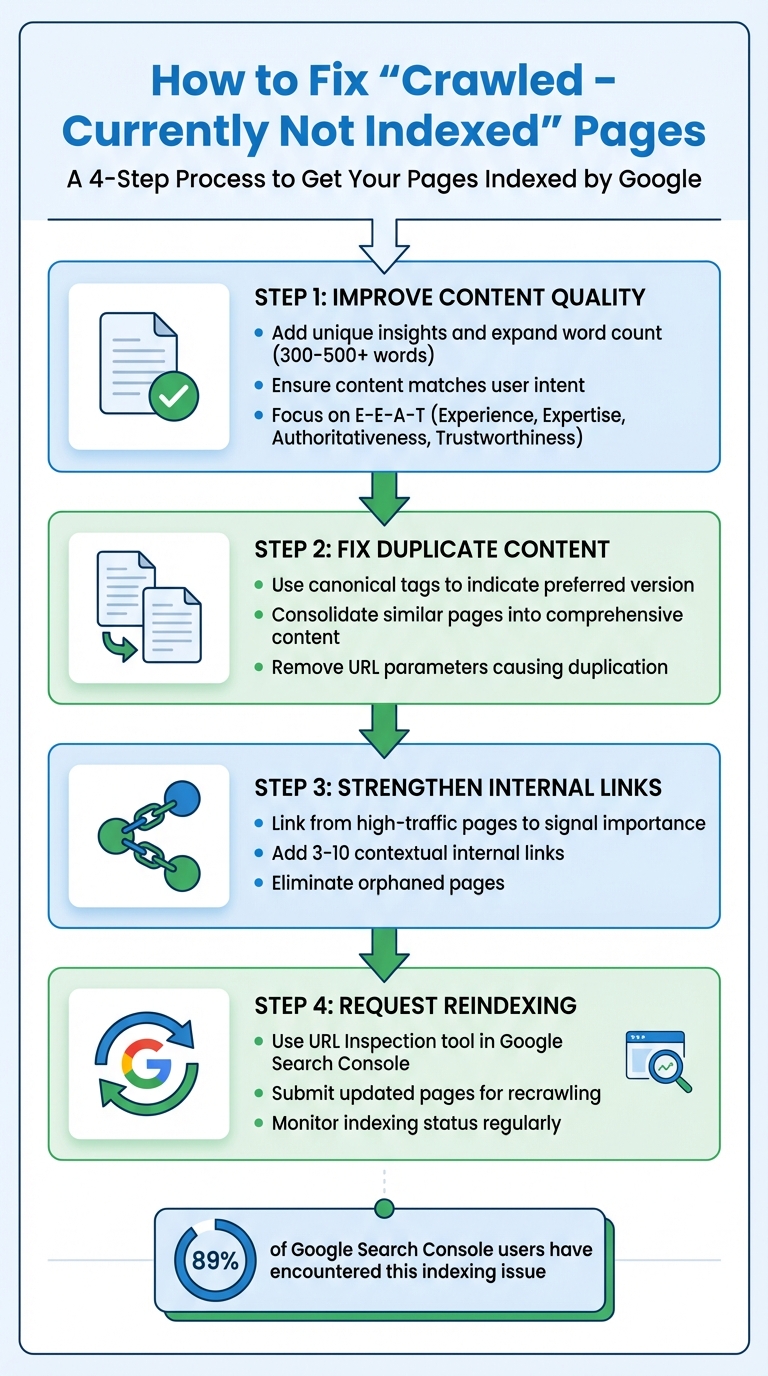
If you've seen the "Crawled - Currently Not Indexed" message in Google Search Console, it means Google visited your page but decided not to include it in the index. This isn't due to technical errors; it's because Google's algorithm determined the content doesn't meet its quality standards. Pages stuck in this status won't appear in search results, resulting in lost traffic and opportunities.
How to Fix Crawled - Currently Not Indexed
The fix for "Crawled - Currently Not Indexed" is to improve the page's content quality and uniqueness, strengthen the internal links pointing to it, then resubmit the URL for reindexing in Google Search Console. Google already crawled the page, so this is a quality and priority problem, not a technical block. Give Google a clear reason to keep the page, then prompt it to look at the page again.
Crawled vs Discovered - Currently Not Indexed
These two Google Search Console statuses look similar but mean different things. "Crawled - Currently Not Indexed" means Googlebot fetched the page and read the content, then chose not to index it (usually a quality, duplication, or priority signal). "Discovered - Currently Not Indexed" means Google knows the URL exists but has not crawled it yet, often because of crawl budget limits, slow server response, or weak internal linking. The fixes overlap heavily: raise content quality, add internal links from strong pages, keep your sitemap clean, and resubmit. For "Discovered" pages, also cut crawl waste (fix redirects, 404s, and slow responses) so Google spends its budget on the URLs that matter.
Key Reasons for This Issue:
- Thin or low-value content: Pages with less than 300-500 meaningful words or lacking originality.
- Duplicate content: Similar pages confuse Google, causing it to skip indexing.
- Poor internal linking: Orphaned pages with no links from key areas are often ignored.
- Crawl prioritization: Google may deprioritize pages it considers less critical.
How to Fix It:
- Improve content quality: Add unique insights, expand word count, and ensure the page matches user intent.
- Fix duplicate content: Use canonical tags or consolidate similar pages.
- Strengthen internal links: Link from high-traffic pages to signal importance.
- Request reindexing: Use the URL Inspection tool in Google Search Console to prompt Google to revisit updated pages.
By focusing on high-value pages and ensuring they meet Google's quality benchmarks, you can resolve indexing issues and improve your site's visibility.
How to Find and Diagnose Affected Pages
Finding Affected Pages in Google Search Console
Start by opening Google Search Console and heading to the Pages (or Indexing) section. Look for the table labeled "Why pages aren't indexed", and click on the row that says "Crawled - currently not indexed". This will give you a list of URLs that are affected. Keep in mind, this data is typically 3-4 days old.
To narrow down the list to your most critical pages, use the sitemap filter at the top of the report. Select "All submitted pages" to focus on URLs you've flagged as important. If you're dealing with a large volume of affected URLs, exporting the data to Google Sheets or Excel can save time. Once exported, use tools like "Split text to columns" to identify patterns - such as recurring subfolders, URL parameters, or thin archive pages that Google tends to skip.
Interestingly, 89% of Google Search Console users have encountered pages stuck in this status. For larger websites, note that the report caps at 1,000 example URLs, making filtering and exporting even more critical.
After identifying affected pages, take the next step by inspecting individual URLs with the URL Inspection tool.
Checking Individual URLs for Problems
The URL Inspection tool is your go-to for diagnosing specific issues. Enter the affected URL into the search bar, and you'll get details on crawl status, canonical tags, and any technical blockers. Pay close attention to these key fields:
- "Crawl allowed?": Ensures the page isn't blocked by robots.txt.
- "Indexing allowed?": Checks for noindex directives.
- "Google-selected canonical": Reveals if Google sees the page as a duplicate.
For real-time results, click "Test Live URL" to confirm that Googlebot can access the page. Then, use "View Tested Page" to see how Google views the page's HTML and layout. If there's a discrepancy - like the URL Inspection tool showing "Indexed" while the Page Indexing report lists "Crawled - currently not indexed" - rely on the inspection results, as they are more up-to-date.
"Index coverage report data is refreshed at a different (and slower) rate than the URL Inspection. The results shown in URL Inspection are more recent, and should be taken as authoritative." - Google Search Central
Another key check is the "Google-selected canonical" field. If Google has chosen a different URL as the canonical, your page might be treated as duplicate content and skipped. Finally, ensure the page performs well on mobile devices, as poor mobile usability can hurt indexing in today's mobile-first indexing landscape.
Evaluating Content Quality and Originality
Once technical issues are resolved, turn your attention to the quality and originality of the content. Pages with less than 300-500 meaningful words risk being flagged as thin content. But word count alone isn't enough - compare your page to the top 10 search results for your target keyword. If your content feels like a rehash of what's already ranking, it might lack the distinctiveness needed to earn a spot in Google's index.
Focus on Information Gain - the fresh insights, unique data, or perspectives your page brings to the table. If your page doesn't offer anything new compared to existing content, it might be filtered out by Google's quality systems. The E-E-A-T framework (Experience, Expertise, Authoritativeness, Trustworthiness) remains a key factor in 2026. Pages showcasing firsthand experience saw visibility improve by 38% in late 2025, while generic AI-generated content dropped by as much as 71% in product review categories.
Also, make sure your content matches user search intent. For instance, if users are looking for a how-to guide but land on a product list, this mismatch could prevent indexing. Lastly, check for orphaned pages - those with few or no internal links. Adding 3-10 contextual internal links from high-authority pages can signal to Google that the page holds value and deserves attention.
Why Pages Get "Crawled - Currently Not Indexed" Status
Thin or Low-Quality Content
When Google evaluates a page, crawling is just the first step. Indexing is where Google decides if the content meets its quality standards. Thin or low-quality content often fails this test, but it's not just about word count - it's about the value the content provides.
Pages that rely on AI-generated text without any added insights, incomplete or overly generic content, or automated data like scraped sports scores or product details are often flagged as low quality. If more than 5% of your site's pages remain unindexed, Google might interpret your domain as low quality, which can hurt your entire site's rankings.
"Googlebot successfully visited your page, downloaded its content, processed it - but decided not to include it in Google's index."
- Hassan, SEO Consultant & Automation Specialist, Digital Skill Learn Hub
To address this, compare your unindexed pages with the top-ranking pages for your target keywords. If your content doesn't offer something fresh - like unique research, case studies, or a different perspective - it's likely to be ignored. Guides that perform well in indexing are often between 1,500 and 5,000 words, but what matters most is the depth and usefulness of the information.
Duplicate or Similar Content Across Pages
Duplicate or nearly identical content across multiple URLs can confuse Google's algorithm, forcing it to pick just one page - or none at all - for indexing. This issue dilutes signals like backlinks and internal link authority, reducing the overall impact of your content.
Common causes of duplication include URL parameters (like tracking codes), pagination in blog or product lists, and e-commerce product variations (such as different colors or sizes). Google's John Mueller has pointed out that conflicting tags like noindex and canonical tags can create further confusion, weakening your page's chances of being indexed.
Since 2026, Google has raised the bar even higher for content quality, especially with the rise of AI-generated material. Pages that closely resemble existing content - whether on your site or elsewhere - are more likely to be excluded from the index. Many auditing tools now flag pages as duplicate if their content similarity exceeds 90%.
| Cause of Duplication | Common Example | Recommended Fix |
|---|---|---|
| URL Parameters | Tracking codes, session IDs | Use canonical tags or configure parameter handling in Google Search Console |
| Server Config | HTTP vs HTTPS; WWW vs non-WWW | Set up 301 redirects to consolidate versions |
| E-commerce Variants | Product in different colors/sizes | Use drop-down menus or canonical tags to consolidate URLs |
| Pagination | Blog or product list pages (/page/2/) | Apply unique titles or noindex tags to deeper pages |
In addition to duplication, weak internal linking can also hinder a page's value in Google's eyes.
Poor Internal Linking Structure
Pages that lack internal links are often treated as low priority by search engines. These "orphaned" pages lack the signals that demonstrate their relevance and importance within your site's content structure. Without links from key areas - like your homepage or high-performing pages - Googlebot may decide these pages aren't worth indexing.
Research shows that improving internal linking can boost Googlebot crawl rates by as much as 30%. Linking strategically from authoritative pages highlights a page's value and helps search engines understand how your content fits together.
"A common situation is really that our algorithms are just not sure about the overall quality of the website. And in cases like that, we might crawl the URL, we might look at the content and say: 'I don't know'."
- John Mueller, Search Advocate, Google
Think of your site as a cluster of topics, with pillar pages supported by related subtopics. This interconnected structure not only demonstrates expertise but also helps search engines identify which pages deserve more attention. By refining your content and linking strategy, you can improve your chances of getting indexed.
How to Fix Pages That Won't Index
Focus on Your Most Important Pages First
Not every unindexed page needs your immediate attention. Start by identifying the pages that have the biggest impact on your business. Use tools like Google Search Console to pinpoint pages with high traffic or revenue potential.
Your priority should be pages that directly support your key goals - like service pages, product categories, or lead-generation content. These are far more critical than blog archives or outdated resources. Tackling your top 10-20 pages first can yield faster, noticeable results compared to spreading your effort across every unindexed page.
Once you've prioritized, the next step is to focus on improving the quality of these pages to meet Google's current standards.
Expand and Improve Content Quality
After deciding which pages to address, the next move is refining their content. Google's algorithms in 2026 emphasize "information gain", meaning your page needs to offer something fresh and valuable to stand out.
Start by comparing your unindexed pages to the top-ranking results for your target keywords. If your content doesn't bring unique insights to the table, it's likely to be ignored. Boost your page's credibility by strengthening E-E-A-T (Experience, Expertise, Authoritativeness, Trustworthiness). Adding short author bios and citing credible sources can make a difference. For U.S. audiences, using localized details like inches, miles, or Fahrenheit can also help build trust.
"In 2026, quality gaps are the #1 cause of indexing problems. Google's algorithms have gotten pickier than a cat at dinnertime."
- Hassan, SEO Consultant
If you have multiple thin pages covering similar topics, consider merging them into a single, comprehensive "power page." Use 301 redirects to funnel link equity from the old pages to the new one. This not only improves the depth of your content but also helps resolve duplication issues, which often cause the "Crawled - Currently Not Indexed" problem.
Use IndexMachine to Automate the Indexing Process
Once your content is improved, it's time to ensure Google re-crawls those updated pages. This is where IndexMachine comes in. It automates the submission of updated URLs directly to Google Search Console and Bing Webmaster Tools.
IndexMachine allows you to submit up to 20 URLs daily for Google and 200 URLs for other search engines. This ensures your updates are crawled quickly. Plus, its daily reports let you track which pages have been successfully indexed in real time. For U.S. businesses managing multiple domains - like regional landing pages or separate sites for different products - IndexMachine's single-dashboard tracking makes it easier to monitor indexing progress across all domains.
If you want to weigh other submitters first, see all the major indexing tools compared side by side on method, price, and status.
Why Google Crawls Your Page but Refuses to Index It (And How to Fix It)
Preventing Future Indexing Problems
Once you've optimized your pages for indexing, the next step is making sure future issues don't creep up.
Track Indexing Status Regularly
Keeping an eye on your indexing status is key to catching problems early. A good habit is reviewing your Google Search Console (GSC) Pages report weekly. This report breaks down the ratio of indexed versus excluded URLs, helping you spot potential issues before they hurt your traffic or revenue.
Here's a telling stat: in a study of 213 GSC profiles, 89% had the "Crawled - Currently Not Indexed" error. This shows how common the issue is, but also how preventable it can be with regular monitoring. To focus on your most important URLs, switch your GSC view to "Submitted pages." This way, you can zero in on the URLs in your sitemap that drive traffic and conversions.
Don't forget to check your Crawl Stats in the GSC Settings. This section reveals how often Googlebot visits your site and flags server errors (like 4xx or 5xx) that might be wasting your crawl budget. If your site is too large for GSC's 1,000-URL report limit, tools like IndexMachine can generate daily reports, making it easier to track indexing across multiple domains from one dashboard.
Keep Sitemaps and Site Structure Clean
A well-maintained XML sitemap makes crawling more efficient. If your sitemap includes redirects, 404s, or noindex pages, you're wasting Googlebot's resources. Stick to URLs that are live (200-status), canonical, and indexable, and remove anything that doesn't meet these criteria.
"Submitting a sitemap is merely a hint… it doesn't guarantee that Google will download the sitemap or use the sitemap for crawling URLs." - Google Search Central
Even with a spotless sitemap, your site structure plays a huge role. Pages buried four or five clicks away from the homepage are crawled far less often. To avoid this, keep your most important pages within three clicks of the homepage. Use a hub-and-spoke structure, where pillar pages link to related subpages. This setup not only helps search engines understand your site's hierarchy but also signals authority and depth. And don't leave any page stranded - each one should have internal links pointing to it. Pages only discovered through sitemaps often get low priority.
For sites with frequently changing content, automate sitemap updates and aim for a Time to First Byte (TTFB) under 3 seconds. Slow-loading pages can discourage crawlers from sticking around. Staying informed about search algorithm updates is another smart way to protect your site's visibility.
Stay Updated on Search Engine and LLM Changes
Indexing is getting tougher. By 2026, Google will be even more selective about which URLs it keeps in its long-term index. The March 2024 Core Update, for instance, slashed "unhelpful" content in search results by 40%. Google has also announced that updates will roll out more frequently in 2025 and 2026 compared to previous years.
"Google is willing to discover far more URLs than it is willing to keep in the index long-term. The goal is not to force everything into the index, but to make sure your business-critical URLs are crawlable, renderable, and clearly worth indexing." - Oliver Bennett, SEO Technical Specialist, SeekLab.io
The February 2025 core update placed even greater emphasis on the quality of medical content and the credibility of its sources. As search engines evolve, industries like healthcare and finance must pay close attention to these shifts. At the same time, advancements in large language models (LLMs) are reshaping how content is discovered. Optimizing for both human readers and AI systems is no longer optional - it's essential. Tools like IndexMachine can help businesses stay ahead by supporting both traditional search engine indexing and LLM-based platforms, ensuring your content remains visible everywhere it matters.
Fix crawled but not indexed pages faster
Once you have improved the page and strengthened its internal links, the page still has to be recrawled before the fix counts. IndexMachine resubmits your updated URLs through the official APIs and tracks whether Google actually indexes them, so you are not guessing. Check the current status of any page with the free index checker.
Conclusion: Next Steps for Fixing Indexing Issues
Addressing "Crawled - Currently Not Indexed" problems can be straightforward with a well-planned approach. Begin by diagnosing the issue using Google Search Console's URL Inspection tool and Pages report. These tools help pinpoint affected URLs and reveal the reasons behind their exclusion. Once identified, focus on your most valuable pages - those that drive revenue, traffic, or conversions - rather than spreading your efforts across less important URLs.
By prioritizing high-impact content, you can strengthen the pages that matter most, boosting their potential to rank well. To do this, enhance thin pages (typically under 300-500 words) by adding unique and meaningful content, resolve duplicate content issues, and use canonical tags where necessary. Double-check technical essentials like removing accidental noindex tags, ensuring inclusion in your XML sitemap, and building strong internal links from authoritative pages.
"If indexing fails, ranking becomes impossible, regardless of content quality or optimization work." - Yocreativ
Once you've made these updates, use the URL Inspection tool to request reindexing and speed up the crawling process. For businesses handling multiple domains or thousands of pages, tools like IndexMachine can simplify the process by automating daily submissions to Google, Bing, and even LLMs like ChatGPT. This automation can seamlessly integrate into your ongoing SEO strategy, keeping your content visible and up-to-date.
FAQs
How long does it take Google to index a page after I fix it?
After making changes to a page, Google usually indexes it within 1 to 7 days. The exact timing can vary based on factors like your site's crawl budget and overall authority. Some pages might get indexed almost immediately, while others could take longer - especially if the site has persistent issues or is considered a lower priority in Google's crawl schedule.
When should I merge thin pages vs. use canonical tags?
When pages offer little value or contain duplicate content, it's a good idea to merge them. This not only improves the overall quality of your content but also consolidates ranking signals, which can positively impact SEO. For managing duplicate or near-duplicate pages, canonical tags are essential. They help signal the preferred URL for indexing, ensuring search engines grasp your site's structure while keeping the user experience intact and maintaining SEO performance.
How many internal links does an unindexed page need?
When it comes to internal links for an unindexed page, there isn't a magic number to aim for. What really matters is building a logical, user-friendly internal linking structure. This helps search engines not only find the page but also grasp its relevance and value. Make sure your links are relevant and placed strategically to pass authority and context to the page in the best way possible.