

Summary: Google's crawl budget determines how often its bots visit your site and index your pages. But with AI bots now making up 52% of global web traffic, server resources are stretched thin. If your site isn't optimized, Googlebot might skip your most important pages, leaving them unindexed for weeks.
Key Points:
- Crawl Budget Basics: It depends on your server's capacity and Google's interest in your content.
- AI Bot Impact: Bots like GPTBot consume bandwidth without directly boosting traffic, slowing your server and reducing Googlebot's crawl frequency.
- Optimization Tips:
- Improve server speed (TTFB under 200ms).
- Block low-value URLs (e.g., faceted navigation).
- Prioritize high-value pages using internal linking and regular updates.
- Use tools like Google Search Console and IndexMachine to monitor crawl efficiency.
Why It Matters: With AI-driven traffic growing 96% in a year, managing your crawl budget ensures your content gets indexed and remains visible in search and AI-generated results.
The Real Importance of Crawl Budget for SEO
What Is Google's Crawl Budget and Why It Matters
Crawl budget refers to the number of URLs Googlebot is willing and able to crawl on your site within a given timeframe. It's essentially a combination of two factors: your server's capacity and the importance Google assigns to your content. The Crawl Rate Limit reflects how much your server can handle without crashing, while Crawl Demand depends on things like how popular or fresh your content is.
Why does this matter? Because if your crawl budget is wasted on things like duplicate pages, infinite URL variations, or broken links, Googlebot might never reach your most important content. For instance, on e-commerce sites, 38% of URLs crawled don't generate any organic traffic.
This issue is even more pressing in today's AI-driven web. AI bots now make up 52% of global web traffic, and their activity can overwhelm servers.
"The crawl efficiency problem is almost never a server issue - it's a URL inventory problem."
- Rohit Sharma, IndexCraft
Adding to the challenge, every new AI tool brings its own crawler, further increasing automated traffic. If these bots slow your server down, Googlebot may reduce its crawl frequency. And since Googlebot now handles both search indexing and AI model training for Gemini, blocking Google's AI crawlers could also hurt your search visibility.
How AI Content Growth Affects Crawl Budgets
The web is more congested than ever. In 2025, Googlebot accounted for 4.5% of all HTML requests on Cloudflare's network, surpassing other AI bots, which collectively made up 4.2%. But it's not just about the volume of requests - efficiency is also a problem. Pages that rely on JavaScript rendering take nine times longer to crawl than static HTML, creating delays for bots trying to access key content.
This inefficiency can lead to wasted crawl budgets. If your server is overwhelmed, bots may not reach your most valuable pages. Sites with poor mobile performance are hit especially hard, as Google now uses a mobile-first crawler exclusively.
AI bots fall into three main categories: training bots, search bots, and user bots. For example, training bots like GPTBot crawl thousands of pages for every single visitor they send back, consuming massive bandwidth while offering minimal direct return.
"Everyone and my grandmother is launching a crawler… The web is getting congested… but it's designed to handle it."
- Gary Illyes, Search Relations Team, Google
Interestingly, while 79% of major publishers block AI training bots, 71% also unintentionally block retrieval bots, which are critical for AI-driven search results. This highlights the need for a clear strategy to block non-essential bots while allowing those that boost traffic.
Factors That Influence Google's Crawl Budget
Managing your crawl budget effectively is crucial, especially with the challenges posed by AI-driven traffic. Google's crawl budget depends on two main factors: Crawl Rate Limit and Crawl Demand.
Crawl Rate Limit is tied to your server's performance. Metrics like Time to First Byte (TTFB), stability, and hosting capacity all play a role. If your TTFB exceeds 500ms, Googlebot reduces its crawl rate. To avoid this, aim for a TTFB under 200ms.
On the other hand, Crawl Demand reflects how much interest Google has in your site. This is influenced by things like backlinks, how often you update your pages, and your site's overall authority. Sites with fresh, authoritative content are crawled more frequently, while outdated or low-value sites are deprioritized.
Here's a quick breakdown of factors that impact crawl budgets and what you can do to optimize them:
| Factor | Impact on Crawl Budget | Recommended Action |
|---|---|---|
| Server Speed (TTFB) | High (Directly throttles crawl rate) | Keep TTFB under 200ms |
| Faceted Navigation | High (Creates infinite URL waste) | Block unnecessary URLs via robots.txt |
| Redirect Chains | Medium (Each hop burns 1 request) | Simplify redirect paths to one hop |
| Content Freshness | High (Boosts crawl demand) | Regularly update key pages |
| Internal Link Depth | Medium (Deep pages are crawled less) | Keep key pages within 4 clicks |
Server errors are another big factor. Frequent 5xx errors tell Google your site is unstable, leading to reduced crawl rates. Similarly, faceted navigation can create endless URL variations, wasting your crawl budget.
Your site's internal linking structure also matters. Pages buried more than three or four clicks from the homepage are crawled less often. Redirect chains further complicate things, as each additional hop uses up crawl requests and slows Googlebot down. Even small improvements in mobile load times - like cutting 0.1 seconds - can increase retail conversions by 8.4% and signal to Google that your site can handle more traffic.
"If your site isn't mobile-friendly, it's not just users you'll lose, it's search engines too."
- Google Engineer
Lastly, Google enforces a 2MB limit for indexing HTML and text content. If your pages exceed this size, critical content might be ignored during indexing. Keeping your pages lean ensures that all key information is considered for ranking.
How to Assess Your Website's Crawl Budget
Understanding how Google interacts with your site is key to managing your crawl budget effectively. With the rise in AI-driven web traffic, knowing where your crawl budget is being spent helps you prioritize content and avoid inefficiencies. Two tools can simplify this process: Google Search Console for historical crawl data and IndexMachine for real-time monitoring and alerts.
Using Google Search Console to Monitor Crawl Stats
Google Search Console provides a 90-day overview of how Googlebot crawls your site. To access this information, go to Settings > Crawl stats > Open report. This report highlights three key metrics:
- Total Crawl Requests: The number of URLs Googlebot tried to access.
- Total Download Size: The total amount of data transferred during crawling.
- Average Response Time: How quickly your server responded to crawl requests.
Pay close attention to the Response Code Breakdown. High percentages of 404 or 5xx errors suggest that Googlebot is wasting crawl budget on broken or unstable pages. If DNS failures exceed 5%, it could indicate site availability issues. Even one 5xx error can cause Googlebot to slow down its crawl rate for several days. Similarly, if the Average Response Time exceeds 1.5 seconds, Google may reduce its crawl rate.
The Crawl Purpose section reveals whether Google is discovering new URLs or refreshing existing ones. A sudden increase in "Discovery" requests without new content might mean Googlebot is stuck on irrelevant or junk URLs, often caused by faceted navigation.
"The Googlebot Crawl Stats data is not for the technical SEO rookies. Google specifically says this data is aimed at 'advanced users' with thousands of pages on their site."
- Jessica Bowman, Enterprise SEO Consultant
Export this data monthly to monitor long-term trends since Google only keeps 90 days of crawl data. Also, check the Host Status section. It should show "Green." If Google can't fetch your robots.txt file for 12 hours, it will stop crawling your site altogether.
For ongoing, real-time insights that extend beyond the 90-day limit, consider using IndexMachine.
Using IndexMachine for Crawl Insights

While Google Search Console provides historical data, IndexMachine offers real-time monitoring to help you stay ahead in managing your crawl budget. Its Indexing Dashboard consolidates data on indexed versus unindexed pages for each domain, with visual charts showing daily indexing activity.
The Filter by Status feature allows you to pinpoint inefficiencies by isolating pages marked as "rejected" or "in progress." These statuses often signal issues with content quality or wasted crawl budget. Additionally, the Last Crawled Date tracking ensures your important pages are not being overlooked.
IndexMachine also includes a 404 alert system, notifying you immediately when broken links appear. This prevents search engines from wasting crawl requests on non-existent pages, helping you maintain efficiency.
How to Optimize Your Website for Crawl Efficiency
Understanding how Google allocates crawl budget is just the first step. The real challenge lies in using that budget wisely. With the rise of AI crawlers like GPTBot and ClaudeBot competing for server resources, it's more important than ever to streamline how bots access and process your content. The goal? Make your most important pages easy to find and load while cutting out unnecessary waste. Key areas to focus on include server performance, prioritizing high-value pages, and ensuring a logical site structure.
Improving Server Performance and Loading Speed
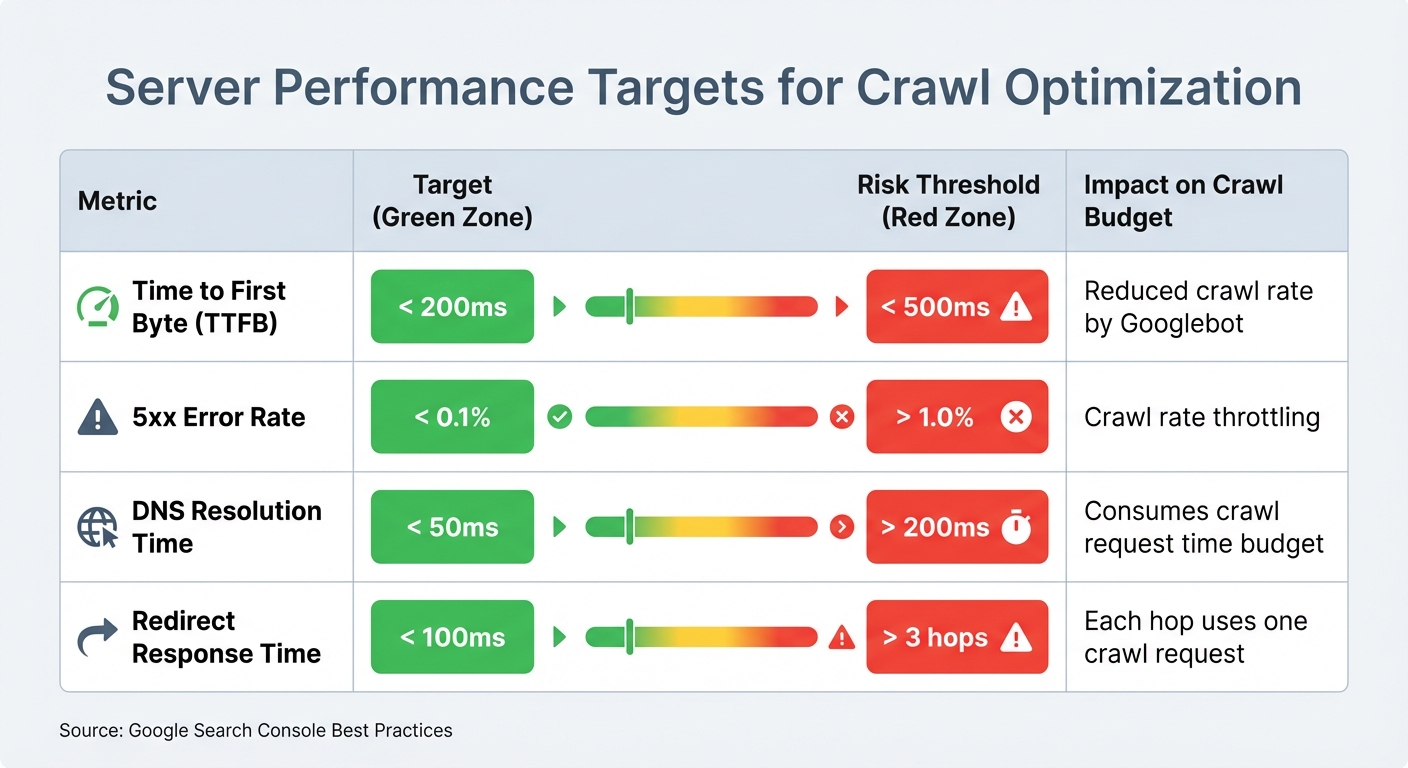
Fast, stable servers are essential for better crawl rates. Googlebot, for example, increases its crawl rate for servers with a Time to First Byte (TTFB) under 200ms. On the flip side, servers with TTFB exceeding 500ms often see a reduction in crawl activity. Another critical factor is keeping your 5xx error rate below 0.1%, as even a single 5xx error can lead to prolonged throttling.
JavaScript-heavy websites face additional challenges. Pages rendered client-side can take up to nine times longer to crawl compared to static HTML. Plus, many AI crawlers, including GPTBot and ClaudeBot, don't execute JavaScript, which means critical content might go unseen. By implementing Server-Side Rendering (SSR), you ensure that key elements like product descriptions or pricing load directly in the raw HTML, making them immediately accessible.
Redirects can also eat into your crawl budget. Each hop in a redirect chain consumes one crawl request, so it's best to keep chains short and response times under 100ms. Avoid chains longer than three hops altogether. To handle traffic spikes and prevent 503 errors, a CDN and optimized caching are invaluable tools.
| Metric | Target | Risk Threshold | Impact |
|---|---|---|---|
| Time to First Byte (TTFB) | < 200ms | > 500ms | Reduced crawl rate by Googlebot |
| 5xx Error Rate | < 0.1% | > 1.0% | Crawl rate throttling |
| DNS Resolution Time | < 50ms | > 200ms | Consumes crawl request time budget |
| Redirect Response Time | < 100ms | > 3 hops | Each hop uses one crawl request |
Once your server is optimized, the next step is to focus on directing crawlers to your most important pages.
Prioritizing High-Value Pages with the PAVE Framework
Not every page on your site deserves equal attention. The PAVE Framework helps you evaluate and prioritize pages based on four factors:
- Potential: Does the page have a realistic chance of ranking well or driving traffic?
- Authority: Does it reflect strong E-E-A-T (Experience, Expertise, Authoritativeness, Trustworthiness) signals?
- Value: Does it offer unique, actionable, or high-quality information?
- Evolution: How often does the page get updated with meaningful changes?
Pages such as product listings with high conversion potential, category pages targeting commercial keywords, and evergreen content with backlink opportunities should take priority. On the other hand, pages like internal search results, faceted navigation filters, or thin content with little value should be deprioritized.
For example, a media publisher conducted an audit in early 2026 and reduced its "Discovered - currently not indexed" metric by 31%. By pruning non-canonical URLs, they freed up crawl budget for 4,800 high-priority articles that had been stuck in the discovery queue for over 90 days. The result? Faster indexing for valuable content.
Streamlining Site Structure for Better Crawlability
A well-organized site structure is just as important as server performance. High-value pages should be no more than 3–4 clicks away from the homepage, as pages buried deeper (7+ clicks) are crawled far less frequently. Use a clear hierarchy - such as Category > Subcategory > Product - and breadcrumbs to help crawlers understand the relationships between pages.
Orphan pages (those without internal links) are another common issue. Since crawlers rely on links to discover content, these pages often go unnoticed. Similarly, soft 404s - pages that return a 200 OK status but display error content - waste crawl budget as bots repeatedly visit them.
Faceted navigation can also create crawl inefficiencies. Block low-value parameters in your robots.txt file (e.g., Disallow: /*?color=) or use AJAX-based filters that don't generate extra URLs. Keep your sitemap clean by including only canonical, indexable URLs with a 200-status code. Remove redirects, 404s, and noindexed pages to ensure crawlers focus on your most important content.
A mid-size e-commerce site serves as a great example. In early 2026, they faced severe indexing delays across 85,000 product pages. By blocking 340,000 filter URLs via robots.txt, removing 12,000 out-of-stock products from their sitemap, and reducing server response time from 1,200ms to 340ms using a CDN, they cut crawl waste by 73%. These changes sped up new product indexing by 81% (from 21 days to 4 days) and increased organic traffic by 58%.
Automating Indexing and Monitoring with IndexMachine
Manually submitting pages to Google Search Console can be a time sink, especially when you're dealing with hundreds of pages. IndexMachine simplifies this process by automating content detection, submission to Google, Bing, and LLM platforms, and status verification through direct API integrations.
This tool scans your XML sitemap daily, identifying new or updated pages. When a change is detected, the URL is automatically queued for submission to Google, Bing, and platforms like ChatGPT and Perplexity. If a page ends up in the "Crawled – currently not indexed" status, IndexMachine will automatically retry submission to prompt reconsideration. It integrates effortlessly with your existing monitoring tools, ensuring your site stays optimized without extra manual effort.
You'll also get daily reports that track indexing progress. These reports include visual charts that show how many pages are indexed each day and flag any that may need further attention.
IndexMachine Features for Crawl Optimization
IndexMachine offers a Full Autopilot mode, which takes care of the entire indexing process from start to finish. It monitors your sitemap, submits new URLs, verifies their status, and retries submissions until the pages are indexed. For larger websites, the wide indexing strategy ensures more pages are crawled, even if it takes a bit longer.
The multi-engine dashboard provides a single interface to manage indexing across Google, Bing, and LLM platforms. Since Bing powers many AI-driven search APIs, ensuring content is indexed there increases its chances of appearing in AI-generated results. Additionally, the platform offers detailed insights for each page, including coverage status, last crawl date, and indexing updates, making it easier to identify and fix pages that aren't indexing.
These features are included with all IndexMachine plans.
IndexMachine Plans and Pricing
IndexMachine offers three lifetime plans, each tailored to different needs based on domain and page limits. All plans include essential features like Full Autopilot, daily reports, proactive 404 alerts, and indexing support for Google, Bing, and LLM platforms. The main differences lie in the number of domains and pages supported.
| Plan | Price (Lifetime) | Domains | Pages per Domain | Daily Submission Limit |
|---|---|---|---|---|
| SaaS Builder | $12.50 | 1 | 1,000 | 20 URLs/day (Google), 200 URLs/day (others) |
| 5 Projects | $50 | 5 | 1,000 | 20 URLs/day (Google), 200 URLs/day (others) |
| Solopreneur | $84.50 | 10 | 10,000 | 20 URLs/day (Google), 200 URLs/day (others) |
The SaaS Builder plan is perfect for small businesses or single-domain projects. For those managing multiple client sites, the 5 Projects plan offers more flexibility. If you're handling larger operations, the Solopreneur plan provides higher page limits and additional domain support. Keep in mind that Google's API enforces a daily submission cap of 20 URLs across all plans, while Bing and other platforms allow up to 200 submissions per day.
Conclusion
Google's crawl budget has become a critical factor in staying competitive, especially in an online world increasingly dominated by AI-generated content and bots, which now account for 52% of global web traffic. Missing opportunities like AI Overviews or real-time indexing can leave your site invisible when users are actively searching.
To stay ahead, a well-rounded approach is crucial. Start by auditing your URLs and cutting down on crawl waste through smart robots.txt configurations. Implement server-side rendering to bypass the 9x JavaScript penalty that slows crawlers. Use the PAVE Framework to focus on pages that directly contribute to your revenue. These steps help combat the strain caused by the growing wave of AI crawler traffic.
But technical tweaks alone aren't enough. With AI crawler traffic spiking 96% in just one year, automation has become essential. Manual processes can't keep up. Automation ensures your content gets indexed almost instantly, switching from a "pull" model (waiting for crawlers) to a "push" model (proactively delivering content). This way, your pages hit search engines and AI platforms while they're still fresh.
Websites that treat their crawl budget like a strategic resource - optimizing servers, refining content, and adopting push indexing - will stand out in traditional search rankings, AI Overviews, and beyond.
FAQs
How do I know if crawl budget is actually hurting my rankings?
To figure out if you're dealing with crawl budget problems, start by checking whether Google is crawling and indexing your most important pages. A few red flags to watch for include:
- A large number of pages marked as "discovered but not indexed."
- Googlebot spending too much time on low-value or duplicate content instead of your key pages.
Your best tool for this? Google Search Console. Use it to review crawl stats and confirm that high-priority pages are being crawled regularly. By focusing on optimizing crawl efficiency, you can boost your site's rankings and visibility.
What should I block in robots.txt without risking deindexing key pages?
To prevent important pages from being deindexed, you can block AI crawlers like GPTBot, PerplexityBot, and OAI-SearchBot in your robots.txt file. Use specific disallow rules to restrict access to the content you want to protect, while ensuring that essential pages remain accessible for indexing. Setting up these rules correctly allows you to maintain control over your site's content and visibility.
When does it make sense to use server-side rendering to improve crawling?
Server-side rendering can play a key role in making sure your content is accessible and easy for search engine crawlers to index. This is particularly helpful for websites with a lot of dynamic or large-scale content. By using server-side rendering, you can make better use of your crawl budget, ensuring that important pages are indexed efficiently and don't get overlooked.