

Outdated content can hurt your website's performance. It impacts SEO rankings, user trust, and conversions. Here's the solution: run a content audit and decide whether to keep, update, or remove old pages.
Key Takeaways:
- Keep content: If it aligns with your goals and performs well.
- Update content: If it has potential but needs improvements (e.g., new stats, better keywords).
- Remove content: If it's irrelevant, outdated, or harming your site's quality.
By addressing outdated content, you can improve search rankings, enhance user experience, follow an SEO indexing checklist, and boost traffic by up to 30% in three months. Start with a data-driven audit, track performance, and schedule regular updates to stay competitive. If you've removed or updated pages, ensure you get your website indexed by Google fast to see results sooner.
How Outdated Content Damages Your SEO
Effects on Search Rankings and Indexing
Outdated content isn't just a small hiccup - it can drag down your entire site's performance. Google's Helpful Content System evaluates your domain as a whole, meaning a handful of stale pages can harm your overall rankings. As Google puts it: "Low quality content on part of a site can impact a site's ranking as a whole".
Broken links and outdated URLs also waste your crawl budget, which limits how effectively search engines can discover and index new or important pages on your site.
For time-sensitive topics, Google's Query Deserves Freshness (QDF) algorithm prioritizes recently updated content. This means competitors who refresh their content can gain an edge, climbing 3–4 positions in rankings for as long as 12–18 months. Adding to the challenge, AI tools like ChatGPT tend to favor URLs that are 393–458 days newer than Google's organic results. If your content isn't up-to-date, it risks being ignored by these platforms.
Technical details matter too. Outdated statistics, broken links, and irrelevant information weaken your site's E-E-A-T (Experience, Expertise, Authoritativeness, and Trustworthiness). These issues not only signal poor upkeep to search engines but also hurt your credibility with users. The result? A double hit to both rankings and conversions.
User Experience and Conversion Problems
Outdated content doesn't just hurt your search rankings - it also frustrates your visitors. When users land on pages with broken links, expired offers, or discontinued products, they're likely to leave immediately. This behavior sends negative signals to search engines, further harming your rankings. Ann Smarty, Co-founder of Smarty Marketing, sums it up: "Outdated content and broken links will likely result in bounces. These are lost leads and clients".
The damage goes beyond single visits. Encountering outdated advice or irrelevant information can erode trust in your brand. As Mike Murray, Founder of Online Marketing Coach, explains: "It's just not a good look to have facts and data that aren't useful. If we don't retire this, we might turn off a prospect who questions our value".
Even if outdated pages manage to maintain their rankings, they often suffer from lower click-through rates. Why? Search snippets display publication dates, and users naturally gravitate toward fresher content. A page might appear on the first results page but still be ignored if its snippet reveals it's several years old.
The ripple effect of outdated content is clear: lower engagement, higher bounce rates, and fewer conversions. These poor user signals can create a vicious cycle, where low engagement leads to even worse rankings and diminished site performance overall.
How Outdated Content Is Keeping You Off Page 1 of Google (And When to Refresh)
Running a Content Audit: Evaluate Before You Decide
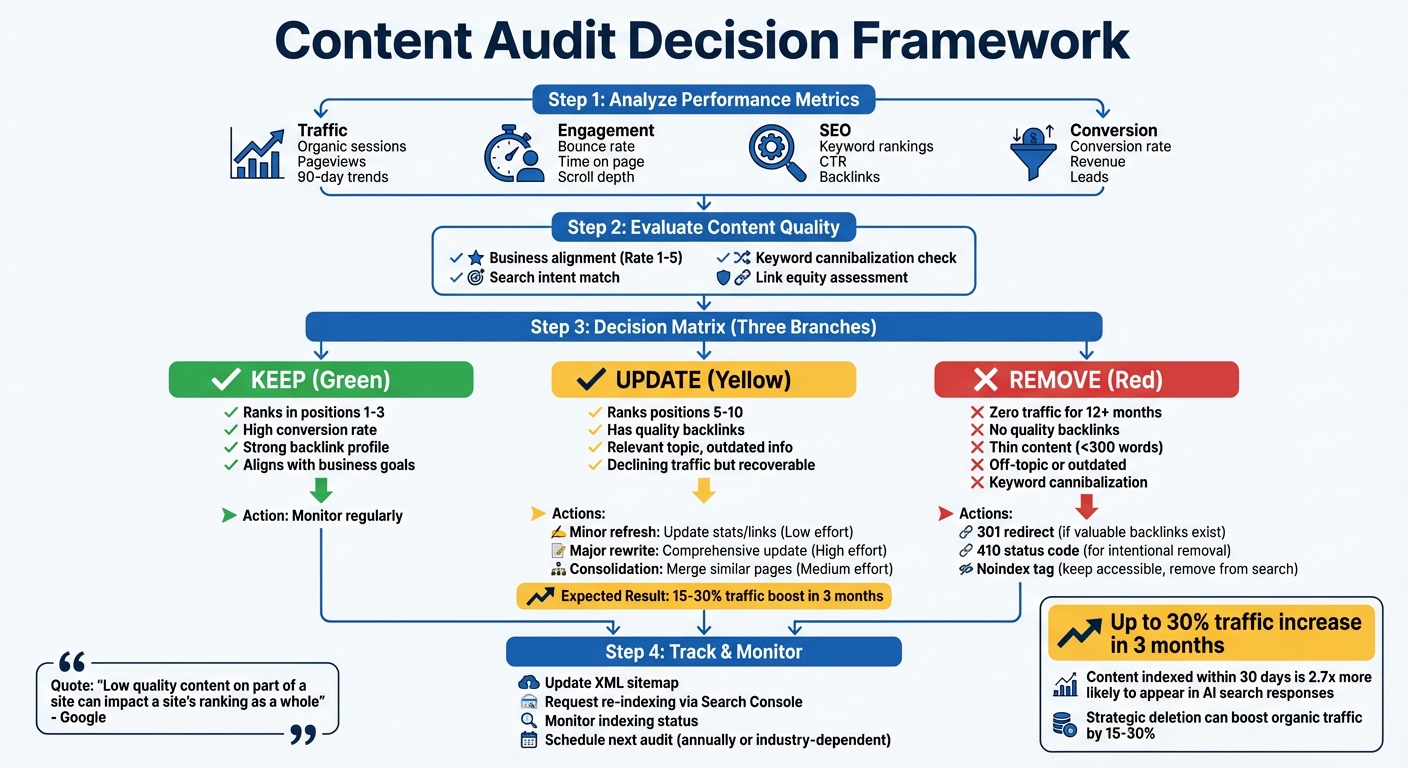
Before you decide to update or delete a page, start with a data-driven content audit. This process helps you make informed choices instead of guessing which pages need attention. By analyzing the numbers, you can determine whether to keep, update, or remove older content.
Metrics That Show Content Performance
To evaluate content performance, focus on measurable data like traffic, engagement, SEO, and conversions. Use tools like Google Analytics and Search Console to gather traffic data. Look at metrics like organic sessions, pageviews, and changes over the past 90 days. If a page has seen little to no traffic over the last year, it might be outdated or underperforming.
Engagement metrics like bounce rates and time on page are equally telling. A high bounce rate paired with minimal time on the page suggests the content isn't meeting user expectations. Scroll depth can also reveal issues - if users barely make it past the opening paragraph, something needs fixing.
SEO metrics are another key area. Monitor keyword rankings, click-through rates (CTR), and backlinks. Pages that have dropped out of the top 10 search results or show high impressions but low clicks likely have outdated titles or meta descriptions.
Conversions, however, are often the most revealing. A page with modest traffic but a strong conversion rate (e.g., signups or sales) is far more valuable than a high-traffic page that drives no business results.
"The purpose of a content audit for SEO is to improve the perceived trust and quality of a domain, while optimizing crawl budget and the flow of PageRank (PR) and other ranking signals throughout the site." - Everett Sizemore, Moz
| Metric Category | What to Track | Red Flag Signal |
|---|---|---|
| Traffic | Organic sessions, pageviews, referral traffic | Declining or zero traffic over 12 months |
| Engagement | Bounce rate, time on page, scroll depth | High bounce rate with low time on page |
| SEO | Keyword rankings, CTR, backlinks | Dropping rankings or high impressions with low clicks |
| Conversion | Conversion rate, revenue, leads | Low business value despite decent traffic |
Once you've analyzed performance metrics, the next step is to evaluate how well each page aligns with your current goals and audience needs.
Alignment with Business Goals and Audience Needs
Numbers are important, but they're only part of the picture. It's just as crucial to assess whether your content aligns with your business objectives and what your audience cares about today.
One way to do this is by creating a scoring system. Rate each page on a scale of 1 to 5 based on its relevance and value. Off-topic pages can dilute your site's authority, even if they attract some traffic. Removing irrelevant content often strengthens your site's perceived expertise.
Search intent plays a big role here. If user behavior has shifted, your content needs to adapt. For example, a page that once answered "what is X" might now need to focus on "how to use X" or "X vs. Y" to match what users are searching for.
Also, watch out for keyword cannibalization, where multiple pages compete for the same keywords. Consolidating weaker pages into a single, stronger one can improve relevance.
"If you take two or three or four kind of weaker pages and merge them into one... that's something where we can say that this is a stronger page. We can see that... more parts of the site are referring to this one single piece of content so it's probably more relevant than those individual small pieces that you had before." - John Mueller, Google
Removing low-quality pages can also help optimize your crawl budget. This ensures search engine bots focus on your high-value content. In fact, strategic content deletion has been shown to boost organic traffic to core pages by 15-30% within three months.
Before making changes, record baseline metrics like rankings, traffic, and conversions. These benchmarks will help you measure whether your decisions improved performance or need further tweaking. A thorough audit ensures every page on your site contributes to your SEO and aligns with your business priorities.
Keep and Update: Refreshing Existing Content
When to Update Instead of Remove
Refreshing content can breathe new life into pages with valuable backlinks or important keywords.
Start by assessing link equity. Pages with backlinks from reputable sites carry authority you don't want to lose. Similarly, if a page targets high-volume, business-relevant keywords - even if it's underperforming - it's worth keeping and improving.
Use Google Search Console to spot declining pages - those with drops in impressions or clicks are great candidates for updates rather than deletion. If the topic is still relevant but search trends have shifted (e.g., from text-based guides to video content), a rewrite can be more effective than removal.
Content critical to your business - like product guides, sales materials, or customer support pages - should always be prioritized. Keeping these up-to-date directly impacts revenue and customer satisfaction.
"If you can improve your content that's probably the best approach possible because then you have something really useful on your website." - John Mueller, Senior Search Analyst, Google
Once you've identified pages to refresh, here's how to bring them back to life.
How to Update Content Effectively
Refreshing content isn't just about tweaking a few lines - it's about adding real value for readers and search engines. Here's how to do it right:
- Fix outdated elements: Update stats, replace broken links, and refresh old screenshots. For example, in March 2025, Loganix improved a link-building service page by fixing technical issues and adding helpful visuals, resulting in a 10-spot boost in search rankings.
- Adapt to new search intent: Use Google's "People Also Ask" section to find emerging questions and integrate them into your content as FAQs or additional sections.
- Combine weak content: Merge similar articles into one comprehensive guide and use 301 redirects to avoid keyword cannibalization. Nextiva did this in 2021 by revamping its "Voice over IP" guide - adding videos, updating images, and expanding sections - which led to a 155% session increase in just two months.
- Focus on readability: Use clear headings, summary sections, and structured data like FAQ schema to make your content easier to scan. Research shows AI assistants favor content that's 25.7% newer than standard search results.
Here's a quick guide to decide the level of effort your content needs:
| Action | Appropriate Use | Effort Level |
|---|---|---|
| Minor Refresh | Content is accurate but slightly dated; ranks in top 5-10 | Low (Update stats/links) |
| Major Rewrite | Topic is relevant, but content is thin or outdated; no longer ranking | High (Rewrite from scratch) |
| Consolidation | Multiple weak pages compete on the same topic | Medium (Merge & redirect) |
Republishing and Signaling Changes to Search Engines
After updating your content, it's essential to let search engines know about the changes. Simply editing a page won't guarantee a quick re-indexing.
- Update publication dates wisely: Only revise the publication date if you've made significant improvements. Show both the original and "last updated" dates for transparency.
- Request indexing: Use Google Search Console's URL Inspection tool to prompt re-indexing of your updated page. Also, ensure your XML sitemap's
lastmodtag reflects the new update. - Revamp metadata: Refresh title tags and meta descriptions to include the current year or highlight new sections. This can improve click-through rates and help re-rank the page.
For example, in August 2024, Ahrefs republished a 2018 post on "link reclamation", tripling its monthly organic traffic from 350 to over 1,000 visits. Similarly, in April 2024, HubSpot revamped its "Competitive Analysis" article, boosting its AI Overview visibility from 151 to 476 citations.
Finally, add internal links from high-traffic pages to spread link equity and signal importance to search engines. Treat your update like a new launch - promote it via email and social media to drive engagement.
To streamline the process, tools like IndexMachine can automate indexing, track progress, and ensure your refreshed pages are crawled by search engines and AI systems.
"Great SEO isn't just about what you publish - it's about what you maintain. Keep your content relevant, and Google will keep sending traffic." - David Roche, Founder, Pixelghetto Marketing
Remove: When to Delete Content
When Deletion Makes Sense
Some pages can harm your site's performance and should be removed.
Start with pages about discontinued products or past events. These outdated pages can confuse visitors and waste your crawl budget. Thin content - those under 300 words with little value - should also go if there's no way to expand it meaningfully. Such pages lower your site's overall quality and are better deleted than improved.
Keep an eye out for keyword cannibalization. If multiple weak pages target the same search intent, they end up competing with each other, splitting authority, and dragging down rankings. Content with no traffic over the past year and lacking quality backlinks is another candidate for removal. Similarly, content from experiments or off-topic subjects that don't align with your business can weaken your site's focus. If a page would embarrass your brand today, it's best to delete it. And, most importantly, remove anything outdated or potentially harmful - like old medical advice or deprecated structured data.
How to Remove Content Without Losing SEO Value
Once you've identified problematic content, it's crucial to manage its removal in a way that protects your SEO.
For pages with quality backlinks, use a 301 redirect to guide users to a relevant page. If a page holds no value, return a 410 status code to speed up de-indexing. Avoid redirecting to your homepage, as this can negatively impact SEO.
"From our point of view, in the mid term/long term, a 404 is the same as a 410 for us... The subtle difference here is that a 410 will sometimes fall out a little bit faster than a 404." - John Mueller, Senior Search Analyst, Google
For outdated but still useful content, like old documentation, consider adding a noindex tag. This keeps the page accessible while removing it from search results. After deleting content, review all internal links pointing to the removed URLs and either update or remove them to avoid broken links. Don't forget to update your XML sitemap to reflect these changes and notify search crawlers.
For urgent removals, the Google Search Console Removals tool can temporarily hide URLs while you set up proper redirects. Finally, use tools like IndexMachine to monitor de-indexing progress and ensure your site remains efficient in search indexing.
Executing and Tracking Your Content Changes
How to Prioritize Content Actions
Once your content audit is complete, the next step is deciding which pages to address first. To make the most impact on SEO, sort your content into three categories: SEO positive, SEO neutral, and SEO negative.
- SEO positive pages are your high performers, typically ranking in positions 1–3. These pages are best left untouched.
- SEO neutral pages, often ranking in positions 5–10, are ripe for updates and optimizations.
- SEO negative pages are thin or outdated, potentially harming your site's reputation. These may need to be removed or consolidated for better results.
For pages with no views over the past year and no quality backlinks, consider removing or merging them. However, if a page has strong backlinks, it's better to refresh the content instead of removing it. When consolidating weaker articles on the same topic, use 301 redirects to a single, more authoritative page to retain link equity.
Pay special attention to pages flagged as "Crawled – Not Indexed" in Google Search Console. This status often indicates that the content doesn't meet Google's quality standards and should be reviewed or improved.
Using IndexMachine to Track Indexing Status

After implementing changes, it's critical to monitor how they affect your site's indexing status. Keep in mind that search engines don't update instantly - changes can take weeks or even months to fully reflect.
IndexMachine simplifies this process by automating the submission of updated pages to Google Search Console and Bing Webmaster Tools. It also provides visual progress tracking with charts that show which pages are indexed and which are still pending. Features like daily indexing reports and 404 error alerts help you quickly address broken links, which can impact your crawl budget.
The platform also provides detailed insights into each page's coverage status and last crawl date. For pages you've removed, IndexMachine tracks de-indexing progress, ensuring outdated content is eventually dropped from search results. With the ability to handle up to 20 URLs per day for Google and 200 for other search engines, it's a practical tool for managing your audit findings without the hassle of manual submissions.
Consistent tracking like this ensures your updates are effective and that your site remains optimized over time.
Setting Up a Regular Audit Schedule
Content maintenance is an ongoing task. What's relevant today can become outdated tomorrow - especially in fast-changing industries. To keep your content fresh, plan to conduct audits annually or more frequently if your industry evolves quickly.
A useful approach is to establish an update ratio: for every five new articles published, refresh at least one older piece. This keeps your content library both current and manageable. Update your XML sitemap's <lastmod> tag and rely on IndexMachine's daily reports to prioritize refreshed content for crawling.
Keep a detailed log of your actions in a spreadsheet or dashboard. Record whether each URL was kept, updated, or removed, along with its indexing status. Regularly check the "Success" status of your sitemaps in Google Search Console and Bing Webmaster Tools to confirm that your updates are being processed correctly.
Interestingly, content indexed within the last 30 days is 2.7 times more likely to appear in AI-generated search responses compared to older cached content. This makes consistent updates an essential part of staying competitive in search rankings.
Get your refreshed pages recrawled sooner
An update only counts once Google recrawls it. IndexMachine resubmits your updated and removed URLs automatically so the changes register faster, instead of waiting for the next natural crawl. Check the current status of any page with the free index checker.
Conclusion: Making Smart Content Decisions
Managing content effectively means making decisions grounded in data to boost both SEO and user experience. To do this, assess each piece of content based on its performance metrics, link value, and how well it supports your business objectives.
Google has emphasized the importance of content quality, stating: "Low quality content on part of a site can impact a site's ranking as a whole... Removing low quality pages or moving them to a different domain could help your rankings for the higher quality content". This highlights how even a few weak pages can hurt the visibility of your strongest ones.
A solid approach includes keeping high-performing content, refreshing pages with potential, merging similar pieces, and removing content that diminishes overall quality. For pages with valuable backlinks, use 301 redirects to preserve their link equity. When deleting pages that don't have a suitable replacement, opt for a 410 status code to signal intentional removal.
Once your audit is complete, set a routine for regular reviews to prevent content from becoming outdated. Industries evolve, competitors refine their strategies, and rankings fluctuate. By scheduling audits - annually or more often in fast-paced industries - you can stay competitive. Tools like IndexMachine can simplify this process by automating indexing submissions and delivering daily updates.
FAQs
How do I know if a page is outdated?
A page might feel outdated if it includes old statistics, mentions products or laws that are no longer applicable, or fails to align with current search intent. Using tools like Google Search Console can help you spot these pages. Refreshing and updating them can boost both their relevance and SEO performance.
Should I update, merge, or redirect old content?
Deciding what to do with old content - whether to update, merge, or redirect it - comes down to assessing its value and relevance.
- Update content if it still pulls in traffic, has backlinks, or carries historical importance. Keeping it current can maintain or boost its performance.
- Merge related pieces of content to create a stronger, more comprehensive resource. This not only consolidates authority but also enhances the user experience.
- Redirect or remove pages that are outdated or low-quality. Doing so helps maintain your site's overall SEO health and prevents clutter.
Regular content audits are essential to ensure your website stays aligned with your goals and strategy.
What's the safest way to delete a page without hurting SEO?
To remove a page without damaging your SEO, implement 301 redirects to direct both users and search engines to a related, relevant page. Additionally, use tools like Google's Remove Outdated Content feature to ensure the deleted page is properly de-indexed. This method helps preserve your site's SEO strength while avoiding broken links and keeping users satisfied.