

Canonical tags are essential for managing duplicate content on your website. They guide search engines to the primary version of a page, consolidating link equity and preventing keyword competition between similar URLs. Without proper implementation, search engines might waste crawl budgets or misinterpret your site's structure. Here's a quick guide to get it right:
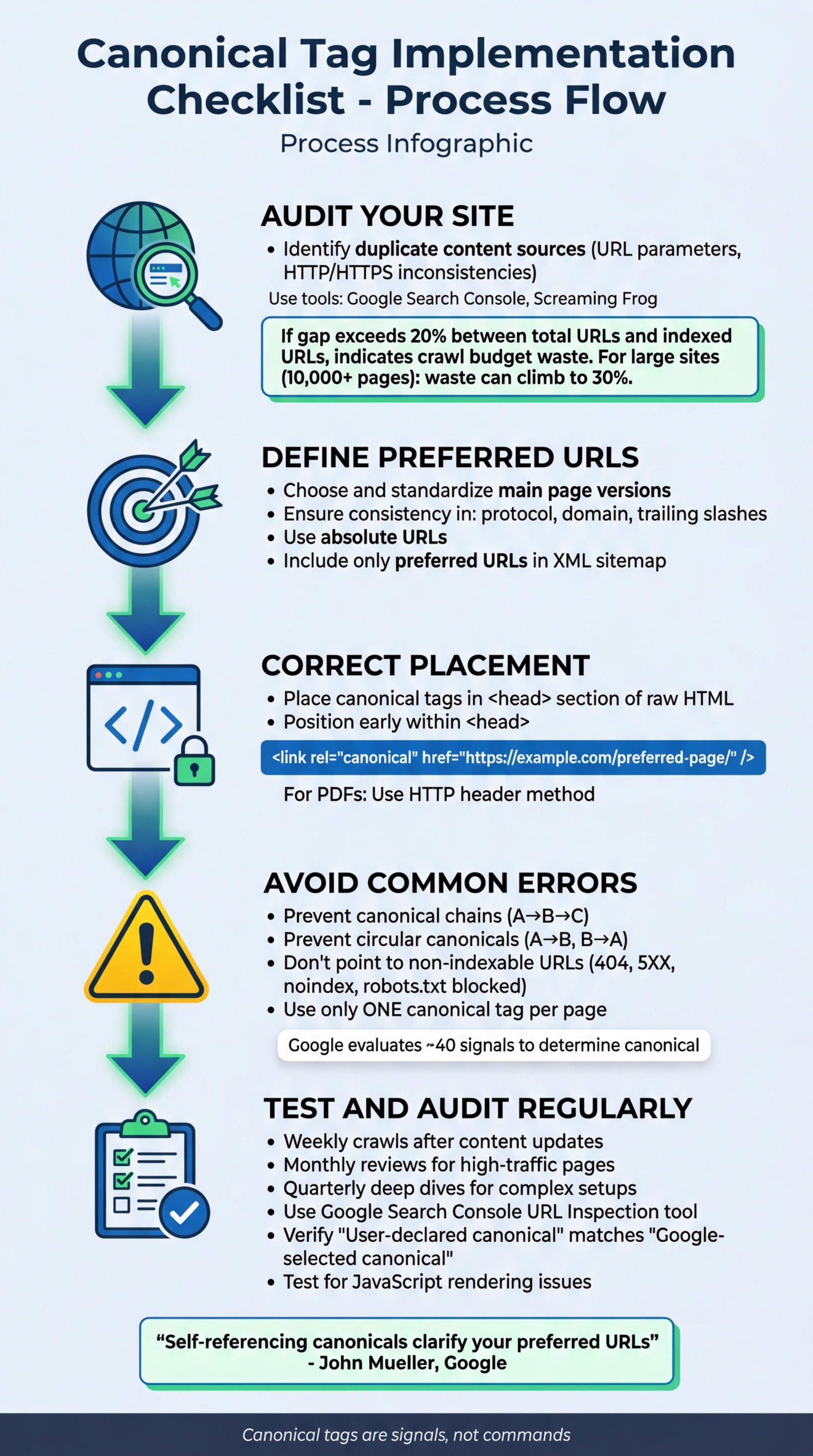
- Audit Your Site: Identify duplicate content sources, such as URL parameters or HTTP/HTTPS inconsistencies, using tools like Google Search Console or Screaming Frog.
- Define Preferred URLs: Choose and standardize the main versions of your pages, ensuring consistency in protocol, domain, and trailing slashes.
- Correct Placement: Place canonical tags in the
<head>section of the raw HTML, using absolute URLs. - Avoid Common Errors: Prevent issues like canonical chains, loops, or pointing to non-indexable URLs.
- Test and Audit Regularly: Use tools like Google Search Console and Screaming Frog to validate tags and catch errors.
Proper canonical tag usage ensures search engines focus on your best content, improving indexing and overall site performance.
How and When to Use the Canonical Tag
Preparation Steps Before Implementation
Before diving into the process of adding canonical tags to your website, it's crucial to lay the groundwork. A structured preparation phase can help you avoid common pitfalls and ensure smooth implementation. These steps will prepare you for the technical details of syntax, placement, and validation discussed later.
Conduct a Complete Website Audit
Start by auditing your site for potential sources of duplicate content. These could include URL parameters, session IDs, or pagination issues. Additionally, check for inconsistencies between HTTP/HTTPS, www/non-www versions, and trailing slashes.
Leverage tools like Google Search Console to understand how Google interprets your site. Pay attention to pages flagged as "Duplicate, Google chose different canonical than user" or "Duplicate without canonical." Use a crawling tool like Screaming Frog to compare the total number of URLs your site generates to the number indexed by Google. If you notice a gap exceeding 20%, it could indicate a significant waste of your crawl budget. For larger websites (10,000+ pages), this waste can climb to 30%, often due to duplicate, low-quality, or blocked URLs.
Next, check for technical barriers that could impact your canonical strategy. Ensure your preferred URLs are not blocked by robots.txt, marked with noindex tags, or returning 404 or 5xx errors. Review your internal links to avoid orphan pages and to strengthen your site's architecture. Once you've identified duplicate content and technical issues, determine which URLs will serve as the primary versions.
Define Your Preferred URLs
Using insights from your audit, decide which URLs will act as the main, authoritative versions. These should reflect factors like quality backlinks, historical performance, and user experience. Document these decisions in a shared resource so your entire team is on the same page.
Standardize URL components by selecting one protocol (HTTPS is recommended), one domain variant (www or non-www), and a consistent approach to trailing slashes. For URLs with parameters - such as those from filters, sorting options, or tracking codes - identify the "clean" version to serve as the master page. Always use absolute URLs in canonical tags for clarity.
Make sure your XML sitemap includes only these preferred URLs. As Google's John Mueller advises:
Self-referencing canonicals clarify your preferred URLs.
This means even canonical pages should include a self-referencing canonical tag, ensuring search engines index the intended version.
Coordinate Across Teams
Successful implementation of canonical tags requires collaboration between content creators, developers, and SEO specialists. Misalignment can lead to conflicting signals, such as discrepancies between canonical tags, internal links, and sitemap entries, which may cause Google to ignore your directives.
Assign clear roles across teams to streamline the process. Regular check-ins - especially after major events like content migrations or platform updates - can help maintain consistency. Developers should ensure canonical tags are placed in the <head> section of the raw HTML and not added later via JavaScript. This placement ensures search engine bots can detect them immediately.
Canonical Tag Syntax and Placement Checklist
Once you've defined your preferred URLs and completed a site audit, it's time to ensure the proper technical setup of canonical tags. This checklist will help you verify that everything is implemented correctly, ensuring your canonical strategy works as intended. Even a small syntax mistake can cause search engines to overlook the tag, leaving unresolved duplicate content issues that can prevent your pages from being indexed.
Verify Placement in the <head> Section
Make sure your canonical tag is located in the <head> section of your HTML document. If it's placed in the <body>, search engines won't recognize it. To improve detection, position the tag early within the <head> section.
It's equally important to confirm that the tag is visible in the raw HTML source code, not just after JavaScript execution. For non-HTML files like PDFs, use the HTTP header method instead. For example:
Link: <https://www.example.com/file.pdf>; rel="canonical"
Use Absolute URLs
Canonical tags should always use absolute URLs, including the full protocol (https://) and domain name. Here's the correct format:
<link rel="canonical" href="https://example.com/preferred-page/" />
Although relative paths (like /page/) are technically allowed, Google advises using absolute URLs to avoid confusion. Stick to the standardized URL format you defined earlier, ensuring consistency in protocols and trailing slashes. Also, double-check that no conflicting canonical tags exist on the page.
Avoid Multiple Canonical Tags
Each page should have only one canonical tag. Multiple tags can send mixed signals to search engines, which may result in them ignoring the tags altogether. As The LinkGraph Team explains:
If Google encounters multiple canonical tags, it may ignore them entirely, leaving you with unresolved duplicate content issues.
To prevent this, use a single canonical solution and review your theme files to identify and remove any conflicting tags. Regularly audit your site with tools like Screaming Frog or Sitebulb to flag pages with multiple rel="canonical" attributes. Additionally, Google Search Console's URL Inspection tool can help confirm that your "User-declared canonical" matches the one Google recognizes. If you find discrepancies, you may need to take additional steps to get your website indexed by Google fast and ensure the correct version is prioritized.
Common Errors to Avoid
Even when canonical tags are used correctly in terms of syntax and placement, misconfigurations can still cause issues. These errors can confuse search engines, waste crawl budgets, and disrupt proper page rankings. Let's dive into some common mistakes and how to fix them.
Eliminate Canonical Chains
Canonical chains happen when Page A points to Page B, and Page B then points to Page C. This creates a relay system that search engine crawlers must follow, which can lead to indexing errors. A typical cause is pointing a canonical tag to a URL that already redirects (via 301 or 302). For example, if a product page canonicalizes to /product-old/, but that URL redirects to /product-new/, a chain is formed.
To identify these chains, tools like Screaming Frog's "Canonical Chain" report or Sitebulb can help visualize where the signals break down. Additionally, Google Search Console's URL Inspection tool can show discrepancies between the "User-declared canonical" and the "Google-selected canonical." The fix? Make sure every page points directly to the final, live authoritative URL, skipping any intermediate pages. For large websites, map these chains in a spreadsheet and use regex replacements in your CMS or CDN to update them across thousands of pages.
As Google's John Mueller advises:
Self-referencing canonicals are a good practice - but not critical.
To avoid chains altogether, implement self-referencing canonical tags and check for reciprocal links that might cause confusion.
Prevent Circular Canonicals
Circular canonicals occur when two or more pages point to each other, creating a loop. For instance, if Page A points to Page B and Page B points back to Page A, search engines struggle to determine which page is the authoritative version, often leading to indexing issues.
Stevy Liakopoulou, an SEO Specialist at Search Magic, highlights:
Canonical loops create confusion, making it difficult for search engines to identify which page should be considered the authoritative version.
To address this, use auditing tools like Sitebulb or Semrush to identify loops. Once spotted, designate one definitive version as the canonical page. Update all duplicates to point to this version, and ensure the primary page includes a self-referencing canonical tag. Avoid pointing canonical tags to pages that redirect back to the original, as this creates unnecessary conflicts.
Avoid Pointing to Broken or Non-Indexable URLs
Canonical tags should always reference live, valid URLs that return a "200 OK" status. If they point to broken pages (404 or 5XX errors) or non-indexable pages (e.g., those with noindex rules or blocked by robots.txt), they fail to consolidate link equity and can confuse search engines.
Make sure canonical tags point to crawlable and secure URLs. Since Google prioritizes HTTPS over HTTP, using secure URLs in your canonical tags is essential to avoid mixed signals. Google evaluates about 40 different signals to determine the primary canonical version, so clarity is key here. Allan Scott from Google's Dups Team explains:
When strong signals, such as rel="canonical" tags or 301 redirects, conflict with one another, Google's system may fall back on weaker signals to make a decision.
To prevent these issues, ensure that all canonical targets return the correct status codes. For example, if Page A points to Page B, and Page B redirects to Page C, update Page A's canonical tag to point directly to Page C. Use tools like Google Search Console's URL Inspection feature, Screaming Frog, or Sitebulb to audit your site for broken canonicals, loops, and chains.
Auditing and Testing Canonical Tags
This section explains how to audit and test canonical tags after implementation to ensure they work correctly. Issues like technical errors, JavaScript conflicts, or typos can disrupt their functionality.
Inspect Pages for Correct Canonical Tags
For smaller websites, start with manual spot checks. Open the page source and confirm the canonical tag is located in the <head> section and points to the correct URL. However, this method isn't practical for larger sites, where automated tools become essential.
Leverage Google Search Console's URL Inspection tool to understand how Google interprets your pages. Enter a URL to compare the "User-declared canonical" with the "Google-selected canonical." If these don't match, it means Google is overriding your choice, often due to conflicting signals like redirects or noindex tags. During audits, categorize URLs by their status:
- Self-referencing: Ideal scenario where the canonical tag points to the same URL.
- Missing: No canonical tag is present.
- Canonicalized: The tag points to a different URL.
- Non-indexed: The tag points to a page blocked from indexing.
- Multiple: More than one canonical tag exists, which is an error.
For large-scale sites, automated tools can help streamline this categorization process.
Use Tools for Validation
Automated tools are invaluable for identifying canonical tag issues across large websites. Site crawlers like Screaming Frog, Sitebulb, or Moz can audit thousands of pages at once, flagging problems such as missing tags, multiple tags, or canonicals pointing to 404 errors or redirects. These tools also highlight more complex issues like canonical chains, loops, and broken targets - challenges that manual checks often miss.
Bulk checkers are particularly useful for validating specific URLs. They flag statuses like "Self-Ref", "Chained", or "Error". Tools like IndexMachine can automate ongoing monitoring, ensuring your canonical tags remain accurate as your site evolves and new pages are indexed across various search engines.
Establish a regular audit schedule to catch errors early:
- Weekly crawls after content updates.
- Monthly reviews for high-traffic product and category pages.
- Quarterly deep dives for complex setups, such as cross-domain or international canonicals.
Once static HTML is validated, ensure JavaScript doesn't interfere with your canonical tags.
Test for JavaScript Rendering Issues
JavaScript can disrupt canonical tags in two key ways: by injecting them after the initial page load or by altering existing tags dynamically. To avoid this, Google advises placing canonical tags directly in the raw HTML, as canonicalization occurs both before and after rendering. Stevy Liakopoulou, an SEO Specialist at Sitebulb, emphasizes:
The canonical tag should be directly placed in the raw HTML to ensure it's available before any JavaScript rendering.
Use Google Search Console's "Test Live URL" feature to inspect both the raw HTML and the rendered version. Look for differences between the initial server response and the post-JavaScript version. In Screaming Frog, enable JavaScript rendering mode (Config > Spider > Rendering), then apply filters like "Canonical Only in Rendered HTML" or "Canonical Mismatch" to locate pages where tags are either missing from the raw HTML or altered after execution.
You can also temporarily disable JavaScript in your browser to confirm the tag appears in the initial server response. If the tag vanishes when JavaScript is disabled, search engines may not detect it immediately. Check your browser console for hydration errors in frameworks like React, as these can make canonical tags invisible to crawlers.
Conclusion and Key Takeaways
Setting up canonical tags is not a one-and-done task - it requires regular attention to safeguard your site's SEO performance. By channeling ranking signals and consolidating link equity into a single, authoritative URL, canonical tags help prevent duplicate or similar pages from weakening your site's SEO.
Keep It Consistent
Consistency is the backbone of effective canonical tag implementation. Make sure your internal links, XML sitemaps, and structured data all point to the same canonical URL. This reinforces the signal you're sending to search engines. As Martin Splitt puts it:
Canonical tags operate as signals not commands.
In other words, while canonical tags are strong indicators, search engines might override them if conflicting signals exist. To avoid this, always use absolute URLs to remove any ambiguity. Additionally, apply self-referencing canonical tags to every page - this helps protect against unexpected tracking parameters or different URL variations. A consistent approach ensures your site is ready for routine indexing checks.
Regular Audits Are Essential
Frequent audits are a must to ensure your canonical tags continue pointing to the right versions of your pages. Set up a schedule to catch issues early: run weekly crawls, conduct monthly reviews, and perform quarterly audits. This is especially important for sites that are updated often. Tools can simplify this process by verifying canonical accuracy and maintaining clean signals. For example, tools like IndexMachine can automate monitoring, helping you stay on top of changes and ensuring your pages are indexed correctly by both search engines and AI systems.
Lauren Busby, Co-Founder of Trebletree, highlights the importance of vigilance:
Canonicalization is a powerful tool, but it can become a silent culprit if you don't monitor it regularly.
Staying proactive with your audits is key to keeping your canonical tags working as intended and avoiding potential SEO pitfalls.
FAQs
When should I use a canonical tag instead of a 301 redirect?
When you need to point out a preferred version of a page while still allowing access to the original URL, use a canonical tag. This is especially useful for handling duplicate content, like pages with URL parameters or paginated content, as it consolidates ranking signals without affecting user access.
On the other hand, a 301 redirect is the way to go if you're permanently moving a page. It ensures both users and search engines are directed to the new URL while also transferring link equity to that destination. Each serves a distinct purpose, so choose based on your specific needs.
Why is Google choosing a different canonical than the one I set?
When you specify a canonical URL, Google doesn't always stick to your choice. Why? It looks at several signals - like redirects, rel="canonical" tags, and sitemap entries - to decide. If these signals don't match or Google thinks another URL is better suited for indexing, it may override your selection. To avoid this, make sure all signals are consistent so Google can align with your preferred canonical URL.
How do I handle canonicals for paginated, filtered, or faceted URLs?
When dealing with paginated URLs, make sure to use self-referential canonical tags. For instance, page=2 should have a canonical tag pointing to itself. This helps avoid duplicate content issues. Additionally, link the pages in sequence using next/prev tags and always include a link back to the first page.
For filtered or faceted URLs, the same principle applies - use self-referential canonical tags. Also, maintain a clear and logical link structure. This ensures search engines can efficiently index all the relevant content on your site.