

When your programmatic SEO pages aren't getting indexed, it's usually due to one or more of these common issues:
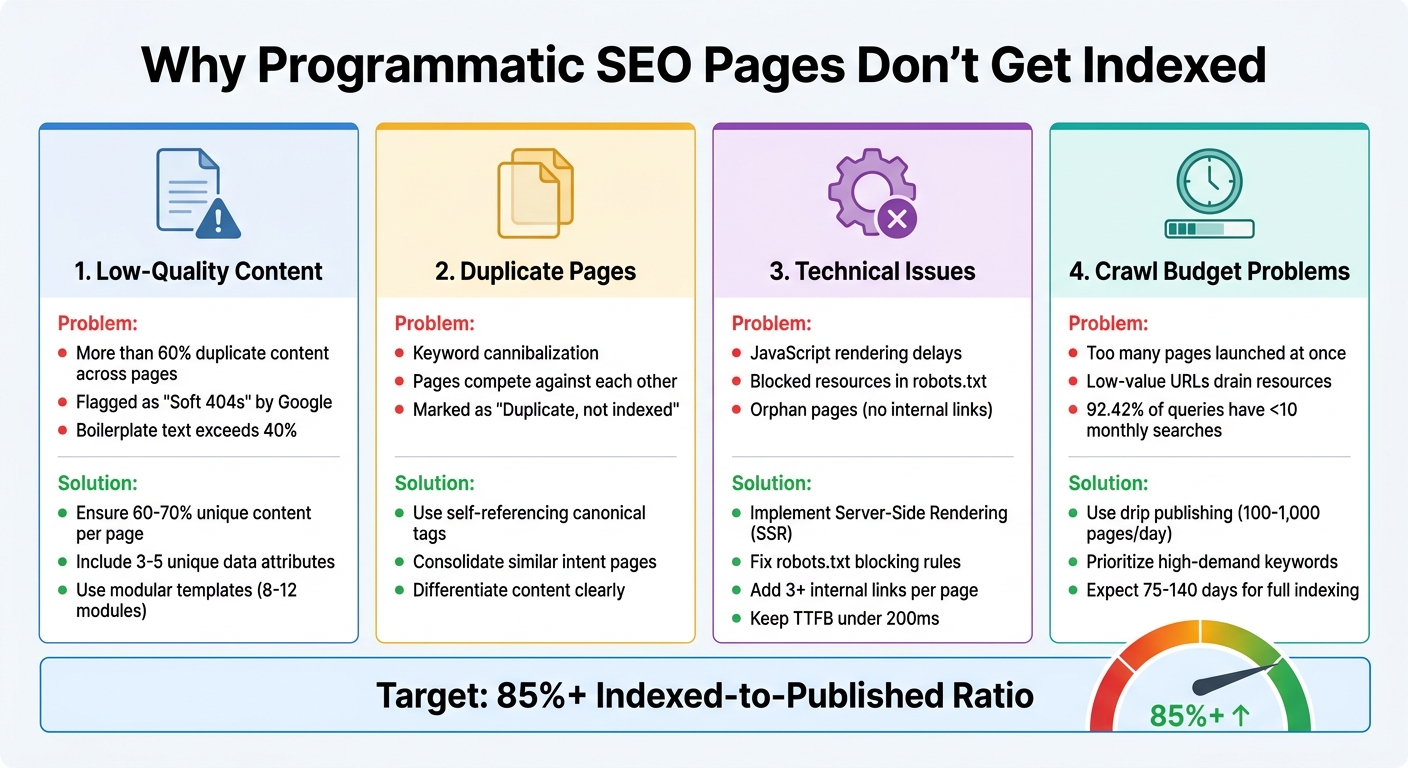
- Low-Quality Content: Pages with repetitive or insufficient unique content often get ignored by Google. Ensure at least 60-70% of each page is unique.
- Duplicate Pages: Similar pages targeting the same intent can cause keyword cannibalization. Use self-referencing canonical tags to signal the primary version.
- Technical Problems: Issues like JavaScript rendering delays, blocked resources, or orphan pages can prevent indexing. Fix these by implementing server-side rendering (SSR) and strong internal linking.
- Crawl Budget Issues: Launching too many pages at once or creating pages for low-demand keywords can overwhelm Google's crawl capacity. Drip publishing and prioritizing high-value pages help manage this.
Quick Fixes:
- Improve content with unique data points and reduce boilerplate text.
- Resolve technical errors like blocked resources or slow loading times.
- Optimize crawl budget by focusing on pages with real search demand.
Use tools like Google Search Console to monitor indexing progress, identify errors, and validate fixes. Aim for an indexed-to-published ratio above 85% to ensure your efforts drive organic traffic.
Issues With Programmatic SEO And How To Fix Them
If you're struggling with visibility, learning how to get your website indexed quickly is the first step toward fixing these programmatic issues.
Why Programmatic SEO Pages Fail to Get Indexed
When programmatic SEO pages don't show up in search results, the issue usually falls into one of four categories: low-quality content, duplicate pages, technical issues, or crawl budget problems. Let's break these down to understand how they can derail your indexing efforts.
1. Thin or Low-Quality Content
Google's algorithms, including SpamBrain, are designed to spot pages that rely on templates with only minor changes, like swapping out a few variables. If more than 60% of a page's content is identical to other pages on your site, it's unlikely to get indexed. Ideally, the shared content - or boilerplate - should stay below 40%.
Pages with insufficient unique content can be flagged as "Soft 404s", meaning Google treats them as missing, even though they technically load. Worse, these weak pages can hurt your entire domain's performance, not just the specific pages in question.
To fix this, you need to ensure 60-70% of each page's content is unique, using specific data points rather than just swapping keywords. Aim to include at least 3-5 unique data attributes per page to meet Google's quality standards.
2. Duplicate or Near-Duplicate Pages
Programmatic systems often generate pages targeting similar search intents, like "CRM for small business" versus "small business CRM software." This leads to keyword cannibalization, where your pages compete against each other instead of ranking effectively. When Google detects near-identical content, it clusters those pages and indexes only one "primary" version, marking the rest as "Duplicate, not indexed".
To resolve this, use self-referencing canonical tags on all programmatic pages. These tags signal to Google which version of the page should be treated as the main one.
3. Technical Barriers Blocking Indexation
Sometimes, technical problems prevent crawlers from accessing your content. For example, client-side JavaScript frameworks like React or Vue can slow down indexing because they require two steps: loading the page and rendering the content. Using Server-Side Rendering (SSR) can fix this by delivering fully-rendered HTML right away.
Here's a real-life example: In February 2023, Kinsta's team found over 400 blocked resource errors caused by a Disallow: /wp-admin/ rule in their robots.txt file. This rule inadvertently blocked admin-ajax.php, a critical file. By adding an explicit Allow: /wp-admin/admin-ajax.php directive, they fixed the issue in just a few days.
Another common issue is orphan pages - pages that exist in sitemaps but lack internal links. Google treats these as low priority. To avoid this, ensure every programmatic page has at least three internal links pointing to it. Without proper linking, even well-optimized pages can remain invisible.
4. Mismanagement of Crawl Budget
Launching thousands of pages at once can overwhelm your site's "crawl capacity" - the resources Google allocates to crawl your domain. When Googlebot spends its time on low-value URLs or pages with excessive parameters, it may ignore your new programmatic pages. As Google explains:
"Having many low-value-add URLs can negatively affect a site's crawling and indexing".
Crawler traps, like infinite URL loops caused by faceted navigation or session IDs, can further drain your crawl budget. Additionally, creating pages for modifiers with little or no search demand is a waste of resources since 92.42% of all search queries have fewer than 10 monthly searches.
A better approach is "drip publishing" - releasing pages in small batches instead of dumping thousands of URLs at once. This aligns with Google's adaptive crawl rate and ensures pages are indexed more efficiently. For large-scale rollouts, it can take 75 to 140 days for URLs to move from "Discovered" to "Indexed" status.
Managing your crawl budget effectively is crucial to get programmatic pages noticed and indexed by Google.
How to Fix Indexing Problems for Programmatic Pages
If you've pinpointed issues like thin content, duplicate pages, technical barriers, or poor crawl budget management, it's time to address them. Focus on three key areas: content quality, technical fixes, and crawl budget optimization.
1. Improving Content Quality
Start by using a modular template with 8–12 conditionally rendered content modules. This method reduces repetitive boilerplate text and allows for natural variation across pages.
Take Wise as an example. They successfully index over 12,000 currency pair pages by featuring unique, real-time data like exchange rates, historical charts, and fee comparisons. Similarly, NomadList excels by leveraging crowdsourced data on factors like internet speeds, safety scores, and cost of living - details that are difficult for competitors to replicate.
Incorporating proprietary content, such as user reviews or original research, can make your pages stand out. For instance, in 2025, an e-commerce client applied AI-driven unique content creation to over 5,000 programmatic category pages. The result? A 143% boost in organic traffic and a 76% revenue increase within six months.
Adding rich media - like custom images, charts, videos, or interactive widgets - can also improve perceived quality. While AI tools can help generate content quickly, always include human oversight to refine the output and avoid errors like soft 404s. Aim for an indexed-to-published ratio above 85%; if it drops below 50%, pause publishing and audit your content.
Once your content is solid, tackle the technical issues that can hinder indexing.
2. Fixing Technical SEO Issues
Technical barriers often go hand in hand with content problems. To start, ensure every programmatic page includes a self-referencing canonical tag. Google's John Mueller emphasizes:
"I recommend doing this kind of self-referential rel=canonical because it really makes it clear for us which page you want to have indexed or what this URL should be when it's indexed".
If you're using client-side frameworks like React or Vue, switch to Server-Side Rendering (SSR) or Static Site Generation (SSG) to deliver fully rendered HTML and avoid JavaScript-related delays.
Build a strong internal linking structure using a hub-and-spoke model. Each programmatic page should link to its parent category and related pages, making it easier for Googlebot to navigate your site.
To improve crawl efficiency, keep your Time to First Byte (TTFB) under 200ms. Also, use consistent URL parameters and split large XML sitemaps into smaller files with no more than 10,000 URLs each.
3. Managing Crawl Budget Efficiently
Effective crawl budget management complements your content and technical fixes. Instead of publishing thousands of pages all at once, use drip publishing to release 100–1,000 pages daily. This gradual rollout aligns with your site's crawl budget and builds trust with Googlebot. For large-scale programmatic rollouts, expect the full indexing process to take between 75 and 140 days.
In 2025, KrispCall - a telephony SaaS company - used a programmatic strategy to create pages for every US area code. By analyzing search demand, they found that 28% of area codes had fewer than 10 monthly searches. Excluding these low-demand pages from their initial indexable set helped conserve their crawl budget, with 82% of their US traffic coming from these programmatically generated pages.
Optimize your robots.txt file with wildcard rules, such as Disallow: /*?, to block crawlers from wasting resources on sorting filters, session IDs, or faceted navigation paths. Additionally, apply noindex tags to pages with fewer than three unique data points or those targeting keywords with less than 10 monthly searches. This ensures Googlebot prioritizes high-value pages.
Zapier is a great example of efficient crawl management. Their dense internal linking structure connects integration pages back to parent app pages, enabling them to manage over 800,000 programmatic pages while ranking for 3.6 million organic keywords.
Using Google Search Console to Diagnose Indexing Issues
Once you've tackled content, technical, and crawl budget challenges, it's time to turn to Google Search Console (GSC). This tool gives you a clear view of how Google interacts with your site, helping you spot patterns that might otherwise go unnoticed. Start by diving into the Page Indexing Report for quick insights.
1. Analyzing Index Coverage Reports
The Page Indexing Report (previously called Coverage) is where you'll begin. It organizes URLs into two categories: "Indexed" (green) or "Not indexed" (red), with explanations for excluded pages. For sites with programmatic pages, filtering by XML sitemaps can help you focus on specific templates or categories.
A healthy indexing rate should stay above 90%, while anything below 70% signals deeper issues. Pay close attention to exclusion reasons. For instance:
- "Duplicate without user-selected canonical": This often points to conflicting URL parameters or missing canonical tags in your templates.
- "Soft 404": This indicates your templates might be creating empty or low-value pages that incorrectly return a 200 status code instead of a proper 404.
Gary Illyes, a Search Advocate at Google, highlights the importance of quality in indexing:
"Index selection, while it's largely about (RAM/flash/disk) space, it's tightly tied to quality of content. If we have tons of free space available, we're more likely to index crappier content."
Once you've addressed these issues, use the "Validate Fix" feature in GSC to prompt Google to recrawl the affected URLs and monitor the progress of your changes.
2. Identifying and Resolving Crawl Errors
Beyond the coverage data, the URL Inspection Tool is invaluable for diagnosing errors in real time. By using the "Test Live URL" feature, you can see exactly how Googlebot renders a page and identify any blocked resources. Common errors for programmatic pages include:
| Error Type | Common Cause | Recommended Fix |
|---|---|---|
| Server Error (5xx) | Overloaded server, slow TTFB | Upgrade hosting, optimize database queries, or implement caching. |
| Soft 404 | Thin or empty content | Add meaningful content or return a proper 404/410 status code. |
| Redirect Error | Loops or long redirect chains | Point redirects directly to the final destination. |
| Blocked by robots.txt | Disallow rules in robots.txt | Audit and fix rules; use the GSC robots.txt tester. |
Pay close attention to the "Crawled – Currently Not Indexed" status. While not a technical error, it suggests the content may be too thin, duplicate, or lacking value. Similarly, "Discovered – Currently Not Indexed" points to crawl budget limitations - Google knows the URL exists but hasn't crawled it yet.
After addressing these issues, keep an eye on your site's indexing trends to ensure long-term improvement.
3. Tracking Indexation Progress Over Time
The Crawl Stats Report (under Settings) offers a detailed view of Googlebot's activity, including total crawl requests and their purpose. A rise in "Discovery" crawls is a good sign that Google is actively finding your new programmatic pages. Also, monitor your server's average response time to ensure it can handle the increased load without timing out.
For large-scale programmatic sites, track your indexing rate weekly. Calculate it by dividing the number of indexed pages by the total number of known pages, then multiplying by 100. Use the Page Indexing Report to filter by specific sitemaps and track how different templates are performing. Additionally, the Sitemaps Report shows "Submitted and indexed" counts, confirming whether URLs are being processed.
Conclusion
Getting programmatic SEO pages indexed isn't about cranking out an endless stream of URLs. It's about focusing on three core elements: unique, high-quality content, strong technical optimization, and consistent monitoring. These three work together as a system - technical excellence won't matter if your content feels overly templated, and even the best content won't succeed if search engines can't crawl and index it. Striking this balance is key to achieving optimal indexing.
To measure success, aim for an indexed-to-published ratio of over 85%. Falling short of this benchmark often points to issues like excessive templated content or technical missteps, such as missing self-referencing canonical tags, both of which can drag down indexation efforts.
Technical health plays a massive role here. Simple measures like implementing self-referencing canonical tags and using segmented XML sitemaps as part of a comprehensive SEO indexing checklist can keep your pages from getting stuck in the dreaded "Discovered – Currently Not Indexed" category.
Patience is also part of the process. For large-scale rollouts, it can take anywhere from 75 to 140 days to see meaningful results. During this time, consistent monitoring is essential. Use tools like Google Search Console to track exclusion reasons, analyze crawl patterns, identify server errors, and keep an eye on boilerplate ratios.
FAQs
How long should I wait before worrying about pages not indexing?
When publishing new or updated content, waiting 2 to 4 weeks before worrying about indexing is generally a good rule of thumb. Google often takes time to crawl and evaluate pages. If your pages still aren't indexed after this period, it might be time to investigate. Tools like Google Search Console can help identify issues such as content quality, technical errors, or incorrect crawl settings that could be causing delays.
Should I use noindex or delete thin programmatic pages?
Deleting thin programmatic pages is often a smarter move than simply applying noindex tags. Pages with minimal or low-value content can drag down your site's SEO performance and even put you at risk of penalties from Google. While noindex might hide these pages from search results temporarily, it doesn't address the underlying quality concerns.
By removing these pages entirely, you maintain a cleaner site structure and reduce the chances of SEO penalties. If a page can't be improved with better content, it's better to let it go than to let it harm your site's overall performance. Focus your efforts on creating or enhancing content that provides real value to users.
What's the fastest way to find the #1 indexing blocker in Google Search Console?
To pinpoint the main indexing issue in Google Search Console, start with the 'Crawled – Currently Not Indexed' status. This section shows pages that Google has crawled but hasn't indexed, often due to issues like thin content or weak internal linking. Dive deeper using the URL Inspection tool to examine individual pages. Look for problems like noindex tags or crawl errors. Once you've identified and fixed these issues, you can request reindexing to speed up the process.