

If you see the "Page with Redirect" status in Google Search Console, it means Googlebot found a URL that redirects to another page. The original URL won't appear in search results; only the final destination URL is considered for indexing and ranking. This is usually normal and intentional, like during site migrations (e.g., HTTP to HTTPS). However, misconfigured redirects, such as chains, loops, or accidental redirects, can waste crawl budget and harm SEO.
Key Points:
- Redirect Types:
- 301/308: Permanent, transfers ranking signals.
- 302/307: Temporary, keeps the original URL indexed initially.
- Issues to Watch For:
- Redirect chains (A → B → C).
- Redirect loops (A ↔ B).
- Redirected URLs in sitemaps.
- Fixes:
- Use direct redirects (A → C).
- Remove redirecting URLs from sitemaps.
- Update internal links to point to final URLs.
To manage redirects effectively, regularly review the "Page with Redirect" report in Search Console, fix errors promptly, and ensure proper redirect configurations to optimize your SEO indexing strategy.
Page with Redirect in Google Search Console - What is it & how to fix it?
What 'Page with Redirect' Means in Google Search Console
In Google Search Console, the "Page with Redirect" status indicates that Googlebot has found a redirect and is indexing only the final destination. This means the original URL is essentially ignored - Google focuses solely on the content of the destination page for indexing.
"Any content received from the original URL is ignored, and the final target URL's content is processed instead." - Google Search Central
This matters because the original URL will not show up in search results. Instead, Google uses the destination page's content, metadata, and headers to determine rankings.
How Google Detects Redirects
When crawling, Googlebot identifies redirects by checking the HTTP status code. If it encounters a 3xx code, it follows the "Location" header to the destination URL, continuing through up to 10 redirect hops. Google also picks up redirects implemented via HTML meta refresh tags or JavaScript during the rendering phase. However, server-side 3xx redirects are preferred because they're faster and send stronger SEO signals.
Why Google Tracks Redirects Separately
Google tracks redirects separately in the Coverage report to help distinguish between intentional site updates and potential errors. This distinction is crucial for diagnosing issues. For instance, if you accidentally redirect a high-traffic product page to your homepage, it would appear in this report, allowing you to address the problem before it affects rankings. Without this tracking, it might be unclear why certain pages stop ranking.
The "Page with Redirect" status is listed under the "Not indexed" section. This prevents duplicate content issues and ensures users are directed to the most current version of your content. The separation also helps you confirm whether redirects are part of planned site changes - like moving from HTTP to HTTPS - or unintended mistakes.
| Redirect Type | Signal Strength | How Google Responds |
|---|---|---|
| 301 / 308 | Strong | Passes all ranking signals to the destination URL; indexes it permanently |
| 302 / 307 | Weak | May temporarily keep the original URL indexed before transitioning to the target |
Common Reasons for Redirects
Redirects often happen due to planned updates or accidental configuration mistakes. Understanding the distinction is key to managing them effectively. Let's break down both scenarios.
Planned Redirects for Website Maintenance
Intentional redirects are a routine part of maintaining a website. For instance, when switching to a new domain, 301 redirects ensure visitors and search engines are seamlessly directed to the updated content. Similarly, upgrading from HTTP to HTTPS is critical, especially since 84% of online users abandon purchases on insecure sites.
Rebranding or reorganizing your site - like moving a page from /services/ to /blog/ or merging duplicate content - also calls for redirects, which help retain link equity and maintain SEO value.
Temporary redirects, such as 302 or 307 status codes, are handy for short-term needs. Whether it's A/B testing, site maintenance, or seasonal campaigns, these redirects guide users to temporary pages without removing the original URL from search engine indexes. For example, a holiday sale page might use a 302 redirect, while the standard product page remains accessible year-round.
Unintentional Redirects and Configuration Errors
On the other hand, accidental redirects usually result from technical errors. For example, platforms like WordPress often enforce specific URL structures (like adding trailing slashes), which can unintentionally cause redirects when internal links don't match.
Redirect chains, where URL A points to B, which then points to C, can hinder crawl efficiency. Even worse are redirect loops, where URL A redirects to B, and B redirects back to A, making pages unindexable.
Other common culprits include plugin conflicts, where multiple SEO tools manage the same URLs, and typos in redirect rules (e.g., "htttp" instead of "http"). Research shows that 95.2% of websites face 3XX redirect issues that can harm SEO, and 88% specifically struggle with HTTP to HTTPS redirect problems.
"Page with redirect is NOT an error. It is a classification." - Hassan, SEO Expert, Digital Skill Learn Hub
One red flag to watch for is redirected URLs appearing in your XML sitemap. Sitemaps should only list final, indexable URLs. Missteps here can lead to indexing inefficiencies. By identifying and addressing these problems, you can keep your site running smoothly and ensure search engines index it effectively.
How Redirects Impact Indexing and SEO
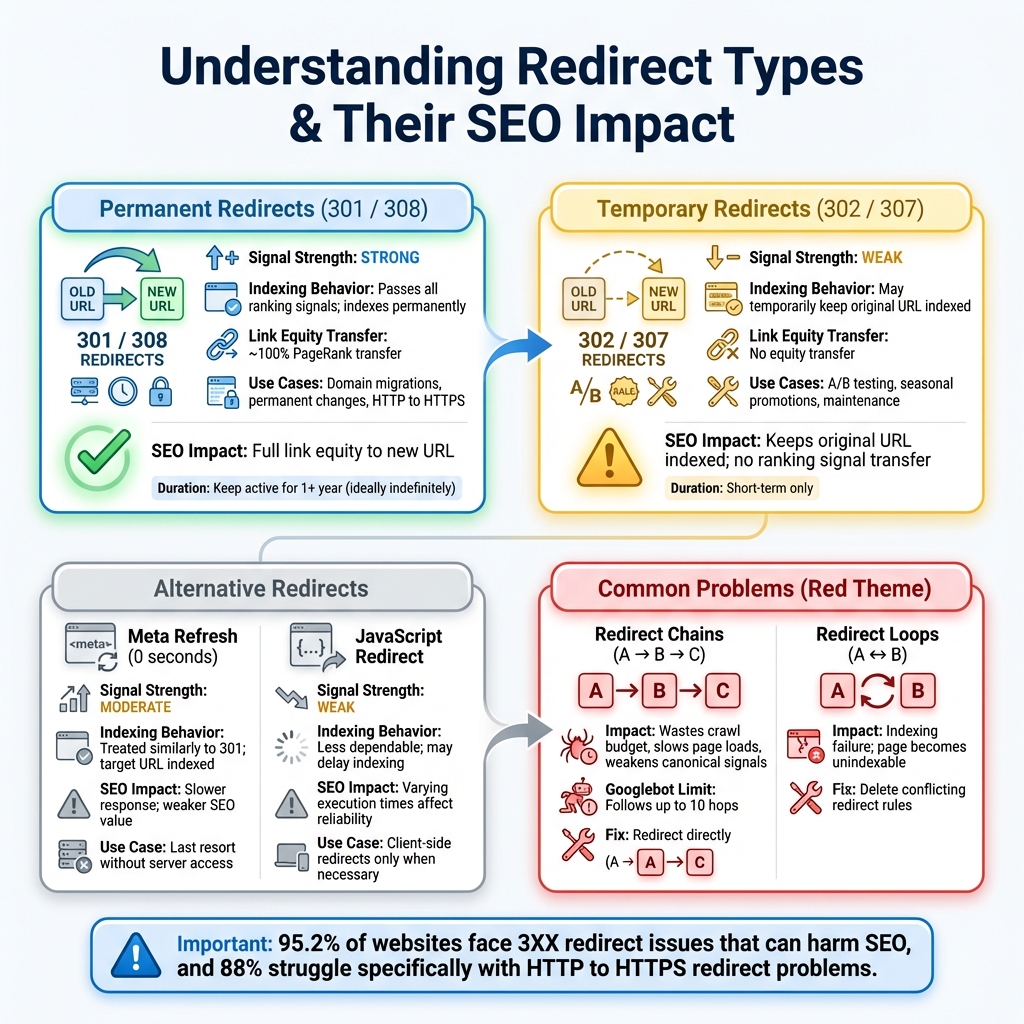
Redirects play a crucial role in maintaining search visibility and guiding Google's indexing process. Done correctly, they ensure smooth transitions for users and search engines. But when misconfigured, they can waste crawl budget and disrupt rankings.
Effects of Properly Configured Redirects
Permanent 301 redirects are a strong signal to Google that the original URL has permanently moved to a new location. When Googlebot encounters a 301, it follows the redirect and treats the new URL as the canonical one. This means the new URL replaces the old one in Google's index, and the original is marked as "Page with redirect" in Search Console, disappearing from search results. This is especially useful during site migrations or domain changes, as it consolidates ranking power to the new URL.
On the other hand, Temporary 302 redirects send a weaker signal. These allow the original URL to remain indexed while traffic is temporarily directed elsewhere. This makes 302 redirects ideal for short-term changes like A/B testing or seasonal campaigns. However, if a 302 is left in place for an extended period, Google may eventually interpret it as permanent and treat it like a 301. The key difference lies in how each redirect type impacts indexing: 301s lead to the new URL taking over entirely, while 302s typically leave the old URL visible unless reclassified by Google over time.
When redirects are not configured properly, they can create significant SEO challenges.
Negative Impacts of Redirect Issues
While proper redirects streamline indexing and consolidate ranking signals, poorly executed ones can cause a host of problems. Redirect chains, where one URL redirects to another, which then redirects to yet another, can unnecessarily consume crawl budget and slow down page load times. Googlebot can follow up to 10 redirect hops, but each additional hop increases latency, potentially affecting Core Web Vitals metrics like Time to First Byte and Largest Contentful Paint.
"Redirect chains do not directly reduce rankings, but they slow down page loads, waste crawl budget, and weaken canonical signals." - Gotch SEO
Even worse are redirect loops, where URLs redirect back and forth in an endless cycle. For example, URL A redirects to URL B, which redirects back to URL A. This creates indexing failures, as Google cannot reach the content. If Google encounters more than 10 hops in a loop, it flags a redirect error in Search Console.
Using the wrong type of redirect can also harm SEO. For instance, applying a 302 instead of a 301 for a permanent move could prevent the new URL from inheriting ranking signals. Similarly, redirecting important pages to irrelevant destinations, like the homepage, might result in a "Soft 404" error, which signals to Google that the content is missing. These issues can make your Search Console reports unreliable until fixed.
| Redirect Type | SEO Impact |
|---|---|
| Meta Refresh (0s) | Treated similarly to a 301; the target URL is indexed |
| JavaScript Redirect | Less dependable; may delay indexing due to varying execution times |
Diagnosing Redirect Issues in Google Search Console
Once you grasp how redirects influence indexing, the next step is identifying which pages trigger the "Page with redirect" status and deciding if they need attention. Google Search Console offers several tools to help you identify redirect problems efficiently.
Using the "Page with Redirect" Report
To get started, go to the Indexing section in Google Search Console and click on Pages. Scroll down to the "Why pages aren't indexed" area to locate the "Page with redirect" status. This report lists up to 1,000 affected URLs, showing details like the last crawl date and whether the redirect originated from your site or Google.
To focus on the URLs that matter most, apply the dropdown filter and choose "All submitted pages." This limits the results to URLs in your sitemap - those you specifically want indexed. If any sitemap URLs appear in this list, it's a warning sign because sitemaps should only include final destination URLs that return a 200 status code.
Anna Crowe, an SEO Director and Consultant, emphasizes the importance of staying vigilant:
"Nine times out of 10, there's no action I need to take [regarding the Page with redirect report]. However, moments of awe-inspiring glory have shed light on a URL that was not meant to be redirected." - Anna Crowe, SEO Director and Consultant
If you identify and fix an unintended redirect, click "Validate Fix" in the report. Google will then recrawl the URLs over the next two weeks to confirm the issue has been resolved. Afterward, you can dig deeper by verifying redirect paths to uncover any hidden configuration problems.
Verifying Redirect Paths
Once you've reviewed the report, use the URL Inspection Tool to analyze individual redirect paths and status codes. Simply paste a specific URL into the search bar at the top of Google Search Console to open the tool. This will show the "Google-selected canonical" - the final page Google chose to index instead of your redirected URL. To see the current status, click "Test Live URL" and check if the redirect is still active and how Googlebot interprets the page.
For a detailed breakdown of redirect paths and status codes, external tools like httpstatus.io can be helpful. Look for the X-Redirect-By response header to identify whether a WordPress plugin or site configuration is causing the redirect. Chrome DevTools or other redirect checkers are also useful for spotting redirect chains, where one URL leads to another and then another, wasting crawl budget and slowing indexing.
Additionally, the Crawl Stats Report under Settings provides valuable data. It tracks the percentage of 301 and 302 responses encountered by Googlebot and flags specific redirect errors, such as circular loops.
Fixing and Optimizing Redirects
Once you've identified redirect issues, the next step is to address them effectively. Depending on whether you're dealing with chains, loops, or misconfigurations, the approach will vary.
Resolving Common Redirect Problems
Redirect chains occur when URL A redirects to B, which then redirects to C. This setup not only wastes crawl budget but also weakens SEO value. To fix this, adjust your server or CMS settings so the original URL redirects directly to the final destination. For instance, if /old-page redirects to /temp-page, and /temp-page redirects to /final-page, modify the rules so /old-page points directly to /final-page.
"You should always aim to redirect the original page to the destination URL directly." - Justyna Jarosz, SEO Specialist at Onely
Redirect loops create an endless cycle where Page A redirects to Page B, and B redirects back to A. This prevents Google from accessing any content. Tools like Link Redirect Trace or Screaming Frog can help you identify these loops. Once found, delete the conflicting redirect rule from your server or plugin settings. After adjustments, use the URL Inspection Tool in Google Search Console to confirm that Googlebot can access the final destination.
Sitemap mismatches happen when your XML sitemap contains URLs that redirect instead of returning a 200 status code. Export the list of "Pages with Redirects", cross-check it with your sitemap, and remove any redirecting URLs. Then, resubmit the updated sitemap to Google Search Console for a fresh crawl.
Update internal links across your site - including navigation menus, footers, and content - to point directly to final destination URLs.
"Never rely on redirects to fix broken internal links. If you change a page URL, make sure to update all links that point to it." - Mike, WooHelpDesk
Once you've made these fixes, validate the changes in Google Search Console. These steps not only recover lost SEO value but also lay the groundwork for better redirect management in the future.
Best Practices for Redirect Management
To keep redirects running smoothly, follow these ongoing practices. Use 301 redirects for permanent changes, as they transfer almost all the original page's PageRank to the new URL. For temporary changes, like A/B testing or seasonal promotions, use 302 redirects, which keep the original URL indexed and don't transfer link equity. Keep permanent redirects active for at least a year, though many experts suggest leaving them indefinitely if they still receive traffic or backlinks.
Regularly audit your CMS and plugins - especially on WordPress sites - to ensure there aren't conflicting redirect rules causing unnecessary "Page with Redirect" statuses. Double-check that canonical tags point to the final destination URL and match your sitemap entries. Lastly, avoid blocking redirected URLs in your robots.txt file, as Googlebot needs to crawl these URLs to follow the redirect signals.
| Redirect Type | Status Code | Use Case | SEO Impact |
|---|---|---|---|
| Permanent | 301 / 308 | Domain migrations, permanent changes | Passes full link equity to the new URL |
| Temporary | 302 / 307 | A/B tests, seasonal promotions | Keeps original URL indexed; no equity transfer |
| Meta Refresh | N/A | Last resort without server access | Slower response; weaker SEO value |
Conclusion
Managing redirects effectively is crucial for maintaining your site's search visibility and overall SEO health. Understanding the "Page with Redirect" status in Google Search Console can help you identify and address potential issues. While this status isn't inherently problematic, unmonitored redirects can lead to wasted crawl budget, hidden key pages, and diminished link equity. Remember, only the final destination URL appears in search results - redirected pages themselves won't rank.
To stay on top of redirect management, make it a habit to regularly review your "Page with redirect" report - ideally, at least once a month. Pay close attention to URLs submitted in your sitemap. If you spot redirect chains, loops, or unintended redirects impacting important pages, fix them promptly by setting up direct, one-step redirects and updating your internal links accordingly.
Keep your XML sitemaps clean by including only URLs with a 200 status, ensure canonical tags point to the final destination, and use 301 redirects for permanent URL changes to maintain link equity. Once you've made the necessary updates, use the URL Inspection Tool to verify that Googlebot can properly access your pages. Keep in mind, validation can take 1–3 weeks, with report updates following in 3–6 weeks.
FAQs
Will a redirected URL ever rank in Google?
Yes, it can - though not in the way you might think. When you set up a redirect, Google doesn't rank the redirect URL itself. Instead, it focuses on the final destination page. That's the page that gets indexed and has the potential to rank.
Redirects can still play a key role in SEO. They influence factors like site speed, crawl efficiency, and canonical signals, all of which are important for maintaining or improving rankings. Managing redirects properly ensures your site stays optimized and avoids issues like broken links or lost traffic.
How do I find the final URL Google indexes?
The URL Inspection tool in Google Search Console helps you see the final URL Google has indexed. Simply enter the URL you want to check, and the tool will reveal if the URL has been redirected and where it ultimately leads. This gives you a clear picture of the live version of your page and the URL Google recognizes after processing any redirects.
How long does it take Google to update after fixing redirects?
When you fix redirects, it typically takes Google anywhere from a few days to several weeks to reflect those changes. The timing largely depends on factors like how often Google crawls your site. In most cases, updates are acknowledged within 2–3 weeks. It's important to stay patient while Google processes the adjustments and updates its index.