

404 errors hurt your website's user experience and SEO. They frustrate visitors, damage credibility, and waste search engine crawl budgets, potentially lowering rankings. Fixing these indexing errors ensures smoother navigation, better engagement, and stronger search visibility.
Here's how you can prevent and manage 404 errors effectively:
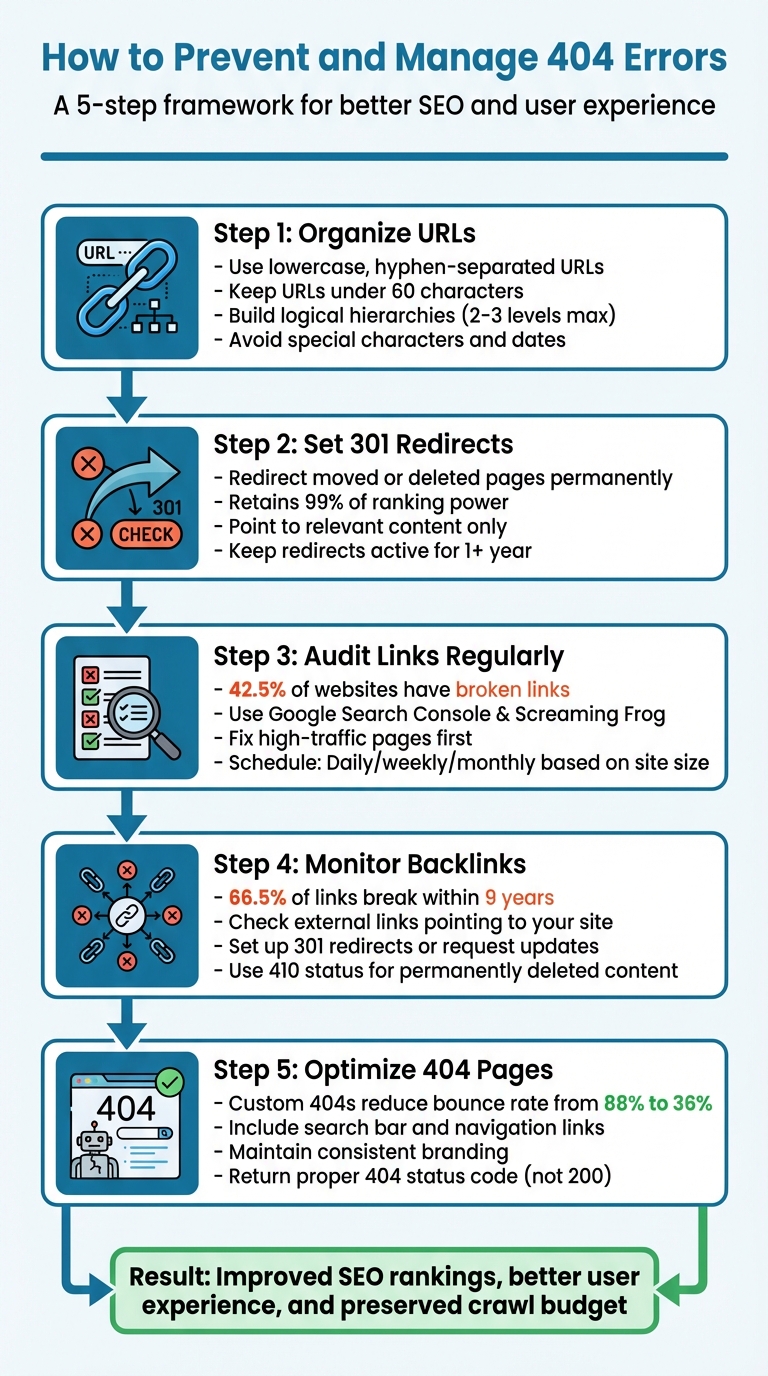
- Organize URLs: Use simple, lowercase, hyphen-separated URLs with logical hierarchies. Avoid unnecessary words and special characters.
- Set 301 Redirects: Redirect users and search engines to updated pages when URLs change or pages are moved.
- Audit Links Regularly: Use tools like Google Search Console or Screaming Frog to identify and fix broken internal and external links.
- Monitor Backlinks: Check for external sites linking to broken pages and either set up redirects or request updates.
- Optimize 404 Pages: Design user-friendly error pages with search bars, navigation links, and consistent branding to keep visitors engaged.
How To Fix 404 Errors on Your Website - A Complete Guide
Fixing these errors is a critical step to get your website indexed by Google fast and maintain your search visibility.
Create a Clear and Consistent URL Structure
A well-organized URL layout makes managing your site easier and reduces the risk of broken links. When URLs follow predictable patterns, you not only make navigation simpler for users but also lower the chances of encountering 404 errors. As SEO consultant Gaurav Tiwari explains:
"URL structure decisions you make today affect your site for years. Changing URLs after they've been indexed risks traffic loss, broken links, and ranking disruption." To mitigate these risks, using an automated indexing tool can help Google discover and process your new URL structure more efficiently.
URL Structure Best Practices
To start, stick to lowercase letters in your URLs. Since URLs are case-sensitive, mixing uppercase and lowercase can lead to duplicate content issues or errors when users or systems attempt to access variations that don't exist.
Use hyphens to separate words in your URLs instead of underscores. Google recognizes hyphens as separators, while underscores can make words appear as a single term. For example, best_seo_tips might be read as one phrase instead of three separate keywords. Keep URLs short - ideally under 60 characters - and focus on 3–5 key words, avoiding unnecessary terms like "the", "and", or "of." Research involving 11.8 million search results showed that concise slugs tend to perform better in rankings.
Also, steer clear of special characters, spaces, and non-ASCII symbols in your URLs. As of June 2025, Google requires compliance with IETF STD 66, which means reserved characters must be percent-encoded to ensure proper crawling. For evergreen content, avoid including dates in your URLs. For example, use /email-marketing-guide/ instead of /2024/email-marketing-guide/ to keep the content relevant without needing to update the URL later.
Build Logical Hierarchies and Predictable Patterns
Your URL structure should reflect your site's navigation and content organization. Aim for a shallow folder hierarchy - no more than 2–3 levels deep. For instance, a URL like /products/software/crm/ is clear and easy to follow, while something like /shop/v2/catalog/items/products/crm/ is unnecessarily complicated.
Ensure your URL paths align with your navigation menu. For example, if your menu shows Products > Software, the corresponding URL should be /products/software/ to maintain consistency and avoid confusing users. Additionally, use subdirectories rather than subdomains. For example, opt for example.com/blog/ instead of blog.example.com to keep all your pages under the main domain's authority, which can simplify link management.
Finally, decide whether to include trailing slashes in your URLs and stick to that choice across your site. Use 301 redirects to enforce this consistency and prevent duplicate content issues.
Once your URL structure is in place, the next step is managing 301 redirects to handle any moved or deleted pages effectively.
Use 301 Redirects for Moved or Deleted Pages
Whenever you move, rename, or delete a page, a 301 redirect ensures visitors and search engines are automatically sent to the new URL. This HTTP status code signals that the page has been permanently relocated, helping avoid the dreaded 404 error. Instead of frustrating users, it seamlessly connects them to the updated content.
One of the biggest benefits of 301 redirects is that they retain nearly 99% of the original page's ranking power. This means all the backlinks and authority you've worked hard to earn don't disappear when you restructure your site. As Chima Mmeje, Senior Content Strategist at Moz, explains:
"Google often treats a 301 redirect as a stronger canonicalization signal. Hence, always use a 301 to ensure proper credit for permanent redirects."
That said, make sure the redirect points to relevant content. Sending users to unrelated pages - like your homepage instead of a specific product page - can backfire. Google might view this as a "soft 404", which could lead to de-indexing. Tony Patrick, Senior Director of SEO at Intero Digital, cautions:
"Don't redirect to something irrelevant just for the sake of avoiding a 404. That's how you create a 'soft 404,' which is just as bad (sometimes worse) in Google's eyes."
When to Use 301 Redirects
A 301 redirect is the go-to solution for permanent changes to your site's URL structure. Here are some common scenarios where it's helpful:
- Restructuring your site's navigation.
- Migrating to a new domain.
- Switching from HTTP to HTTPS.
- Consolidating pages to fix keyword cannibalization (where multiple pages compete for the same search term).
For e-commerce sites, 301 redirects are especially important when discontinuing products. Instead of letting old product pages lead to 404 errors, you can redirect users to a similar product or the relevant category page. SEO specialist Artturi Jalli provides a helpful example:
"If you had a 'Black Friday 2024' page and now focus on 'Black Friday 2025,' a 301 from the old to the new ensures link equity and continuity."
However, if there's no suitable replacement for a page - like an outdated legal notice or a discontinued service - use a proper 404 error or a 410 status code to indicate the content has been permanently removed. Google advises keeping redirects active for at least one year after major site changes to allow search engines enough time to fully adjust.
How to Set Up and Manage Redirects
The process of setting up redirects varies depending on your server type and tools. Here's a quick overview:
-
Apache servers: Edit the
.htaccessfile. Always back it up first, then add a rule like this:Redirect 301 /old-page https://www.yourdomain.com/new-page -
Nginx servers: Modify the server configuration file with a rule like this:
location = /old-url { return 301 /new-url; }
For those using CMS platforms, built-in tools make redirect management easier. For example:
- WordPress users can rely on plugins like Redirection, Yoast SEO, or Rank Math.
- Shopify users can navigate to Content > Menus > View URL Redirects.
- Wix offers a URL Redirect Manager in its SEO Dashboard.
Once your redirects are in place, update internal links to point directly to the new URLs. Don't forget to update your XML sitemap as well, replacing old URLs with the new canonical versions. Avoid redirect chains, as they can slow down page load times and confuse search engine crawlers.
To ensure everything runs smoothly, monitor redirects regularly using tools like Google Search Console's "Crawl Stats" and "Pages" reports. This helps you quickly identify issues like soft 404s or redirect loops. Proper redirect management is a key part of maintaining a clean, user-friendly URL structure and preventing future errors.
Audit and Fix Internal Links
Keeping your internal links in check is more than just good housekeeping - it's a key part of ensuring your site functions smoothly. Regular audits can help you avoid the pitfalls of broken links, which affect 42.5% of websites. These dead links don't just frustrate users; they also waste your crawl budget and can drag your search rankings down by as many as 12 positions in just three months. By staying proactive, you can catch these issues before they hurt your site's performance.
Use Tools to Find Broken Links
Start with Google Search Console, which is a great free tool for spotting broken links. Navigate to Indexing > Pages and look for URLs flagged as "Not found [undefined]." These are the broken links Google has already identified during its crawls.
For a deeper dive, try Screaming Frog SEO Spider, which allows you to crawl up to 500 URLs for free. Filter the results by "Client Error (4xx)" to see all the broken links, and then use the "Inlinks" tab to find the specific pages where these dead links appear.
Need something quick and easy? Browser extensions like Broken Link Checker or Chrome's Inspect tool (Console tab) can help you quickly spot 404 errors.
Prioritize Fixes Based on Impact
Not all broken links are created equal. Start by addressing issues on high-traffic pages like your homepage or main menus. Use Google Analytics to cross-check which errors are affecting your visitors the most. Links buried in older blog posts or archive pages can usually wait until your next scheduled audit.
As Brian Harnish, a VIP Contributor at Search Engine Journal, puts it:
"Internal link structure is a critical ranking factor... if you're not paying attention to your website's internal links, you could be missing out on valuable search engine traffic".
A methodical approach ensures you tackle the most pressing issues first.
Set Up a Regular Audit Schedule
The frequency of your audits depends on how active your site is. High-traffic sites might need daily checks, while most business websites can stick to weekly audits. Smaller sites can usually get by with monthly reviews. Anytime you make major changes - like a site restructure, CMS migration, or bulk content update - be sure to run an immediate audit. For those with technical expertise, you can even automate weekly crawls using Screaming Frog's CLI tool.
Regular audits keep your internal links healthy and your site running at its best.
Monitor Backlinks and External Links
When external sites link to your pages, they might unknowingly create 404 errors. These broken backlinks not only waste SEO authority but also frustrate users who click on them. Over time, links naturally decay - 66.5% of website links break within nine years. That's why keeping a close eye on external links is just as important as managing internal ones. It helps maintain a seamless user experience and keeps your SEO efforts intact.
Identify Problematic Backlinks
Start with Google Search Console to locate external links pointing to broken pages. Go to "Indexing" > "Pages" and filter for "Not found [undefined]" to see pages Googlebot couldn't crawl. Next, check the "External links" > "Top linked pages" report. If you spot broken or deleted URLs here, you've identified backlinks that need attention.
For a more detailed view, Google Analytics 4 can help. Look for "Page not found" or "404" in the "Pages and screens" report. Add "Session source/medium" or "Page referrer" as a secondary dimension to identify which external sites are sending traffic to these broken pages. Tools like Semrush's Backlink Audit or Ahrefs can also help by filtering for "Target URL errors", giving you a list of domains linking to your site's dead pages.
Fix External Link Problems
Managing external links effectively is a natural extension of internal link audits and helps safeguard your SEO performance. Once you've identified broken backlinks, prioritize fixing those from websites that drive significant traffic. You can address these issues using two main strategies: redirects or link updates.
-
Set up 301 redirects: If you've moved content or have a relevant replacement page, a 301 redirect is the best solution. It ensures users and search engines are sent to the correct page while preserving 90–95% of the original page's SEO authority. As Semrush explains:
"A 301 redirect permanently forwards users and search engines from the old URL to the new one and preserves most of the original page's link equity".
-
Request link updates: For high-value backlinks from reputable sites, reaching out to webmasters can be more effective. Provide the broken URL along with its replacement to make the process simple for them. This method helps maintain long-term authority.
If the content is permanently gone and there's no replacement, use a 410 (Gone) status code instead of a 404. This tells search engines that the page won't return and helps speed up de-indexing.
One thing to avoid: redirecting broken backlinks to your homepage. Doing so can create "soft 404" errors, which confuse users and harm your SEO efforts. Focus on providing the most relevant and seamless experience for both users and search engines.
Optimize Your 404 Page for Better User Experience
Even with the best URL management and thorough audits, 404 errors are inevitable. When they happen, a thoughtfully designed error page can make all the difference in keeping visitors engaged. For instance, a standard server-generated 404 page can have a bounce rate as high as 88%, while a custom-designed one can lower that to 36%. Let's dive into what makes an effective 404 page and how to monitor its performance.
Key Features of an Effective 404 Page
To start, your 404 page should feel like an extension of your website. Use the same headers, footers, logos, colors, and fonts to maintain your brand identity. Avoid overwhelming users with technical jargon - stick to simple language like "Page not found."
Next, give users clear paths to continue browsing. Here are a few ways to do that:
- Include a prominent search bar so visitors can easily look for the content they need.
- Add links to your homepage and other important sections of your site.
- Provide an option for users to report errors, which can help you identify and fix issues faster.
Evan Hall from Arvo Digital sums it up well:
"Ideally, with a custom 404 error page, we can downgrade the user's concern from 'broken website' to 'minor inconvenience' by explaining what happened".
Lastly, make sure your 404 page returns the correct status code - a proper 404 error instead of a 200 OK. A 200 OK response for a missing page creates what's called a "soft 404", which can confuse search engines and waste their crawl budget.
Track 404 Page Activity
Keeping an eye on how users interact with your 404 page can provide valuable insights. Use tools like Google Analytics to monitor page views and set up alerts for broken links. In Google Analytics 4, you can create a custom exploration using dimensions like Page path, Page referrer, and Page title to pinpoint broken URLs and understand where users are coming from.
Additionally, analyze which recovery options users are clicking on. Are they using the search bar? Clicking "Home"? Navigating to other pages? Tracking this behavior helps you refine your 404 page to better meet user needs.
Use Tools to Monitor and Resolve 404 Errors
Keeping tabs on 404 errors is a lot easier with the right tools. These tools help you spot and fix broken links quickly - sometimes in as little as 1 to 3 minutes per error. When combined with strategies like redirects and internal link audits, they create a solid system for managing URLs effectively.
Google Search Console and Analytics
Google Search Console (GSC) is an essential tool for identifying 404 errors. Dennis Yu, CEO of BlitzMetrics, emphasizes its importance:
"Google Search Console is the best tool to identify 404 errors because it uses Google's own data and provides accurate insights into your website's performance".
To use it, head to the Pages section and filter for "Not Found" errors. The URL Inspection tool allows you to check individual pages in real time and request re-indexing once fixes are in place. Keep in mind, though, that validation can take up to two weeks.
Google Analytics adds another layer by showing how 404 errors impact your visitors. For example, BlitzMetrics found that 876 visitors landed on a 404 page within 28 days. They used the Rank Math SEO plugin to set up 301 redirects for the broken links with the highest traffic.
One thing to note: GSC only retains data for 16 months. If you need to analyze trends beyond that timeframe, tools like SEOTesting can help. Ruben Gamez of DocSketch shares his experience:
"SEOTesting.com has become one of my go-to SEO tools because it does so much with all the valuable data hidden in Google Search Console".
Once you've identified and manually fixed errors, automation can take over to speed things up.
Automate Indexing and Monitoring with IndexMachine
Catching errors early and automating the next steps can significantly cut down resolution time. IndexMachine simplifies this process by automating re-indexing after you've fixed a 404 issue - whether through a redirect or by restoring content. It submits updated URLs to Google, Bing, and even AI models like ChatGPT, eliminating delays in indexing.
The platform also keeps you in the loop by sending instant alerts when new broken links are detected. It provides detailed page insights, including coverage status and the last crawl date. For those managing multiple domains, IndexMachine offers daily reports and visual progress tracking, making it easy to see which fixes have been successfully indexed.
Conclusion
Effective URL management plays a crucial role in maintaining both search engine visibility and a smooth user experience. For instance, 404 errors inform search engines about pages that have been removed or relocated, which makes addressing them essential.
Here's a quick rundown of key practices: Stick to a clean URL structure - use lowercase letters, hyphens, and logical hierarchies. Short, keyword-focused slugs can even improve click-through rates by 8%. When moving content, apply 301 redirects to transfer link equity to new pages. If a page is permanently deleted with no replacement, opt for a 410 status code instead.
Make regular audits part of your routine. Tools like Google Search Console can help you spot 404 errors early, minimizing their impact on users. Fix broken links directly at their source to avoid redirect chains, which can slow down both search crawlers and visitors.
Platforms like IndexMachine simplify the re-indexing process by automatically submitting corrected URLs to search engines like Google and Bing, as well as supported AI models. This automation not only reduces indexing delays but also helps conserve your crawl budget, especially for large sites with thousands of pages. By adopting these strategies, you'll ensure faster indexing, stronger SEO performance, and a better experience for your audience.
FAQs
When should I use a 301 redirect vs a 404 or 410?
When you need to permanently move a URL, a 301 redirect is your best option. It ensures that SEO value, like backlinks and page authority, is preserved while guiding users seamlessly to the new page. This is especially useful during website migrations, changes in URL structure, or when a page is removed but has valuable backlinks pointing to it.
On the other hand, a 404 or 410 status code should be used when content is permanently gone without a replacement. While both indicate the absence of content, a 410 explicitly tells search engines that the page is permanently removed. This helps search engines deindex the page more quickly and efficiently.
How do I find which pages are causing the most 404 traffic?
If you're trying to figure out which pages are generating the most 404 errors, tools like Google Analytics and Google Search Console are your best friends. These platforms provide reports that show the URLs visitors are attempting to access but end up hitting a 404 error page instead. With this data, you can prioritize which broken links or pages need immediate attention.
Additionally, many SEO tools and plugins are designed to track and report 404 errors. They can help you quickly locate the sources of these errors, making it easier to address the issues and reduce the overall error rate on your site.
How long should I keep redirects after a URL change?
Redirects should stay active for as long as they are necessary to maintain SEO benefits and provide users with a seamless experience. This means keeping them in place until search engines have fully indexed the new URL and the redirect is no longer required to guide visitors or retain link authority. Regularly monitor indexing progress to decide when it's safe to remove or adjust the redirect without risking broken links or losing traffic.