

Real-time indexing ensures your content is quickly visible in AI tools like ChatGPT by notifying search engines and AI crawlers immediately after updates. This is critical as ChatGPT relies on Bing's index and OpenAI's OAI-SearchBot to deliver up-to-date answers. Without proper indexing, your site risks being overlooked in AI-generated responses.
Key Takeaways:
- Real-Time Indexing: Notify search engines like Bing instantly using tools like IndexNow.
- OAI-SearchBot: OpenAI's crawler for real-time search indexing; ensure it's allowed in your
robots.txt. - Bing Integration: Submit sitemaps via Bing Webmaster Tools for faster discovery. You can also apply similar techniques to get your website indexed by Google fast.
- Monitoring Tools: Use platforms like IndexMachine to track indexing performance and resolve indexing issues.
By enabling real-time indexing, you can improve your visibility in ChatGPT responses, drive referral traffic, and stay competitive in the growing AI search landscape.
How to Get Your Site Indexed in ChatGPT Search
How Real-Time Indexing Works for ChatGPT
ChatGPT uses a combination of OpenAI's crawlers and Bing's indexing system to access and deliver the latest information. When you ask a question requiring current data, it pulls from this infrastructure to provide accurate, up-to-date citations.
Understanding OAI-SearchBot and GPTBot
OpenAI operates three distinct crawlers, each with a specific role. OAI-SearchBot is the backbone of ChatGPT's real-time search, actively crawling and indexing web pages for citations. GPTBot, on the other hand, gathers data to train foundational AI models like GPT-4 and does not influence your site's search visibility. A third crawler, ChatGPT-User, is only triggered for explicit URL requests.
One important limitation: none of these crawlers execute JavaScript. While GPTBot downloads JavaScript files about 11.5% of the time, it never runs them. As noted by the Daydream Team:
If your core content depends on JavaScript to appear, it might as well not exist as far as OpenAI is concerned.
This makes Server-Side Rendering (SSR) or Static Site Generation (SSG) crucial to ensure your content is visible to these crawlers. Additionally, if you modify your robots.txt file to manage these bots, it typically takes around 24 hours for the changes to take effect.
OAI-SearchBot vs GPTBot: Key Differences
The two primary crawlers have distinct purposes, and understanding their roles can help you decide how to manage your content:
| Feature | OAI-SearchBot | GPTBot |
|---|---|---|
| Primary Purpose | Real-time search indexing and citations | Training foundational AI models |
| Search Impact | Blocking prevents citations in search | Blocking does not affect search |
| Robots.txt Token | OAI-SearchBot | GPTBot |
| Trigger | Proactive, automated crawling | Continuous, automated crawling |
| JS Rendering | No | No |
OpenAI clearly separates these functions:
Sites that are opted out of OAI-SearchBot will not be shown in ChatGPT search answers - OpenAI.
Similarly, Searcle AI emphasizes:
Blocking GPTBot does not block OAI-SearchBot unless you instruct it.
This separation allows you to maintain search visibility while restricting your content from being used for model training.
How Bing Integration Supports ChatGPT Indexing
In addition to OpenAI's crawlers, Bing plays a key role in enhancing ChatGPT's real-time browsing capabilities. Bing's indexing infrastructure ensures faster content discovery and citation. Since Microsoft is a major investor in OpenAI, Bing serves as the default search engine for ChatGPT's web features.
The IndexNow protocol further speeds up this process. Instead of waiting for Bing's crawler to find updates on its own, IndexNow immediately notifies Bing of changes, making your content eligible for citation as soon as it's submitted via Bing Webmaster Tools. Supported by platforms like Bing, Yandex, Seznam.cz, and Naver, this protocol ensures your content is ready for ChatGPT's real-time responses as quickly as possible.
Steps to Enable Real-Time Indexing for ChatGPT
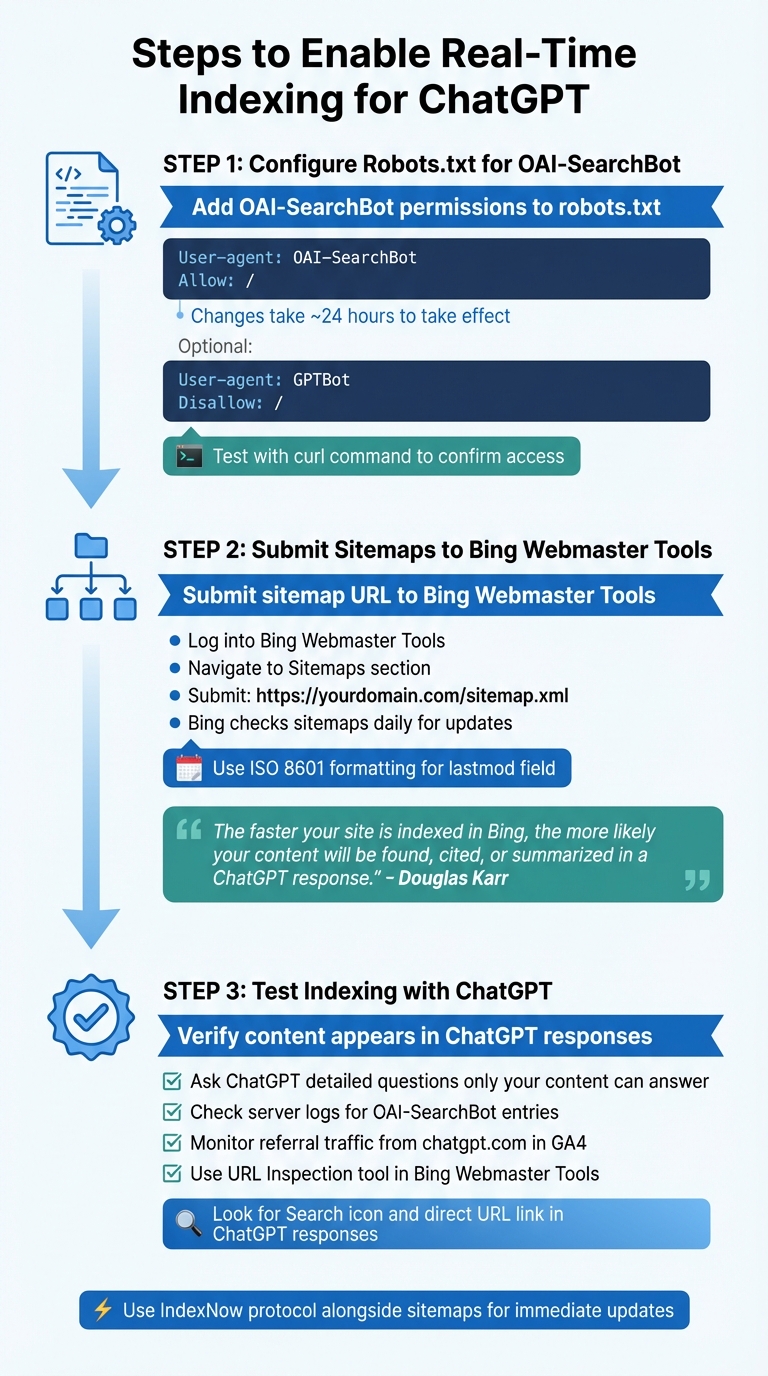
To ensure your content is discoverable and updated in ChatGPT responses, you'll need to configure your site for real-time indexing. This involves setting up your robots.txt file, submitting your sitemap, and verifying that indexing works as intended.
Configuring Robots.txt for OAI-SearchBot
The first step is to adjust your robots.txt file. This file controls which web crawlers can access your content. To make your content visible in ChatGPT responses, you must specifically allow OAI-SearchBot, OpenAI's primary crawler for finding and refreshing content used in ChatGPT citations.
Add these lines to your robots.txt file to allow search indexing:
User-agent: OAI-SearchBot
Allow: /
If you want your content to appear in ChatGPT but prefer to block it from being used for AI training, modify the file like this:
User-agent: OAI-SearchBot
Allow: /

User-agent: GPTBot
Disallow: /
This setup ensures your content can be cited while preventing GPTBot from using it to train future AI models. Additionally, to allow ChatGPT to fetch live data when users share specific URLs during chats, include this rule:
User-agent: ChatGPT-User
Allow: /
Keep in mind that changes to robots.txt usually take about 24 hours to take effect. Including your sitemap location in the file (e.g., Sitemap: https://example.com/sitemap.xml) helps OAI-SearchBot locate your content faster.
To confirm your server isn't blocking OAI-SearchBot, use this curl command:
curl -I -A "Mozilla/5.0 (compatible; OAI-SearchBot/1.0; +https://openai.com/bot)" https://yourdomain.com/
Submitting Sitemaps to Bing Webmaster Tools
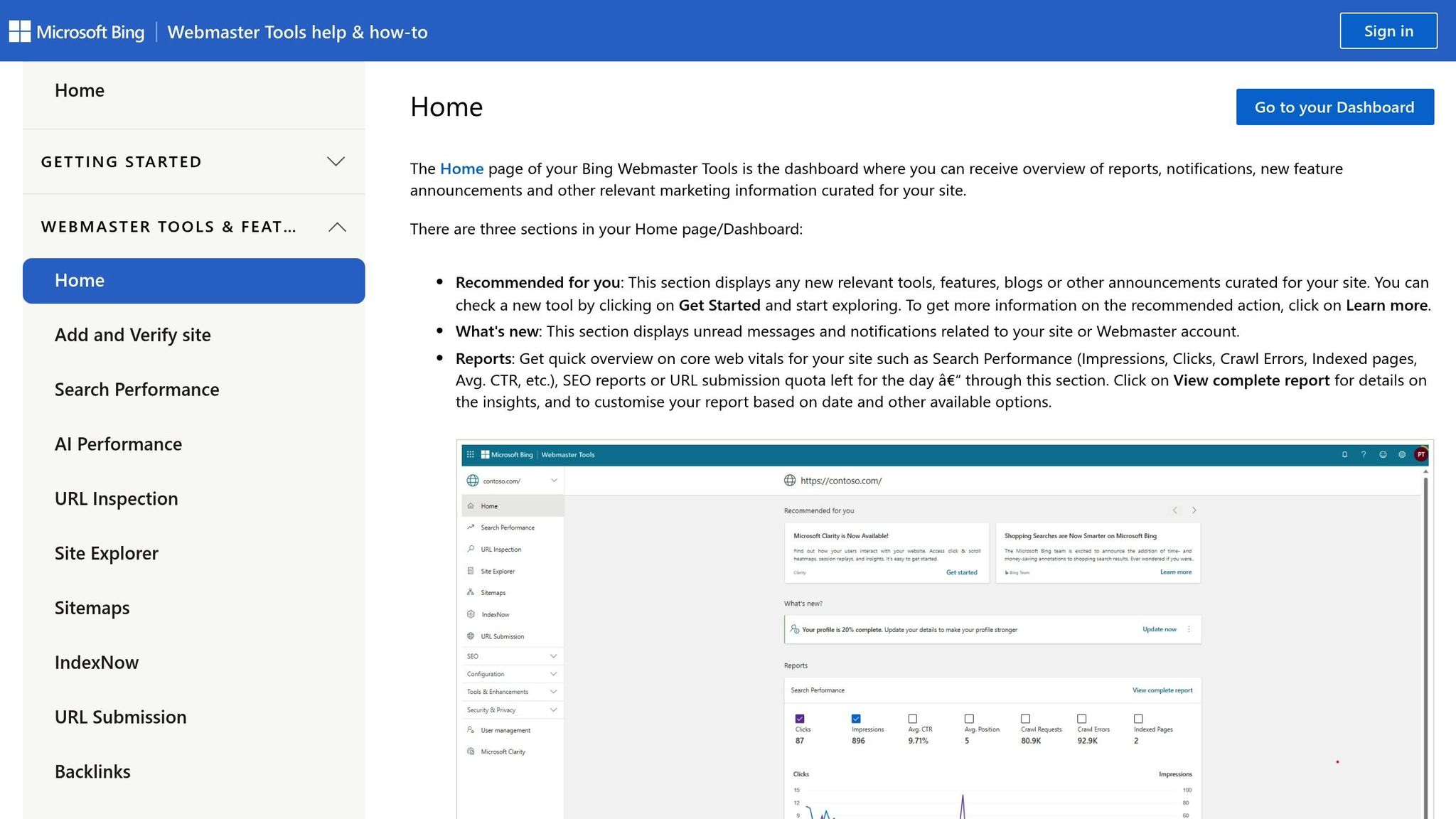
Since ChatGPT heavily relies on Bing's index for live results, submitting your sitemap to Bing Webmaster Tools is a critical step. Bing powers all Microsoft-driven platforms, including Windows Copilot and ChatGPT's browsing mode.
Start by logging into Bing Webmaster Tools with a Microsoft, Google, or Facebook account. If you already use Google Search Console, you can import your sites directly for a quicker setup. Alternatively, verify your site manually through HTML file uploads, meta tags, or CNAME records.
Once verified, go to the Sitemaps section in the left-hand menu and click Submit Sitemap. Enter your sitemap URL (e.g., https://yourdomain.com/sitemap.xml) and hit Submit. Bing typically checks submitted sitemaps daily for updates.
Keep track of your submission status, last read date, and any errors. Douglas Karr, Founder of Martech Zone, emphasizes:
"The faster your site is indexed in Bing, the more likely your content will be found, cited, or summarized in a ChatGPT response."
To improve crawling efficiency, use ISO 8601 formatting for the lastmod field in your sitemap. Only update the lastmod value when the actual content changes, and ensure your sitemap includes canonical URLs - avoid pages with redirects, 404 errors, or noindex tags.
Once your sitemap is active, you can verify that ChatGPT is picking up your updates.
Testing Indexing with ChatGPT
After setting up your robots.txt and sitemap, you'll want to confirm that your content is being indexed. The simplest way is to ask ChatGPT a detailed question that only your newly published content can answer. Look for a Search icon and a direct link to your URL in the response.
You can also check your server logs for entries from OAI-SearchBot, which confirm that ChatGPT is crawling your content.
Additionally, monitor referral traffic in Google Analytics 4 by navigating to Acquisition > Traffic Acquisition. Look for traffic from chatgpt.com/referral or UTM parameters like utm_source=chatgpt.com to verify that users are clicking through from ChatGPT search results.
Finally, use the URL Inspection tool in Bing Webmaster Tools to check if specific pages are indexed. Look at the Sitemaps section for the "Last read date" to ensure Bing has processed your updates. For sites publishing frequent updates, consider using the IndexNow protocol alongside sitemaps to push immediate updates to Bing and ChatGPT.
Best Practices for Monitoring Real-Time Indexing
Keeping a close eye on indexing performance is crucial to ensure your content maintains high visibility in ChatGPT search responses. By monitoring real-time indexing, you can quickly identify and resolve issues by following an SEO indexing checklist, helping to sustain consistent visibility in AI-generated outputs.
Using Bing Tools for Indexing Insights
Bing Webmaster Tools offers a comprehensive way to track how your content performs in Bing and ChatGPT indexing. The IndexNow Insights section provides detailed data on URLs you've submitted, including their crawl status and indexing performance for each page pushed through the protocol.
The AI Performance Dashboard in Bing Webmaster Tools is another valuable resource. It tracks how often your content is cited in Microsoft Copilot and ChatGPT responses, offering metrics like Total Citations and Average Cited Pages. As the Bing Webmaster Team explains:
"Visibility is not only about blue links. It is also about whether your content is cited and referenced when AI systems generate answers."
To uncover new opportunities, monitor Grounding Queries - these are the specific phrases used by AI systems to retrieve your content. Additionally, check the Important URLs Missing tab, which highlights clicked links that haven't been recently submitted via IndexNow. Resubmitting these URLs can help improve their coverage.
Keep an eye out for errors like 429 (Too Many Requests), which indicate you need to adjust submission frequency by referencing the Retry-After header. Similarly, a 422 (Unprocessable Entity) error means the URL doesn't match your verified domain.
To streamline monitoring, consider using tools that consolidate data across multiple platforms.
Using IndexMachine for Advanced Monitoring

IndexMachine simplifies the process by consolidating indexing data from Google, Bing, and ChatGPT into one platform. Its visual charts provide a clear view of daily indexing progress, helping you quickly detect any sudden drops in coverage. You can filter pages by status - indexed, in progress, or rejected - to identify which URLs need immediate attention.
The Autopilot feature automates daily monitoring tasks, scanning your XML sitemaps for updates and resubmitting pages stuck in a "Crawled - Currently Not Indexed" status. This signals search engines to reassess those pages. Each page's metadata includes details such as its coverage state, last crawl date, and indexing status.
Since ChatGPT relies on Bing's search API, IndexMachine's Bing indexing capabilities directly enhance visibility in ChatGPT responses. For IndexNow-based indexing, ensure your API key file is accessible at https://yourdomain.com/{your-key}.txt with 644 file permissions to avoid 403 authentication errors.
Finally, setting up alerts can help you address indexing issues promptly.
Setting Alerts for Indexing Issues
Alerts are crucial for catching problems early, allowing you to fix them before they affect your content's visibility. Organize alerts by severity to prioritize your responses effectively:
- Critical Alerts: These include sustained 5xx errors or robots.txt blocks that prevent crawling entirely.
- High-Priority Alerts: Triggered when indexed pages drop by more than 20% week-over-week, often due to accidental noindex tags or changes in canonical settings.
- Medium Alerts: Cover sitemap parsing errors that require format validation.
- Low Alerts: Track temporary 4xx errors that may resolve on their own.
Integrate your alerts with tools like Slack, email, or PagerDuty for instant notifications. Use multi-signal rules to reduce false alarms by triggering alerts only when multiple indicators, such as a drop in indexed pages and reduced crawl volume, occur simultaneously. Maintain detailed logs of IndexNow submissions, including timestamps, URLs, HTTP response codes, and retry attempts, to identify recurring issues.
Regularly reviewing auto-generated SEO reports in Bing Webmaster Tools can also help you spot site-wide issues, such as metadata problems or poorly structured headings. Lastly, check your robots.txt file to ensure it doesn't mistakenly return a 200 status with a "Disallow" rule blocking important paths.
Verifying and Improving ChatGPT Indexing Performance
Once your content is indexed, it's crucial to confirm its presence in ChatGPT responses and refine your strategy based on performance data. Without verification, there's no way to ensure your content is visible to AI users.
Testing Brand and Keyword Visibility in ChatGPT
Start by checking your server logs for the OAI-SearchBot user agent. Download your access logs and search for this crawler. If it's missing, ChatGPT hasn't crawled your site. In that case, analyze the logs to pinpoint pages with low crawl activity.
Next, test visibility directly. Open an incognito browser and search for your brand combined with a specific topic (e.g., "[Your Brand Name] [Specific Topic]"). This helps confirm whether your site is being cited. Repeat these tests over one to two weeks, as only 30% of brands maintain visibility from one AI response to the next - and just 20% across five consecutive queries.
Also, monitor referral traffic in Google Analytics 4. Go to Reports > Acquisition > Traffic Acquisition and filter for "gpt" to identify chatgpt.com/referral sessions. This confirms users are clicking through from AI-generated responses. Notably, visitors from AI search convert at a rate 4.4 times higher than those from traditional organic search. Since ChatGPT relies heavily on Bing's index, use Bing Webmaster Tools' URL Inspection tool to verify that your pages are indexed and accessible. Remember, updates to your robots.txt file take about 24 hours to register with OpenAI's systems.
These steps lay the groundwork for using analytics to fine-tune your indexing strategy.
Using IndexMachine Insights to Improve Indexing
IndexMachine provides a consolidated view of indexing data from Google, Bing, and ChatGPT, offering real-time insights into page status, last crawl dates, and issues such as 404 errors or "noindex" tags. This tool simplifies the process of identifying and resolving barriers that prevent AI crawlers from accessing your content. Its automated resubmission feature is particularly helpful for pages stuck in a "Crawled – Currently Not Indexed" status, signaling to crawlers that these pages need another look.
Use IndexMachine to track "striking distance" pages - those ranking in positions 11–20 - and prioritize them for re-indexing to quickly boost traffic. The platform also alerts you to 404 and soft 404 errors that waste crawl budget, while its IndexNow integration sends instant notifications to Bing, a key data source for ChatGPT.
For URLs labeled as "Discovered – Currently Not Indexed", strengthen internal links from high-authority pages to encourage crawling. IndexMachine's visual tracking makes it easy to identify which pages need attention and measure the impact of your optimizations over time.
Aligning Content with Bing SEO Guidelines
After optimizing your indexing performance, align your content with Bing's SEO standards to further enhance AI visibility. Since ChatGPT relies on Bing's index, following Bing's guidelines can significantly improve your chances of being cited. Bing favors content that is updated, factual, and based on original research - 83% of AI citations for commercial searches come from pages updated within the last 12 months. In fact, AI-cited content is 25.7% fresher than content appearing in traditional Google search results.
To increase your chances of being referenced in AI responses, create "answer capsules." These are short, 80–200-word blocks that provide clear, definition-first answers, making it easier for AI systems to quote your content. As Mike Khorev points out:
While ChatGPT and Gemini don't rely solely on schema, structured data helps reinforce topical relevance and increases your likelihood of being cited.
Additionally, implement an llms.txt file in your root directory as an "AI Sitemap." This file should include Markdown-formatted summaries to help OAI-SearchBot parse your most important and current pages. Ensure your server delivers 304 "Not Modified" responses for unchanged pages to optimize crawl budget and keep crawlers focused on fresh content.
Conclusion
To truly excel in the strategies outlined earlier, you need to focus on strengthening your indexing performance. Real-time indexing has become a cornerstone for staying visible in the AI-driven search space. Ignoring LLM indexing could mean losing relevance to an audience that's rapidly growing - by 2027, it's projected that 90 million U.S. adults will turn to generative AI as their primary search tool.
Make sure your robots.txt, sitemaps, and indexing monitoring are fine-tuned to align with ChatGPT SEO requirements.
As Indexly Editorial aptly states:
In the fast-evolving digital landscape, ensuring ChatGPT can effortlessly index your website isn't just a technical necessity - it's your key to sustained digital relevance.
A well-optimized indexing system does more than just improve visibility - it delivers tangible results. Tools like IndexMachine bring everything together by consolidating data from Google, Bing, and ChatGPT into one dashboard. With features to track indexed pages, flag crawl issues, and automate content resubmissions, IndexMachine enables faster and more effective indexing. In fact, properly indexed pages can yield returns 3–5 times faster than unindexed ones, and advanced tools can boost indexing success rates to over 85%. Indexly itself bundles indexing with AI visibility tracking at a much higher price point. We compare both approaches in our Indexly alternative breakdown.
Focusing on ChatGPT indexing now will help you stay ahead in this rapidly shifting digital landscape.
FAQs
How fast will my updates show up in ChatGPT?
Updates in ChatGPT can show up anywhere from a few days to several weeks. The exact timing hinges on factors like the quality of the content and how quickly it gets indexed. In some cases, updates in AI search modes have been noted in as little as 24 hours. Keeping a close eye on performance and making regular adjustments can help speed up the indexing process.
Do I need to allow OAI-SearchBot but block GPTBot?
Allowing OAI-SearchBot ensures your site gets indexed and can appear in ChatGPT's search results. On the other hand, blocking GPTBot prevents your content from being used for AI training purposes without affecting its visibility in search results. This strategy gives you more control over how your content is utilized while still keeping it accessible for ChatGPT and other language models.
What should I do if my pages aren't getting cited in ChatGPT?
If your content isn't appearing in ChatGPT references, take steps to make your site more accessible to AI crawlers like OAI-SearchBot. Start by updating your robots.txt file to allow these bots to crawl your site. Incorporate structured data, such as schema markup, to help AI systems better understand your content. Additionally, verify your site in Bing Webmaster Tools to enhance its visibility. These actions can improve how AI systems crawl and index your pages, boosting the likelihood of your content being included in their references.